
Livraison le jour même ou le lendemain

Qualité garantie

Débloquez vos offres de bienvenue: Livraison GRATUITE | Jusqu'à -80 % | 30 jours d'essai gratuits à JoyPlus
Téléchargez l'application
Choosing a new wireless gaming mouse can quickly become overwhelming. Between spec sheets drowning in jargon and sometimes misleading marketing promises, it's tough to navigate the options and avoid buyer's remorse. Our mission is to cut through the noise for you: we'll identify the criteria that truly matter and help you find the perfect mouse for your playstyle.
Before you dive in, here are the three classic pitfalls to avoid at all costs:
To make the right choice, ignore the marketing hype and focus on these key technical specifications. They are what truly define the performance and comfort of your future mouse.
The sensor is the heart of the mouse. Models like the PixArt PAW3395 are renowned benchmarks for their precision and reliability. Rather than fixating on the maximum DPI, check the available sensitivity range and how easily it can be adjusted.
Another crucial point is the polling rate, measured in Hertz (Hz). It indicates how frequently the mouse reports its position to the computer. For gaming, a rate of 1000 Hz has become the standard, ensuring a virtually imperceptible latency of 1 ms. Some models aimed at pro gaming mice push the envelope even further, with rates of 4000?Hz or 8000?Hz for absolute responsiveness.
Choosing a lightweight gaming mouse (generally under 80g) is a must for FPS players who perform frequent, wide, and rapid arm movements (flicks). For other game genres, a slightly heavier weight can offer a greater sense of control.
Ergonomics are just as critical. An ergonomic mouse should fit your hand size and grip style:
Versatility is a major asset. Many wireless gaming mice offer "tri-mode" connectivity:
Check the advertised battery life, keeping in mind that it varies significantly depending on the use of RGB gaming mouse lighting. Good battery life will save you the frustration of running out of power mid-game.
Every gamer has different needs. Here are a few options that cater to distinct user profiles, based on performance and reliability criteria.
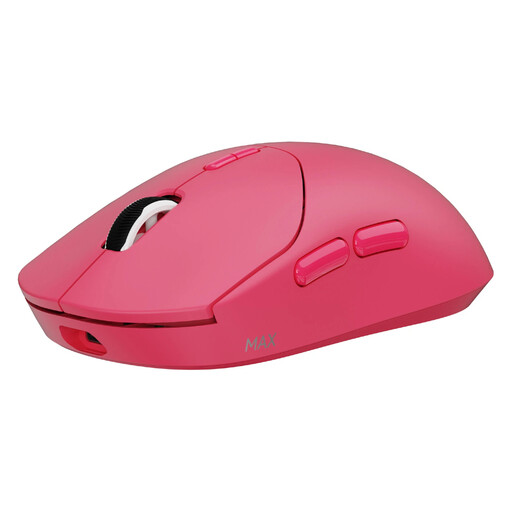
Our take: Engineered for pure performance, this mouse is a weapon of choice for demanding FPS players. Its feather-light 53g weight allows for lightning-fast movements and reduces wrist fatigue during long gaming sessions.
It doesn't get lost in the DPI race, instead focusing on a native 8000 Hz wireless polling rate. The result: latency and precision that make a real difference in competitive play. Its weight is designed for performance, not just for the spec sheet.
Ultra-light 53g weight. 8000 Hz wireless polling rate. Record-breaking battery life (up to 750h in 1000 Hz mode).
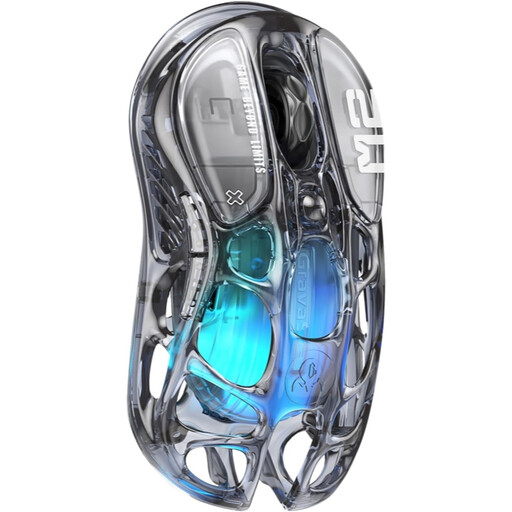
Our take: For those who want to combine performance with aesthetics. With its bold transparent design and customizable RGB lighting, it becomes a centrepiece of your setup. Its tri-mode connectivity also makes it ultra-versatile, perfect for switching from gaming to work.
It proves that style doesn't have to come at the expense of performance. Equipped with the benchmark PAW3395 sensor and a reliable 2.4 GHz connection, it ensures a perfectly smooth gaming experience, light-years ahead of wireless gadgets with questionable latency.
Tri-mode connectivity (2.4 GHz/Bluetooth/Wired). Unique transparent design. High-performance PAW3395 optical sensor (26,000 DPI).
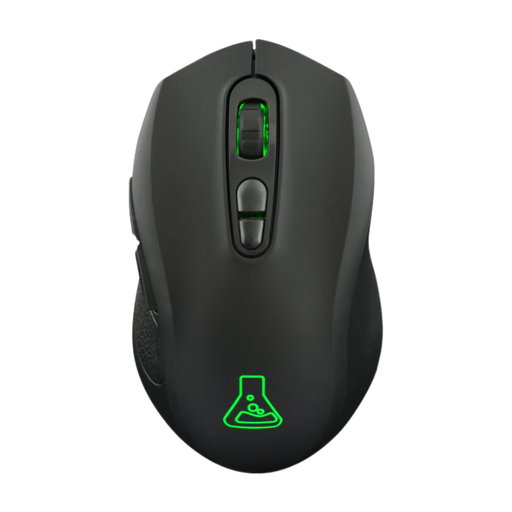
Our take: This is the ideal entry point into the world of wireless gaming. It focuses on the essentials and does them well: a responsive 2.4 GHz connection for gaming, Bluetooth for versatility, and comfortable battery life. All at a very accessible price point.
There are no superfluous marketing numbers here. The focus is on genuinely useful features. Its DPI range of up to 6400 is more than sufficient for all game types, and its dual wireless connectivity is a real bonus in this price range.
Dual wireless connectivity (2.4 GHz + Bluetooth). Ambidextrous design. Good battery life (up to 100h without RGB).
For MMO enthusiasts or gamers who demand maximum control, we have selected models that stand out for their numerous programmable buttons.
This is a persistent myth that is no longer true. Modern 2.4?GHz wireless technologies, like those used in our selection, offer polling rates of 1000 Hz (or even higher). The resulting 1 ms latency is indistinguishable from that of an excellent wired gaming mouse. In competitive play, the freedom of movement offered by wireless has even become a significant strategic advantage.
A mouse's longevity depends on two key components: the battery and the click switches. The battery is designed to withstand hundreds of charge cycles. The main click switches are often rated for tens of millions of clicks (e.g., 20, 50, or even 100 million), ensuring several years of heavy use.
There is no universal ideal weight; it's a matter of personal feel. However, here are some guidelines to help you decide: