
Livraison le jour même ou le lendemain

Qualité garantie

Débloquez vos offres de bienvenue: Livraison GRATUITE | Jusqu'à -80 % | 30 jours d'essai gratuits à JoyPlus
Téléchargez l'application
Choosing a wireless gaming mouse can quickly become overwhelming. Between jargon-filled spec sheets and marketing promises, it's easy to get lost. As a product expert at Joybuy, my mission is to help you cut through the noise. The goal isn't to drown you in details, but to give you the keys to make an informed decision that fits your playstyle and budget.
Before we dive in, let's debunk the two most common and costly traps:
To avoid these pitfalls, focus on a few key points that truly make a difference in performance and comfort.
The sensor is the heart of your mouse. Instead of focusing on the maximum DPI (Dots Per Inch), which measures sensitivity, look into the reputation of the sensor itself (for example, PixArt sensors like the PAW3395 are a gold standard). A good sensor guarantees flawless 1:1 tracking with no unwanted hardware acceleration or spin-outs.
The polling rate, measured in Hertz (Hz), is just as crucial. It indicates how often the mouse reports its position to the computer. A standard of 1,000?Hz (1?ms response time) is the current norm and is suitable for the vast majority of gamers. Models for a pro gaming mouse can reach 4,000?Hz or even 8,000?Hz for theoretically smoother and more responsive tracking—a benefit most noticeable on very high-refresh-rate monitors (240?Hz and above).
The ideal weight depends primarily on your preferences and game type.
Ergonomics is a personal matter. Your grip style (palm, claw, or fingertip) is the number one criterion for choosing a mouse shape that will remain comfortable, even after hours of play.
A modern wireless gaming mouse typically offers several connection modes:
A good rechargeable wireless mouse, equipped with a USB-C port (which has thankfully become the standard) and a battery life of several dozen hours, provides peace of mind.
Here are a few models that cater to different player profiles, keeping our criteria of performance and durability in mind.
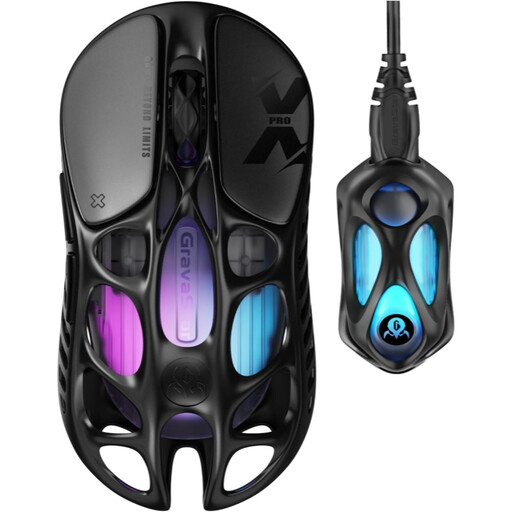
Why we recommend it: Built for pure performance, it combines a featherlight 49 g weight with cutting-edge technology. The perfect mouse for FPS and MOBA players who demand absolute responsiveness and total freedom of movement.
Far from just relying on a marketing-driven DPI number (32,000), it pairs it with an excellent PAW3950 sensor and an 8,000 Hz polling rate for measurable precision. Its magnesium alloy shell ensures lightness without sacrificing robustness.
Featherlight weight (49 g) and 8,000 Hz polling rate for pro-level responsiveness. Full connectivity (2.4 GHz, Bluetooth, wired).
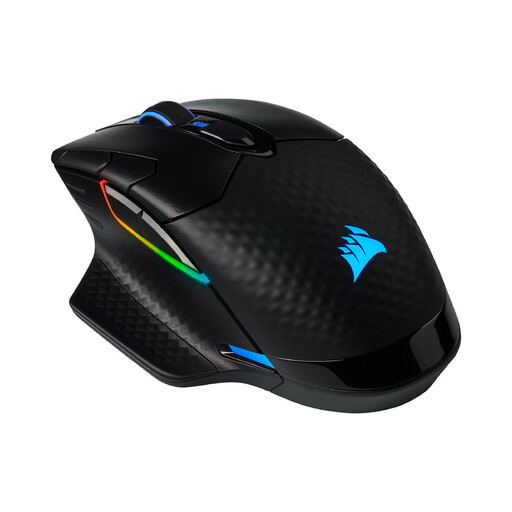
Why we recommend it: This is the ultimate Swiss Army knife. With its full connectivity, 8 programmable buttons, and interchangeable side grips, it adapts to all game types and most hand sizes. A reliable and comfortable choice to power through long gaming sessions.
Its 18,000 DPI sensor is more than sufficient. The mouse focuses instead on tangible benefits: customizable ergonomics and versatile connectivity. It's proof that you can achieve high performance without chasing numbers.
Full connectivity (2.4 GHz, Bluetooth, wired) and 8 programmable buttons via iCUE software. Interchangeable side grips for a custom-tailored hold.
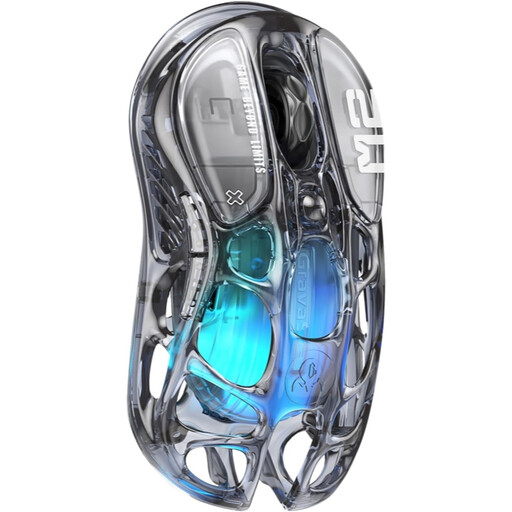
Why we recommend it: For those who want a setup that stands out. Its transparent design and hollowed-out structure, combined with refined **RGB gaming mouse** lighting, make it a true collector's item that doesn't forget to perform in-game.
Here, the design is not just a gimmick. It's backed by quality components, like the excellent PAW3395 sensor, and a controlled weight of 79 g. It's proof that aesthetics and performance are not mutually exclusive.
Unique transparent design with customizable RGB lighting. Balanced weight of 79 g and a high-performance PAW3395 optical sensor.
Browse our complete selection of gaming mice, all tested and approved by our experts.
Yes, without a shadow of a doubt, as long as you use the 2.4?GHz connection via the provided USB dongle. Modern wireless technologies offer such low latency (around 1?ms) that it is imperceptible and fully comparable to a wired connection, even at the highest competitive level. Bluetooth, on the other hand, introduces noticeable latency and should be reserved for office work or casual gaming.
The lifespan depends on two main components: the click switches and the battery. High-quality switches are rated for tens of millions of clicks, which translates to years of heavy use. As for the battery, its longevity depends on the number of charge/discharge cycles. To preserve it, avoid frequent full discharges and use the manufacturer-provided cable for recharging.
For a standard mouse, a slightly damp microfiber cloth works perfectly. For models with a honeycomb shell, a can of compressed air is your best friend for dislodging dust that gets inside without having to disassemble the mouse. Regular cleaning is recommended to preserve the components and ensure good airflow.