
Livraison le jour même ou le lendemain

Qualité garantie

Débloquez vos offres de bienvenue: Livraison GRATUITE | Jusqu'à -80 % | 30 jours d'essai gratuits à JoyPlus
Téléchargez l'application
The days when wireless gaming was synonymous with latency and compromise are a distant memory. Today, a true wireless gaming mouse easily rivals its wired counterparts in responsiveness and precision, all while offering complete freedom of movement. The only problem? The sheer number of available models can be overwhelming.
As the head of buyer's guides at Joybuy, I'm here to help you make sense of it all. In this article, we'll break down the key points to check before you buy, then present our selection of the best mice currently on the market to help you find the perfect one for you.
Before diving into our selection, let's review the essential criteria to ensure you make the right choice.
Sensitivity, measured in DPI (Dots Per Inch), is often the go-to marketing spec. The higher the DPI, the faster the cursor moves on screen for the same hand movement. While spec sheets may boast staggering numbers like 36,000 DPI, don't be fooled: most gamers, including pros, set their mice between 400 and 1600 DPI. What's essential is a sensor that never spins out and translates your movements with absolute fidelity.
Weight is another crucial factor. A lightweight gaming mouse (under 80 grams) is often the top choice for fast-paced shooters (FPS), as it reduces fatigue and allows for quicker flicks. Conversely, a heavier model can provide a greater sense of stability, which is an asset in other game genres.
Nearly all wireless gaming mice rely on a 2.4 GHz RF connection via a small USB dongle. This technology guarantees near-zero latency, which is essential for competitive play. Some models add Bluetooth connectivity, which is more versatile for switching between a laptop and a tablet, but its higher latency makes it suitable only for office work or less demanding games.
Battery life is, of course, a key consideration. Keep an eye on the battery life advertised by the manufacturer. The pinnacle of convenience? A mouse with a charging dock: just place it on its base at the end of a session, and it's always ready for action.
The number of buttons depends entirely on your favourite games. For an FPS gaming mouse, two thumb buttons are often sufficient. For MMOs and MOBAs, however, a programmable gaming mouse loaded with buttons becomes a strategic advantage for casting spells and macros on the fly.
Finally, it's hard to avoid RGB lighting, which has become a standard feature. More than just a cosmetic gimmick, it can also serve as an indicator for battery level or the selected DPI profile.
We have selected three models that excel in their respective categories.
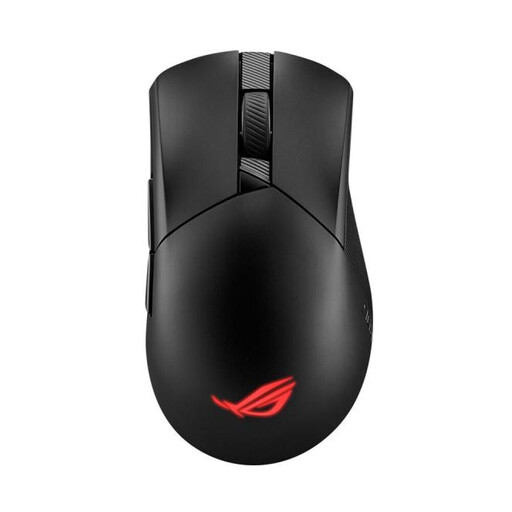
Why it stands out?: The ROG Gladius III Wireless Aimpoint focuses on pure lightness and precision. Weighing in at just 79 grams and featuring the ROG AimPoint optical sensor that goes up to 36,000 DPI, it's aimed at gamers seeking absolute responsiveness and total control.
Key strengths?:
Who is it for?? Clearly for competitors and FPS fans who swear by lightness, speed, and flawless tracking.
See details for the Asus ROG Gladius III
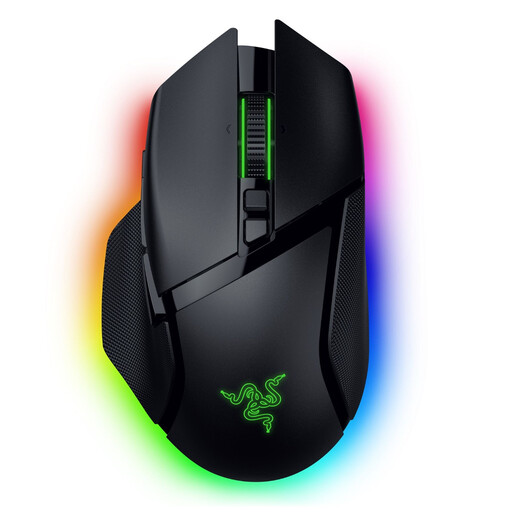
Why it stands out?: The Razer Basilisk V3 Pro is the Swiss Army knife of gaming mice: a true powerhouse of technology and customisation options. With its 11 programmable buttons, smart-reel scroll wheel, and comprehensive RGB lighting, it's aimed at gamers who love to fine-tune every detail.
Key strengths?:
Who is it for?? All-round gamers, from RPG fans to content creators, who want absolute control and an arsenal of shortcuts at their thumb.
Discover the Razer Basilisk V3 Pro
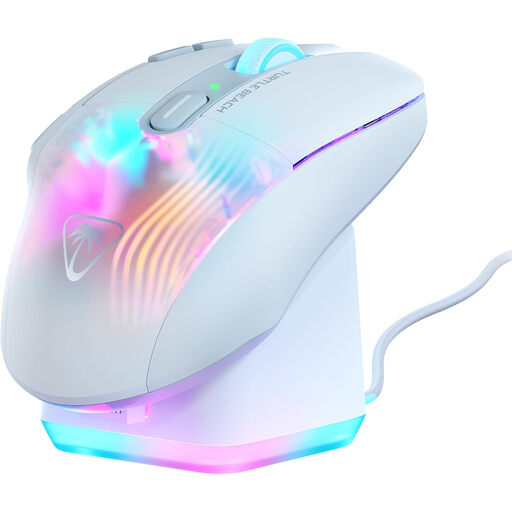
Why it stands out?: The Kone XP Air is the ultimate weapon for MMO and MOBA players. With its 10 physical buttons and Easy-Shift[+] technology, it puts up to 29 programmable functions at your fingertips. The icing on the cake is that it comes with its own RGB rapid charging dock.
Key strengths?:
Who is it for?? Without a doubt, for dedicated MMO, MOBA, and strategy game players who want their entire arsenal of commands at their fingertips.
Check out the Turtle Beach Kone XP Air
Performance is great. But long-term comfort is even better. If none of these shapes seem to suit your grip or if you're concerned about wrist fatigue, then ergonomics should be your top priority.
That's why we also have a dedicated selection of models designed to contour to your hand and relieve strain.
? Explore our range of wireless ergonomic mice
The 2.4 GHz RF connection, via its USB dongle, is designed for performance. It offers near-instantaneous communication with minimal latency, a non-negotiable feature for competitive gaming. Bluetooth, on the other hand, is more versatile (no dongle needed if the device is compatible) and consumes less power. In return, its more noticeable latency makes it better suited for office work or games that don't require millisecond responsiveness.
No, it's mostly a marketing spec. A stratospheric DPI is only truly useful in very specific situations, like multi-4K monitor setups. The majority of gamers opt for much lower values to gain more control. The true quality of a mouse lies in the reliability of its sensor (zero spin-outs, perfect precision), far more than in the maximum DPI number printed on the box.