
Livraison le jour même ou le lendemain

Qualité garantie

Débloquez vos offres de bienvenue: Livraison GRATUITE | Jusqu'à -80 % | 30 jours d'essai gratuits à JoyPlus
Téléchargez l'application
Choosing a wireless gaming mouse has become a crucial decision for anyone looking to optimize their setup. Fortunately, the days when "wireless" meant latency and unreliability are long gone. Today's technologies offer complete freedom of movement with zero compromise on responsiveness. But with an overwhelming number of options on the market, how do you find the right one? This guide is here to break down the essential features and present a selection of standout models, so you can make an informed choice that perfectly suits your playstyle.
Before jumping into specific models, it's essential to understand the features that define a truly high-performance mouse. Here are the key points to consider to guide your decision.
Weight is a decisive factor for both comfort and performance, especially during long gaming sessions. A lightweight gaming mouse (typically under 80 grams) allows for quicker, less fatiguing movements—a critical advantage in fast-paced FPS games. The ergonomics, whether symmetrical (ambidextrous) or asymmetrical (for right-handers), must fit your hand and grip style (palm, claw, or fingertip grip).
The sensor is the engine of the mouse. Its quality determines the tracking precision of your every move. DPI (Dots Per Inch) measures sensitivity: a high-DPI wireless mouse lets you cross the screen with a minimal wrist movement. While staggering numbers (over 20,000 DPI) are often just for marketing, true performance lies in the sensor's ability to operate without hardware acceleration or spin-outs, even at very high speeds (IPS).
Flexibility is one of the greatest strengths of modern models. A triple-mode mouse offers three connection options:
With the theory covered, let's get practical. Here are the models that particularly caught our attention, each catering to specific needs and player profiles.
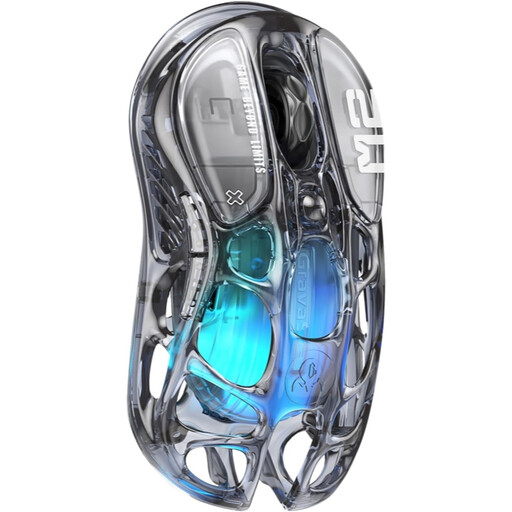
Why it stands out: With its transparent chassis and honeycomb structure, the GravaStar Mercury M2 is a real head-turner. But don't let its looks fool you: it's packed with top-tier components that make it a formidable weapon in-game.
Key Strengths
Who is it for? For gamers who want a mouse that is as stylish as it is powerful. It combines a bold look with a solid spec sheet, making it equally at home in competitive gaming and daily use.
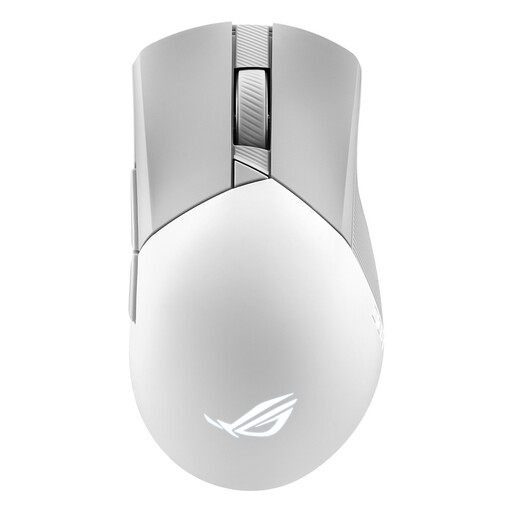
Why it stands out: A flagship of the Asus Republic of Gamers (ROG) line, the Gladius III Wireless Aimpoint is engineered for raw performance. It goes all-in on its ROG AimPoint optical sensor and advanced customization options, including its famous hot-swappable click switches.
Key Strengths
Who is it for? This pro-grade gaming mouse is aimed at demanding gamers and competitors who want absolute control over their hardware. The ability to swap switches and its ultra-precise sensor make it a top choice for those looking to optimize their performance down to the smallest detail.
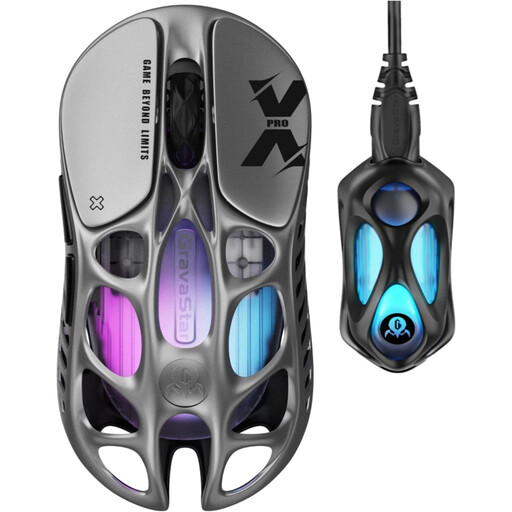
Why it stands out: The Mercury X Pro pushes the boundaries of lightweight design. With its magnesium alloy chassis and feather-light weight, it's built for maximum responsiveness. Its 8K dongle makes it the ultimate weapon for gamers obsessed with latency.
Key Strengths
Who is it for? Built for e-sports and hardcore competitors for whom every gram and every millisecond counts. Its extreme lightness and 8000 Hz polling rate make it a tool of surgical precision for games that demand lightning-fast reflexes.
Our selection focuses on models optimized for FPS and action games, which have a limited number of buttons. However, genres like MMOs or MOBAs often require additional side buttons to assign spells, abilities, and macros.
If you need more commands at your fingertips, we invite you to explore our collection of gaming mice with 6 or more side buttons.
Absolutely. Modern wireless technologies, especially the 2.4 GHz connection via a USB dongle, offer polling rates of 1000 Hz and higher, resulting in a latency of about 1 ms. This performance is indistinguishable from that of a wired mouse for 99.9% of gamers, including at the professional level.
The choice of weight is highly personal. A lightweight gaming mouse (under 70g) is often favored in fast-paced games (FPS) because it facilitates wide sweeps and quick repositioning (the famous flick shots). Conversely, a heavier mouse (over 90g) can provide a greater sense of stability and control, which is appreciated in other genres. Ultimately, there's no golden rule: comfort and personal preference trump everything else.
Triple-mode connectivity means the mouse can connect in three ways: via a 2.4 GHz dongle for maximum gaming performance, via Bluetooth for more mobile use (laptop, tablet), and via a wired (USB) connection to play while charging or to ensure a connection free from any interference.