
Livraison le jour même ou le lendemain

Qualité garantie

Débloquez vos offres de bienvenue: Livraison GRATUITE | Jusqu'à -80 % | 30 jours d'essai gratuits à JoyPlus
Téléchargez l'application
A wireless gaming mechanical keyboard can clear up desk clutter, switch easily from a computer to a tablet and provide a more precise typing experience. The problem is that product pages sometimes bury the genuinely useful features beneath a flood of aesthetic selling points. Before placing your order, there are therefore three potential pitfalls to watch out for.
The first concerns connectivity. The term “wireless” may refer solely to Bluetooth, whereas gamers generally prefer a 2.4 GHz receiver to avoid extra steps and maintain a responsive connection. A USB-C cable also means you can continue using the keyboard while it is charging.
The second point to consider: do not confuse backlighting, RGB lighting and full customisation. An RGB mechanical keyboard may offer several preset effects without allowing you to adjust each key individually. Check how many modes are available, whether they are compatible with the supplied software and whether the lighting effects can be switched off to preserve battery life.
Finally, the US QWERTY layout is not the same as the AZERTY keyboard layout usually used in France. The position of the keys, accents and certain shortcuts changes. This layout may be perfectly suitable for developers, gamers or users who are accustomed to it, but it is best to know this before buying.
For versatile use, the tri-mode Bluetooth 2.4 GHz USB-C format offers genuine flexibility:
Remember to check the supported operating systems too. Several models in this selection work with Windows and macOS, while some also support iOS, iPadOS or Android. However, bear in mind that advertised compatibility does not mean all function keys will behave in exactly the same way across different operating systems.
A compact mechanical keyboard takes up less space, but each format involves a few compromises:
A 75 % model such as the AK820 measures approximately 327 × 136 × 40 mm and has 82 keys, depending on the version. At the other end of the scale, a 98 % model is better suited to spreadsheets, professional shortcuts and users who regularly use the numeric keypad.
A hot-swappable mechanical keyboard lets you replace the switches without soldering, provided you follow the stated compatibility requirements, particularly the difference between 3-pin and 5-pin models. It is a practical feature for upgrading your keyboard over time, but you still need to handle the printed circuit board carefully.
Gasket mounting uses flexible elements positioned between the plate and the keyboard’s frame. It can make typing feel more cushioned, but the result also depends on the plate, foam layers and stabilisers. Product pages that mention PORON, IXPE or several sound-dampening layers provide more concrete information than a simple promise of “quiet typing”.
PBT keycaps generally resist developing a polished, shiny finish better than ABS keycaps. However, you should still check their profile and legends. If you are buying in France, also check the printed layout: a US QWERTY keyboard does not become AZERTY simply by changing a software setting.
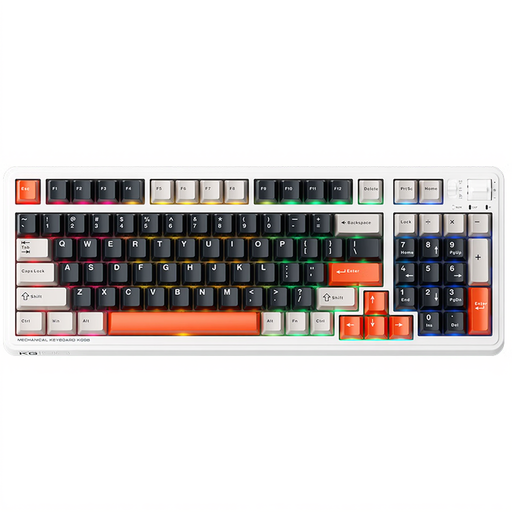
Why this choice suits this profile : Its 98-key layout retains plenty of functions without taking up as much space as a standard keyboard. Wired, Bluetooth and 2.4 GHz connections make it a versatile first setup, suitable for both gaming and work.
The product page clearly states that it supports three modes and hot-swappable switches. However, you need to be comfortable with the US QWERTY layout.
98 keys, Ice Cream Pro Max switches and three advertised connection modes.

Why this choice suits this profile : It is aimed at enthusiasts who want to fine-tune the typing feel, lighting and certain controls, while switching easily between devices.
The product page details the gasket mount, dual silicone dampers, 5-pin hot-swapping and three connection modes.
PBT keycaps, programmable knob, 4 000 mAh battery and compatibility with Windows, macOS, iOS and Android.

Why this choice suits this profile : Those who switch between gaming, work and multiple devices will appreciate its 97 keys, knob and Bluetooth, 2.4 GHz and wired connections.
The information distinguishes between battery capacities depending on whether or not the display is included. Carefully check the selected variant before confirming your order.
97 keys, TFT display depending on the version, gasket structure and solder-free switch replacement.
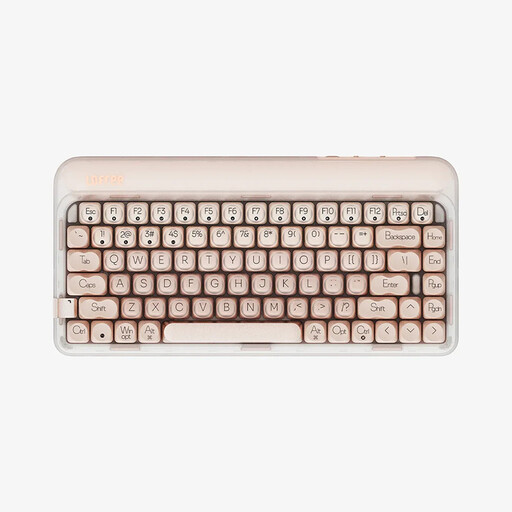
Why this choice suits this profile : Its 84-key layout, 4 000 mAh battery and compatibility with Windows, macOS, iOS, iPadOS and Android are perfectly suited to mobile use.
The product page distinguishes between warm monochrome LED backlighting and RGB models. This detail helps you avoid paying for lighting effects you do not need.
Tri-mode connectivity, pre-lubricated linear switches, PBT keycaps and volume knob.
We have put together a complete, real-time updated selection of products that meet these demanding criteria while complying with European safety regulations.
A model with a 2.4 GHz connection can be used perfectly well for gaming, while USB-C mode remains available for wired use. Bluetooth is more advantageous for office work and mobile devices. Nevertheless, check that the receiver is included, along with the advertised polling rate and power-saving settings.
Its lifespan depends on the switches, battery, intensity of use and maintenance. Some product pages claim 50 million keystrokes, or even more, for the switches. However, this figure applies to the component under specific conditions, not necessarily to the keyboard as a whole. Avoid liquids, unplug the cable before cleaning and use the appropriate tool to replace hot-swappable switches.
It can be suitable for development, gaming or bilingual use, but it changes the position of special characters and accents. For everyday typing in French, check the printed layout and the system settings before buying. A French AZERTY layout will remain simpler for users who mainly write in French.