
Livraison le jour même ou le lendemain

Qualité garantie

Débloquez vos offres de bienvenue: Livraison GRATUITE | Jusqu'à -80 % | 30 jours d'essai gratuits à JoyPlus
Téléchargez l'application
A desk overrun with cables is every gamer's nightmare: it shatters immersion and restricts freedom of movement. To reclaim a clean, high-performance setup, the wireless gaming keyboard emerges as the clear solution. But between the different switch types, compact layouts, and connection technologies, choosing the right model can quickly become a headache. This guide is here to demystify the market and help you find the keyboard that perfectly matches your playstyle, whether you're an esports pro or a fan of casual gaming sessions.
Before diving into our selection, let's review the key factors to consider to make the right choice.
The choice of switch (the mechanism under each key) is crucial: it determines the typing feel, noise level, and responsiveness of your keyboard.
The size of your keyboard has a direct impact on the ergonomics of your gaming space.
Most modern wireless keyboards offer multiple connection modes. 2.4?GHz technology (via a USB dongle) is the gold standard for gaming, thanks to its near-zero latency. Bluetooth, on the other hand, is more versatile and allows you to easily connect the keyboard to multiple devices (PC, tablet, etc.). Also, ensure compatibility with your platform, whether it's a PC or a console, for use as a PS5 gaming keyboard or for Xbox. Finally, for optimal typing comfort, ensure the keyboard has the standard QWERTY layout for your region.
Here are three models that caught our eye, each tailored to a specific type of gamer.

Why it stands out: The AJAZZ AK980 V2 is a true Swiss Army knife, combining a near-full-size (98%) layout with high-end features. Its TFT screen and metal control knob let you manage volume and other shortcuts at your fingertips. Its Gasket Mount structure, combined with multiple layers of sound-dampening material (Poron foam, PET film), ensures a typing experience that is both stable and pleasantly muted.
Pros:
Who is it for? For gamers and content creators who want a high-performance, customisable, and feature-rich mechanical keyboard without giving up a number pad (here in a compact format).
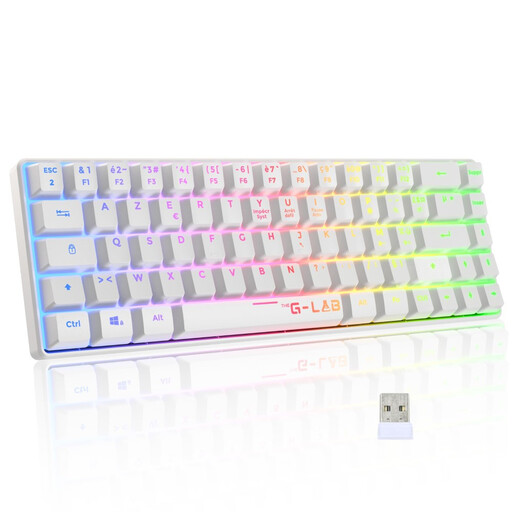
Why it stands out: The Keyz Hydrogen Wireless from The G-Lab focuses entirely on comfort and discretion. Equipped with membrane keys, it provides a silent typing experience, perfect for shared environments. Its TKL gaming keyboard format frees up desk space, while its detachable wrist rest offers welcome comfort during long gaming sessions.
Pros:
Who is it for? Ideal for casual gamers, streamers seeking silence, or those looking for a comfortable, wireless solution for couch gaming, including on consoles.
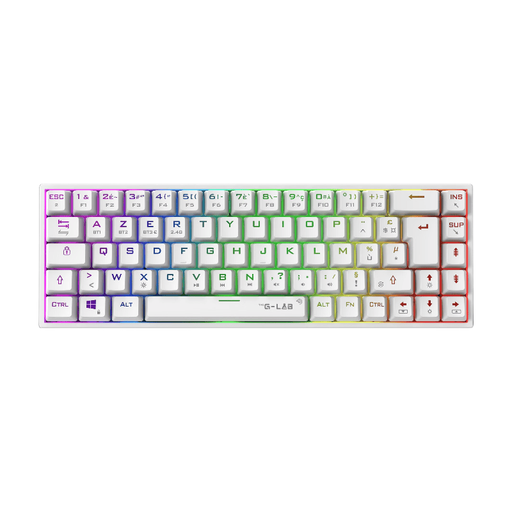
Why it stands out: The Keyz Titanium Wireless is built for performance and minimalism. Its ultra-compact 65% form factor maximises the available space for your mouse, a major asset for FPS players who use low sensitivity. It features Outemu Red mechanical switches, which are linear switches renowned for their light and rapid actuation, perfect for chaining actions in-game.
Pros:
Who is it for? For competitive gamers, especially in FPS titles, who need maximum mouse room and prioritise the responsiveness of an ultra-compact mechanical keyboard.
Of course, our selection is just a glimpse of the possibilities. Every gamer has unique preferences when it comes to typing feel, design, and features. To explore more models with customisable lighting and unique characteristics, feel free to browse our complete category.
Explore our collection of RGB Gaming Keyboards to discover even more models suited to your playstyle.
Modern wireless technologies, especially the 2.4?GHz connection via a USB dongle, have made spectacular progress. For the vast majority of gamers, including at a high level, latency is now imperceptible and has no impact on in-game performance. Entry-level models or those using only Bluetooth may have slightly higher latency, but dedicated gaming keyboards are optimised for responsiveness.
Yes, many wireless gaming keyboards are compatible with the latest generation of consoles. Compatibility is usually ensured via the 2.4?GHz USB dongle. However, the level of integration can vary: some games allow for full use (movement, chat), while others limit it to text input. Be sure to check the compatibility stated by the keyboard manufacturer and the game publisher before you buy.
Regular maintenance extends the life of your keyboard. For cleaning, use a can of compressed air to dislodge dust from between the keys. You can remove the keycaps with a keycap puller for a more thorough cleaning. Clean the keycaps and the chassis with a slightly damp microfibre cloth. Avoid any direct contact with liquids, as this could damage the electronic components.