
Livraison le jour même ou le lendemain

Qualité garantie

Débloquez vos offres de bienvenue: Livraison GRATUITE | Jusqu'à -80 % | 30 jours d'essai gratuits à JoyPlus
Téléchargez l'application
Choosing a new gaming headset can quickly become a headache. Between marketing promises of universal compatibility and endless spec sheets, it's easy to get lost. Yet the goal is simple: find a comfortable headset for long sessions, with immersive sound and a crystal-clear mic, all without breaking the bank on useless gadgets.
As a product expert at Joybuy, my mission is to help you see things more clearly. Let's review the most common pitfalls and the criteria that truly matter for making the right choice.
The marketing spiel is often well-rehearsed, but some promises don't hold up once the headset is on your ears. Here are three points to never overlook:
To avoid these disappointments, focus on objective features. Here are the two key points to inspect under the microscope.
The way your headset connects to your devices determines its everyday versatility.
Don't be fooled by marketing terms like "virtual 7.1 surround sound," which are more about software processing than the headset's raw performance.
Every gamer is unique, and so are their needs. Here are a few options tailored for specific uses that avoid the pitfalls we've just discussed.
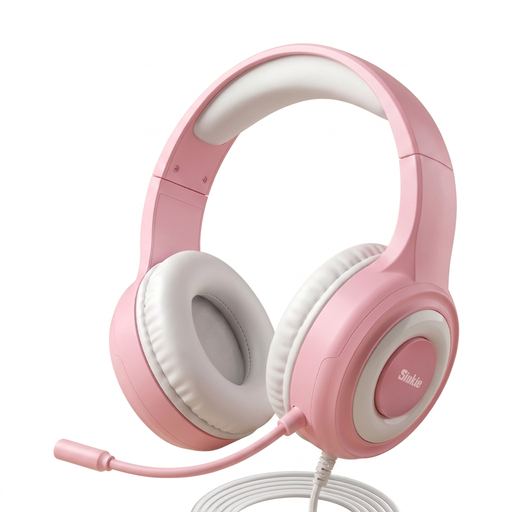
Why we chose it: Ideal for gamers who juggle between PC, PlayStation, and Switch and are looking for an effective "plug-and-play" solution. It skips wireless to guarantee flawless compatibility thanks to its dual connectivity.
It bypasses the misleading "universal compatibility" trap by relying on a dependable wired connection via USB and 3.5mm jack, ensuring functionality across almost all platforms without losing features.
Its 50mm drivers deliver rich stereo sound for good immersion, while the noise-cancelling mic ensures clear communication, all at a very accessible price point.
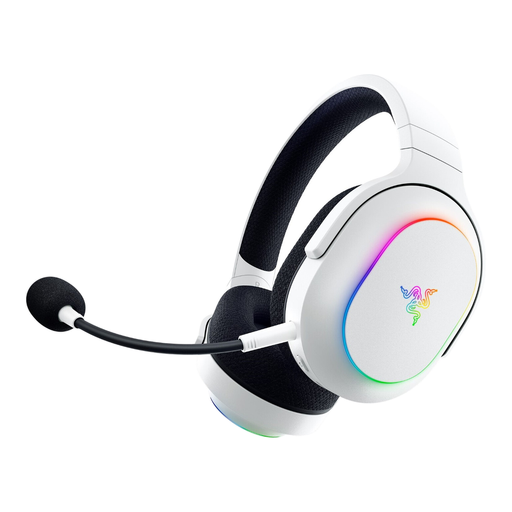
Why we chose it: Perfect for the gamer who moves between their PC, console, and smartphone. The dual wireless connectivity allows you to instantly switch between game audio and a phone call.
It sidesteps the fantasy battery life trap with a colossal 70-hour runtime, even with RGB lighting on. The SmartSwitch Dual Wireless technology lets you switch from the 2.4 GHz dongle to Bluetooth in the blink of an eye.
Its lightweight design (285g) and memory foam earcups ensure excellent long-term comfort, both in-game and on the go. Bonus: its cardioid mic is detachable for more portable use.
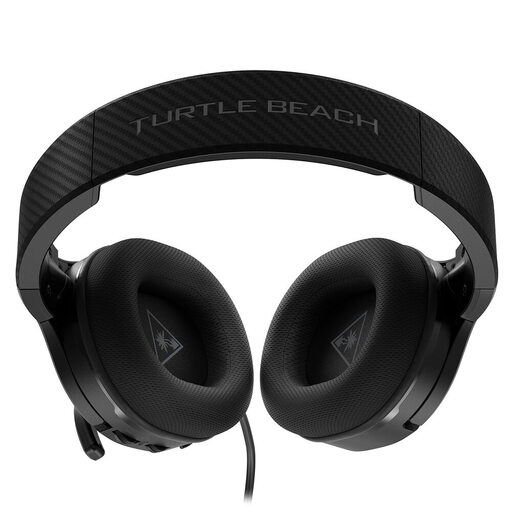
Why we chose it: Designed for gamers who put in long hours, and especially those who wear glasses. The focus here is on long-term comfort and amplified audio quality for maximum immersion.
It tackles the short-lived comfort pitfall with ProSpecs technology: a dual-foam layer that relieves pressure from glasses frames. A detail that makes all the difference during long sessions.
Its amplified audio, powered by a 12-hour battery, delivers punchy bass and more detailed sound. The best part: it continues to work in passive mode once the battery is dead.
We have curated a full range of products that meet our demanding selection criteria.
It's all about latency (the infamous lag). 2.4 GHz technology via a USB dongle offers a connection with no perceptible latency, which is essential for games where every millisecond counts. Bluetooth, while more universal (direct connection to smartphones, tablets, etc.), has higher latency that can create a sound/image delay. For gaming, 2.4 GHz remains the clear winner.
This is the big trap: very rarely. PlayStation and Xbox consoles use proprietary and incompatible wireless protocols. A headset designed for the PS5 will not work wirelessly on an Xbox, and vice versa. For compatibility with both, you either need a model with a specific switch on the dongle (rare and expensive) or fall back on the good old wired connection via the controller's 3.5mm jack.
Yes, and it's far from negligible. RGB lighting, while aesthetically pleasing, is very power-hungry. Activating the lights on a wireless headset can reduce its battery life by 20% to 50% depending on the intensity and effects. If battery life is your priority, a quick trip to the settings to disable this feature is a must.