
Livraison le jour même ou le lendemain

Qualité garantie

Débloquez vos offres de bienvenue: Livraison GRATUITE | Jusqu'à -80 % | 30 jours d'essai gratuits à JoyPlus
Téléchargez l'application
A wireless gaming controller makes it easier to play from the sofa, game on PC or enjoy cloud gaming on mobile. However, product listings sometimes highlight appealing features without always making their limitations clear. Partial compatibility, battery life measured under very specific conditions, unreliable Bluetooth connections or customisable controls that prove less useful than expected: several pitfalls can turn a promising purchase into an accessory quickly relegated to the back of a drawer.
Here are the criteria to consider before choosing an Xbox Series X|S controller, a controller for PC, a model designed for Nintendo Switch or a controller built for eSports.
A Bluetooth controller is not necessarily compatible with every console. Some models work with PC, Android and iOS, but not wirelessly with Xbox. Others are only compatible with Xbox when connected to the console using a USB-C cable.
Check each of the following separately:
A PS5 controller and an Xbox controller do not necessarily use the same protocols. A controller designed for PC may also require specific configuration depending on the game.
A battery life of “up to 40 hours” varies depending on the use of vibration, a gaming headset and lighting, as well as the type of batteries or battery pack. Models using AA batteries let you get straight back to playing with a fresh set, while an integrated battery means you have to recharge it.
Also check what is included in the box:
A customisable controller may include profiles, rear paddles, adjustable triggers or interchangeable modules. These options can be genuinely useful for fighting games, FPS titles or eSports, but they often increase the price while adding more settings to manage.
For family or occasional use, an intuitive layout, comfortable grip and reliable connection will often be more useful than a whole arsenal of advanced features.
For a PC controller, check the supported version of Windows as well as the available connection modes. Bluetooth is suitable for computers equipped with the necessary hardware, while some controllers offer a 2.4 GHz connection using a receiver. A wired USB-C connection remains a simple solution for playing without worrying about the battery level.
On Xbox, Xbox Wireless does not refer to the same technology as standard Bluetooth. On Nintendo Switch, make sure that motion sensors, vibration and console wake-up are supported if you plan to use these features.
The weight listed in the technical specifications is not enough to judge comfort, but it does allow you to compare different models. A 300 to 440-gram controller does not handle in the same way as a heavier model fitted with additional modules.
In particular, look for:
During long sessions, remember to take breaks. Stop using the controller if it becomes unusually hot, gives off an unusual smell or if its battery appears swollen.
A controller with vibration can make haptic feedback more immersive, but adjustable intensity is preferable so you can tailor the feel to your preferences. Models fitted with Hall Effect joysticks use magnetic technology that manufacturers present as helping to limit wear caused by mechanical contact. This feature does not remove the need to check the warranty, availability of replacement parts and maintenance instructions.
For an eSports controller, also compare:
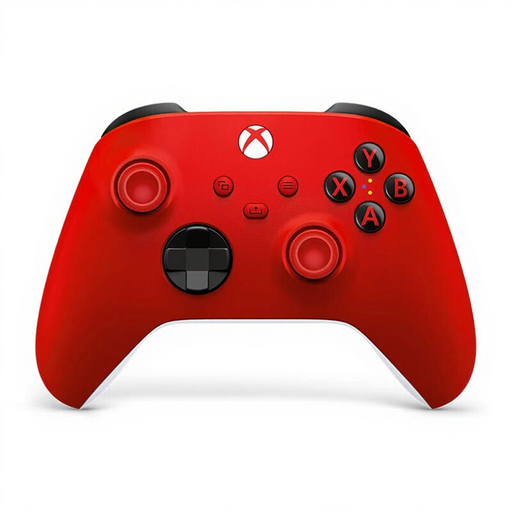
Why this choice suits this profile : This model makes a great first controller for Xbox or PC, thanks to its Xbox Wireless, Bluetooth and wired USB-C connections.
The listing clearly details compatibility with Xbox Series X|S, Xbox One, Windows, Android and iOS. The USB-C cable also enables wired use, but is sold separately.
Up to 40 hours of advertised battery life with two AA batteries included, a 3.5 mm headset jack and control remapping via the Xbox Accessories app.
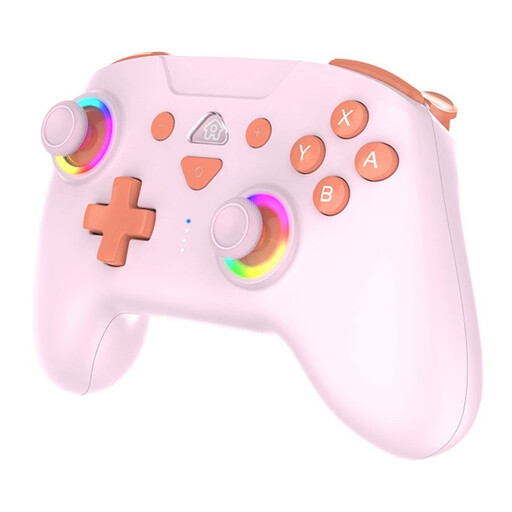
Why this choice suits this profile : This controller is aimed at Nintendo Switch, Switch OLED, Switch Lite and Switch 2 users looking for a rechargeable Bluetooth model.
The listing specifies compatibility with Switch and an advertised battery life of 9 to 10 hours, making it easier to compare with models using batteries.
Rechargeable battery with USB-C cable included, six-axis gyroscope, three vibration levels and two programmable rear buttons.
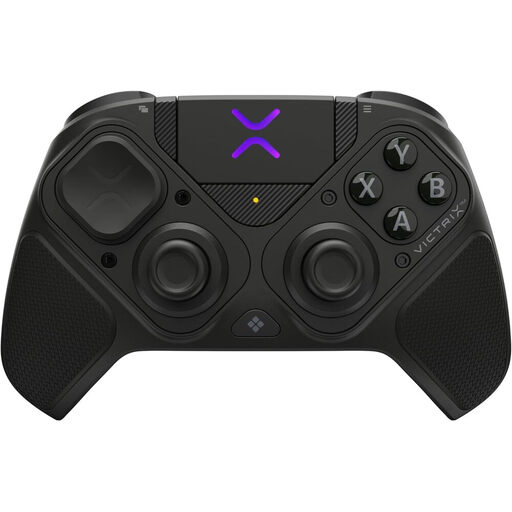
Why this choice suits this profile : This modular controller is designed for PC and Steam Deck players who want to adapt the control layout to the genre of game.
The listing clearly distinguishes between the 2.4 GHz connection and wired USB-C. Modules must be replaced while the controller is switched off, using the tool provided.
Hall Effect joysticks and triggers presented as drift-resistant, four programmable rear paddles and a six-button fighting game module.
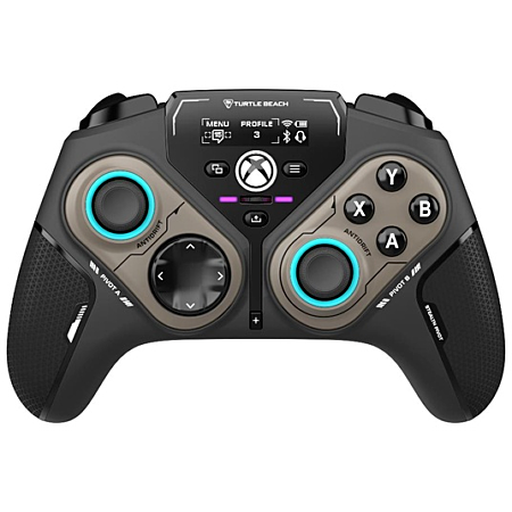
Why this choice suits this profile : It is suitable for PC, mobile and Xbox players who switch between FPS, fighting and racing games.
The listing specifies that use on Xbox is wired, while PC supports the 2.4 GHz receiver and compatible Bluetooth devices.
Pivoting modules, Hall Effect joysticks, adjustable triggers, two rear buttons and up to 20 hours of advertised battery life.
We have compiled a complete, regularly updated list of products that fully meet these demanding selection criteria and European safety standards.
Turn on Bluetooth in Windows settings, put the controller into pairing mode, then select its name from the list of available devices. With some games, you will then need to configure the buttons.
This depends on how often it is used, storage conditions, knocks and maintenance. Avoid moisture, high temperatures and harsh cleaning products. A controller with an integrated battery should be recharged using a suitable cable, while a model using AA batteries allows you to replace its power supply quickly.
Yes, provided that the connection, advertised latency, triggers and customisation options suit the way you play. For competitions, however, check the rules of the game or organiser : some require a wired connection or restrict the use of programmable features.