
Livraison le jour même ou le lendemain

Qualité garantie

Débloquez vos offres de bienvenue: Livraison GRATUITE | Jusqu'à -80 % | 30 jours d'essai gratuits à JoyPlus
Téléchargez l'application
The dangling, tangled cable, an outdated GPS, or even the complete lack of a smart screen: many drivers dream of upgrading their car without resorting to complex and expensive installations. It's one of the most common frustrations we see on the editorial team.
This guide is designed to show you practical solutions for integrating wireless CarPlay or wireless Android Auto into your dashboard. Whether you have an older car with no screen or a recent model with wired CarPlay, there's an option to improve your comfort and safety behind the wheel.
Before you dive in, it's essential to understand the different options on the market. Here are the key points to help you see clearly and make the right choice.
This is the first question to ask yourself.
Most current solutions are designed to be universal. Portable screens are compatible with almost all vehicles that have a 12V-24V cigarette lighter socket, which covers cars, trucks, and motorhomes. For adapters, however, always check the manufacturer's compatibility list, as they generally target vehicles produced after 2016. In any case, installation is almost always "plug-and-play": you plug it in, connect your phone via Bluetooth and Wi-Fi, and you're all set.
Some models go beyond simple connectivity. The most sought-after option right now is arguably an integrated dash cam. A CarPlay with dash cam system allows you to record the road while enjoying navigation, combining safety with modernity. Also consider the screen size, resolution, and audio output options (FM transmitter, AUX cable, native Bluetooth) to stream sound through your car's speakers.
Here is a selection of products that address the most common scenarios, chosen for their ease of installation and everyday relevance.
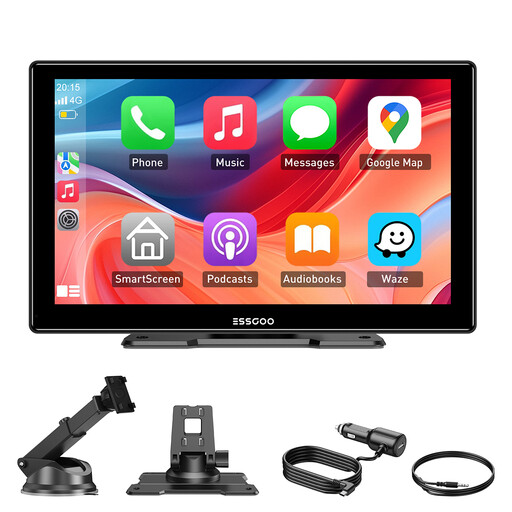
Why it stands out: This screen is the very definition of "plug-and-play". In minutes, it transforms a dated car interior into a modern control centre, without altering the vehicle's original setup.
Pros:
Who is it for? The perfect choice for owners of older vehicles who want to add navigation and multimedia without replacing their head unit. It's also an excellent option for professionals (trucks, LCVs) who frequently switch vehicles.

Why it stands out: This model combines a large CarPlay screen with a complete 4K dash cam system (front and rear). It checks all the boxes: entertainment, navigation, and safety.
Pros:
Who is it for? For drivers who want to maximise functionality with a single device. A particularly relevant solution for those who prioritise safety and want to keep a video record of their journeys.

Why it stands out: Its tiny size and singular purpose. This CarPlay dongle has one mission: to free you from the USB cable if your car already has wired CarPlay or Android Auto.
Pros:
Who is it for? Exclusively for drivers whose cars already have wired CarPlay or Android Auto and who simply want to say goodbye to the cable.
If our selection doesn't exactly meet your needs, or if you're looking for complementary accessories (quality AUX cables, more powerful cigarette lighter chargers...), feel free to explore our dedicated category.
Discover our Selection of Cables & Wires
1. Can a wireless CarPlay adapter add CarPlay to a car that doesn't have it? No. An adapter (or dongle) only serves to convert an existing wired CarPlay connection into a wireless one. For a car not originally equipped, you must opt for a portable CarPlay screen or a compatible replacement head unit.
2. Is the wireless connection as reliable as a wired one? Yes, in the vast majority of cases. Modern systems that use 5 GHz Wi-Fi offer a stable connection with very low latency, which is imperceptible for music, calls, or navigation. The connection is automatically re-established as soon as you get into your vehicle.
3. Is installing a portable screen really that simple? Absolutely. The installation requires no technical skills. You just need to attach the mount (suction or adhesive) to a flat surface, plug the power cable into the cigarette lighter socket, and connect your phone. The whole process takes less than five minutes.