Just because your car has a few years on the clock doesn't mean you have to miss out on the comfort and safety of modern technology. If your dashboard lacks a recent multimedia system, the idea of replacing the entire head unit can quickly become a costly headache. The solution?? Simple, effective, and much more affordable: the portable wireless CarPlay screen.
This guide is here to help you navigate the options. We'll review the essential criteria to check before buying and present a selection of the best products to transform your driving experience.
How to Choose Your Portable CarPlay Screen?
To make the right choice, it's crucial to understand the few features that truly make a difference. Here are the key points to check to find the model that will become your perfect road trip companion.
1. Connectivity?: CarPlay, Android Auto, and Mirror Link
The primary mission of these screens?: to project your smartphone's interface onto a larger, safer display. Make sure to check for compatibility?:
- Wireless Apple CarPlay & Android Auto?: This is the standard today for maximum convenience. Your phone connects automatically as soon as you get in the car, without needing to be plugged in. Most recent models handle both systems, offering total flexibility whether you're on Team iPhone or Android.
- Mirror Link (or screen mirroring)?: This function duplicates your smartphone's screen exactly. It's an excellent alternative for launching apps that aren't natively compatible with CarPlay or Android Auto, like certain video streaming platforms (when parked, of course!).
2. Installation and Power?: The Simplicity of Plug-and-Play
One of the biggest advantages of a portable car stereo is its simple installation. Unlike an integrated system, it requires no permanent modifications to your vehicle's interior.
- Power?: Most screens simply plug into the car's cigarette lighter socket (12V-24V). It's a universal solution that works anywhere.
- Mounting?: Take a look at the type of dashboard mount provided. The most common are suction cups for the windscreen and adhesive mounts for the dashboard. Some models offer robust mounts, ideal for the larger surfaces of vans, trucks, or motorhomes.
3. Screen Size and Extra Features
Your user experience depends directly on the screen quality and any bonus features.
- Size and Resolution?: A 10-inch touchscreen offers an excellent balance between readability and footprint. Aim for at least HD resolution (1080p) to ensure your navigation map is perfectly clear and text is sharp.
- Reversing Camera?: Many packages include an HD reversing camera. This is a real safety bonus, especially on large vehicles where rear visibility is limited. The display automatically switches to the camera as soon as you engage reverse gear.
Top Car Equipment Picks
To help you make the right choice, here is a selection of products perfect for those who want to add CarPlay to their car, simply and without any hassle.
Editor's Choice?: Carpuride V92R Portable Screen
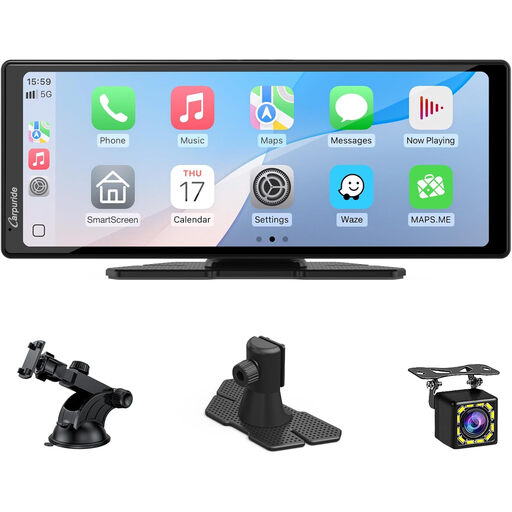
The Carpuride V92R is the ultimate all-in-one solution for instantly modernising any car interior.
- Why it stands out?: This device combines a large 10.26-inch touchscreen with full wireless connectivity (CarPlay and Android Auto). It even goes a step further by including a 720p reversing camera, making it an incredibly complete package for its price.
- Advantages?:
- Large HD Screen?: The 10.26-inch 1080p panel offers perfect visibility for both navigation and media control.
- Universal Connectivity?: Compatible with wireless CarPlay and Android Auto, as well as Mirror Link.
- Flexible Audio?: Sound can be transmitted via the built-in FM transmitter, an AUX output, or the device's own speakers.
- Reversing Camera Included?: The package contains a reversing camera that activates automatically.
- Who is it for??: For drivers of cars, vans, trucks, or motorhomes looking for a complete, reversible, and ready-to-use solution to enjoy navigation, calls, and music from their smartphone.
Upgrading your vehicle doesn't stop at the screen. Here are two accessories that will complete your setup for greater safety and daily convenience.
For Safety?: The 70mai A810-2 4K Dashcam
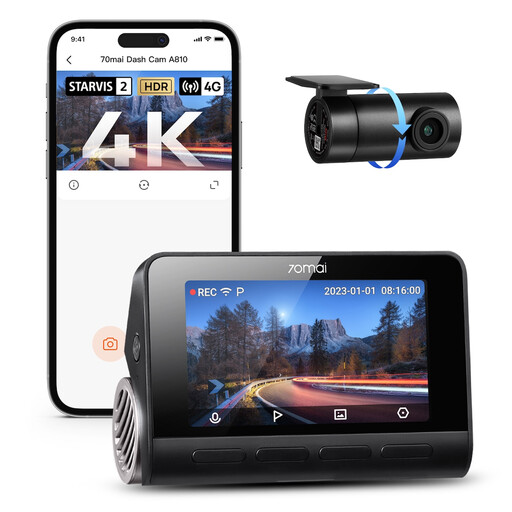
A dashcam is your impartial witness in the event of a road incident. The 70mai A810-2 model plays in the big leagues with top-tier image quality.
- Why it stands out?: Equipped with Sony STARVIS 2 sensors on the front (4K) and rear (1080p), it captures details with stunning precision, day or night.
- Advantages?:
- 4K UHD Image Quality?: Allows for clear reading of number plates and road signs.
- HDR Night Vision?: The HDR technology manages high-contrast lighting for clear images even in difficult conditions.
- Built-in GPS and ADAS?: Records journey data and provides safety alerts (lane departure, collision risk).
- Who is it for??: For all safety-conscious drivers who want peace of mind with irrefutable video evidence in case of an accident or dispute.
For Convenience?: The Rexsun M2 Pro Magnetic Wireless Charger
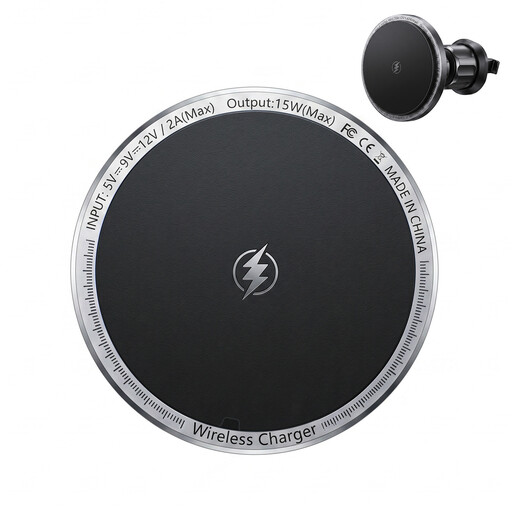
Using wireless CarPlay or Android Auto tends to drain your phone's battery quickly. A dedicated charger is therefore not a luxury, but an almost essential accessory.
- Why it stands out?: This MagSafe-compatible charger offers an ultra-stable magnetic mount and fast charging up to 15W.
- Advantages?:
- Instant Magnetic Mounting?: Allows you to attach and remove the phone with one hand.
- Compact Design?: Attaches to the air vent, leaving the dashboard clear.
- Fast Charging?: Keeps your phone charged even during heavy use of GPS and music streaming.
- Who is it for??: For iPhone owners (12 series and newer) who want a "set it and charge" solution that integrates perfectly with their wireless CarPlay setup.
What About Cables?
Even a "wireless" setup has its cables?: the power cord, and sometimes the one for the reversing camera. To keep your car's interior clean and safe, organising them properly is key.
Discover our selection of Cable Holders for a neat and discreet installation.
Frequently Asked Questions (FAQ)
How does a wireless portable CarPlay screen work?
It's very simple. It plugs into the cigarette lighter socket for power, then connects to your smartphone via Wi-Fi and Bluetooth to display the CarPlay or Android Auto interface. For audio, it transmits sound to your car's speakers via a built-in FM transmitter or a simple auxiliary cable.
Is it compatible with my old car?
Yes, in the vast majority of cases. The only requirement is a functional cigarette lighter socket (12V or 24V), which is found in almost all vehicles, even older ones or commercial vans.
Can I use Apple CarPlay and Android Auto on the same screen?
Absolutely. Most modern screens, like the Carpuride V92R we feature, are compatible with both systems. They automatically detect whether you're connecting an iPhone or an Android smartphone and launch the correct interface. This is ideal if the car is shared by drivers with different phones.


