
Livraison le jour même ou le lendemain

Qualité garantie

Débloquez vos offres de bienvenue: Livraison GRATUITE | Jusqu'à -80 % | 30 jours d'essai gratuits à JoyPlus
Téléchargez l'application
Your car has been faithful, taking you everywhere you need to go, but its dashboard is starting to look seriously dated. Without modern GPS or an easy connection to your smartphone, drives can quickly become a chore. Rest assured, you don't need to buy a new vehicle to enjoy the latest technology.
This guide is here to help you choose the right wireless CarPlay display, the simplest and most effective solution for modernising your car's interior. We'll review the essential buying criteria and present our selection of the best models to transform your driving experience.
Before you take the plunge, let's go over the few features that will make all the difference in your daily use. Here are the key points to check to ensure you make the right choice.
The main appeal of these devices?? Their ability to connect to your smartphone in a flash. Double-check that the model you're interested in is compatible with Apple CarPlay and wireless Android Auto. A wireless connection, via Wi-Fi and Bluetooth, offers unparalleled convenience?: your phone connects automatically as soon as you get in, without you even having to take it out of your pocket. It's the perfect solution for seamless integration into an older car.
Readability is key. A 10-inch portable car display often represents the best compromise between viewing comfort and dashboard space. Take a look at the resolution (aim for at least HD 1600x600 pixels) and make sure there's a day/night mode to avoid being dazzled at night. A responsive touchscreen is also an essential element for safety and comfort.
A good car multimedia system must be able to integrate with your existing audio setup. To broadcast sound, these portable displays offer several solutions?:
Installation should be "?plug-and-play?": the device attaches to the dashboard or windscreen with a suction cup and is powered by the cigarette lighter socket.
To help you make the switch, here is our selection of products that combine modernity, simplicity, and safety.
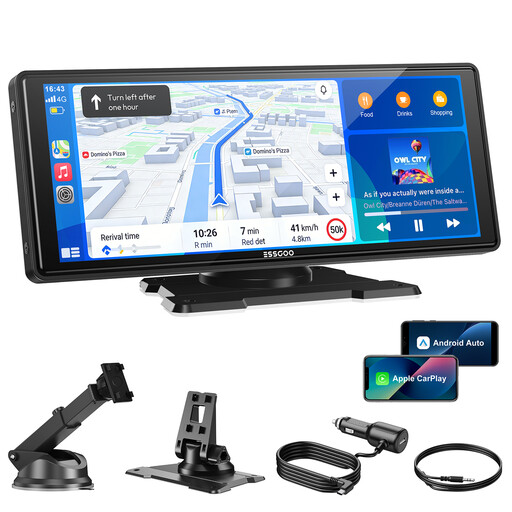
Why it stands out?: This ESSGOO display is the all-in-one solution for those who want to enjoy CarPlay and Android Auto without getting into complex installations. Its dual-band Wi-Fi (2.4?GHz/5?GHz) connectivity ensures a stable and responsive wireless connection. Its large 10.26-inch HD screen offers optimal reading comfort for GPS and apps. With its four audio outputs (speaker, Bluetooth 5.3, FM transmitter, AUX), it is compatible with almost all car radios.
Pros:
Who is it for?? For all drivers whose cars lack a factory screen and who are looking for a high-performance, easy-to-install solution with a large, comfortable display for navigation and media.
Modernising your car also means preparing for the unexpected. A dead battery can quickly turn a simple trip into a real hassle. In this context, portable battery starters have become indispensable safety accessories.
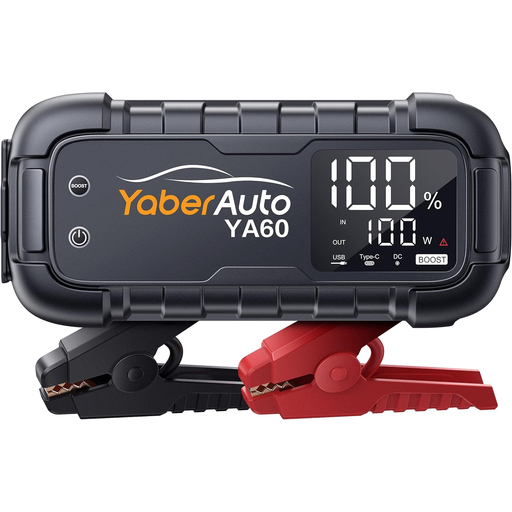
Why it stands out?: The YaberAuto YA60 is much more than just a jump starter. With its peak current of 8000?A, it can restart any petrol engine and diesel engines up to 12.0?L. Its 65?W two-way fast charging function is astounding?: it recharges itself in 1.5 hours and can power your devices (laptop, smartphone) at full speed. It even transforms into a powerful torch.
Pros:
Who is it for?? For owners of large vehicles (SUVs, trucks, vans) and for anyone who wants a super-powerful, versatile device to never be caught off guard, whether by a dead battery or a drained smartphone.
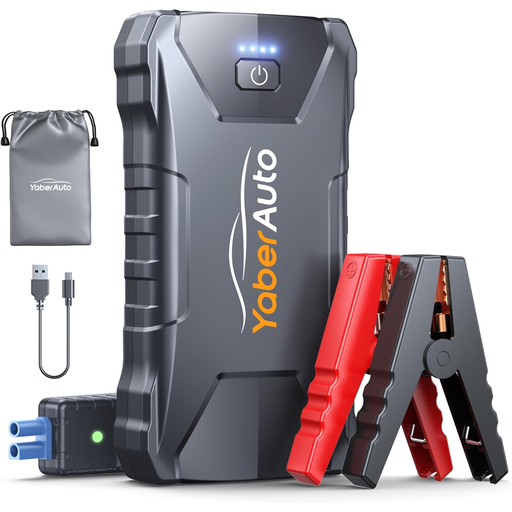
Why it stands out?: The YaberAuto YA80 focuses on compactness without sacrificing the essentials. With a current of 2000?A, it is more than sufficient for most petrol cars (up to 7.0?L) and diesel cars (up to 5.5?L). Its feather-light weight (340?g) and mini format allow it to be slipped into the glove box or even a backpack.
Pros:
Who is it for?? For drivers of city cars, saloons, or motorcycles who are looking for a reliable, discreet, and portable emergency starter, whether for daily commutes or holiday trips.
Your car is all set, but you have other projects in mind?? Joybuy offers a vast selection of products for all occasions. For example, discover our Party Table and Chair Rentals category to organise your events.
1. Can you install CarPlay in a car that doesn't have it from the factory?? Yes, absolutely?! Using a portable wireless CarPlay display, like the ones in our selection, is by far the easiest method. No modifications are necessary?: just plug it into the cigarette lighter and attach it to the dashboard.
2. Will a wireless CarPlay display drain the car battery?? No, there's no risk. These devices are powered by the cigarette lighter socket, which only works when the ignition is on. The screen therefore turns off at the same time as your car, and its power consumption is far too low to have any impact on the battery.
3. How is the sound from the display played through the car's speakers?? Several solutions exist. The most common is the FM transmitter?: you set the display and your car radio to the same radio frequency. If your car has an auxiliary (AUX) jack, a jack cable will provide optimal sound quality. Finally, the display has its own small built-in speaker, which is very handy for GPS instructions.