
Livraison le jour même ou le lendemain

Qualité garantie

Débloquez vos offres de bienvenue: Livraison GRATUITE | Jusqu'à -80 % | 30 jours d'essai gratuits à JoyPlus
Téléchargez l'application
Is your car getting on in years, with a dashboard that lacks built-in GPS or smartphone connectivity? You probably know the daily juggling act of fumbling with your phone to launch Waze, change a playlist, or take a call. A habit that's not just inconvenient, but dangerously distracting.
The solution is brilliantly simple: a wireless CarPlay display with a built-in dash cam. This all-in-one unit modernises any vehicle without permanent modifications. The result: a large screen for navigation, hands-free access to your apps, and a camera to record every journey.
This guide is designed to help you make an informed decision and choose the model best suited to your needs, based on objective technical criteria and real-world use cases.
Before you take the plunge, let's review the key factors that will help you find the ideal road companion for your car and your driving habits.
A smooth experience depends on a flawless connection. Prioritise a model that offers both wireless CarPlay and wireless Android Auto for maximum compatibility. The best devices combine Bluetooth for instant pairing with Wi-Fi (ideally dual-band 2.4/5?GHz) for fast, stable data transfer. Also, check for compatibility with your smartphone's iOS or Android version. As a bonus, some models offer a car mirror link function, which is useful for mirroring your phone's entire screen.
The killer feature of these devices is often their dash cam function. For sharp, genuinely usable footage when you need it, aim for a front and rear 4K dash cam. A high resolution (4K front, 1080p rear) paired with a wide-angle lens (around 140°) is the winning combination to capture the whole scene. The inclusion of a waterproof reversing camera makes parallel parking a breeze. Ensure the model includes loop recording (to prevent the memory card from filling up) and, if possible, a G-sensor that automatically locks the video file in the event of an impact.
The main selling point of this portable CarPlay stereo is its plug and play carplay installation. Forget the auto shop: most models attach to the dashboard or windscreen in seconds using a suction cup or adhesive mount. Power is supplied simply via the cigarette lighter socket (12V-24V).
For audio, you have several options:
We've selected a few models that stand out for their performance and ease of use.

Why It Stands Out This is the ultimate all-in-one solution. This model combines a large 10.26-inch HD touchscreen with a high-performance front and rear 4K dash cam system. The icing on the cake is the included 64?GB memory card, making it ready to use right out of the box.
Advantages
Who Is It For? For those who want a turnkey solution to modernise their car, combining navigation, multimedia, and security without worrying about buying extra accessories.
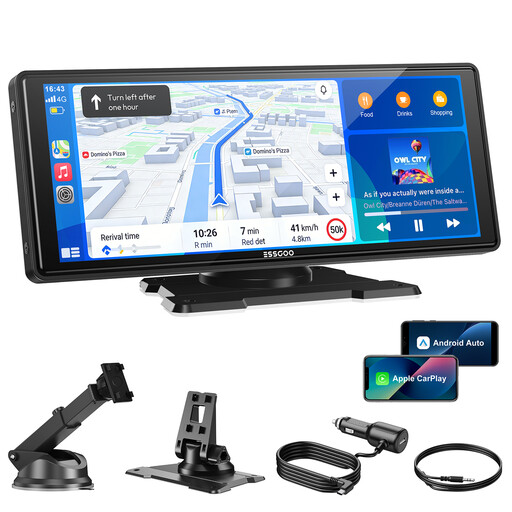
Why It Stands Out This model gets straight to the point: delivering the best possible CarPlay and Android Auto experience on a large, high-quality screen. The focus is on connection stability, with dual-band Wi-Fi and Bluetooth 5.3. It's also upgradeable, as a reversing camera can be added (sold separately).
Advantages
Who Is It For? Ideal for drivers who prioritise display quality and wireless connection reliability, and who don't need an integrated dash cam (or prefer to choose one separately).

Why It Stands Out Note: this isn't a display, but an ultra-compact adapter. Its one and only mission is to convert your car's factory-wired CarPlay into a 100% wireless connection. Its tiny size and plug-and-play installation make it the most discreet and simple solution on the market.
Advantages
Who Is It For? For any driver whose car already has wired CarPlay or Android Auto and simply wants to cut the cord for more daily convenience.
Our mission is to find products that truly simplify your daily life. Today, we're talking about in-car tech, but our curiosity doesn't stop at your car door. To discover other hidden gems selected by our experts, feel free to explore our other guides, like our selection of men's mock neck long-sleeve training tops.
Not at all—in fact, that's their biggest advantage. The installation is plug and play: you attach the mount, plug the display into the cigarette lighter, and pair it with your smartphone. The whole process takes just a few minutes and requires no modifications to your vehicle.
It all depends on your chosen connection method. For the best results, use the AUX output (if your car has one) or a direct Bluetooth connection to your car stereo. The FM transmitter is a convenient fallback, but its sound quality is often degraded by radio interference.
Yes, and that's the whole point. Whether you're using CarPlay (Siri) or Android Auto (Google Assistant), your car voice assistant is fully functional. You can start a route, dictate a message, make a call, or choose your music by voice, all without taking your hands off the wheel or your eyes off the road.