
Livraison le jour même ou le lendemain

Qualité garantie

Débloquez vos offres de bienvenue: Livraison GRATUITE | Jusqu'à -80 % | 30 jours d'essai gratuits à JoyPlus
Téléchargez l'application
A wireless gaming headset means no cables getting tangled around your chair, but not every model is right for every use. Bluetooth can sometimes be less responsive, battery life figures are often based on specific test conditions, and compatibility may be limited with certain consoles. So it’s worth checking a few things before you place your order.
Bluetooth is ideal for listening to music or making calls. When gaming, however, it can cause a delay between the picture and the sound. For a more responsive experience, look for a 2.4 GHz connection with a USB receiver, which is generally designed to provide a low-latency link.
A Bluetooth gaming headset can still be handy for everyday use. A dual-connection model lets you use 2.4 GHz for gaming and Bluetooth with your phone or laptop.
A battery life of ‘up to 70 hours’ often depends on several factors, such as RGB lighting being switched off, moderate volume, the connection type and advanced audio features being disabled. Compare long-battery-life gaming headsets with your actual habits in mind.
Also check how long the headset takes to charge, whether it comes with a 3.5 mm jack cable and whether you can keep playing while it charges. A wired backup option can stop your game being interrupted at the worst possible moment.
A multi-platform gaming headset may work with PC, PlayStation, Switch and mobile devices, but not necessarily with Xbox. Some USB-C receivers also need an adapter or a console in docked mode.
Before placing your order, check:
For a low-latency gaming headset, look for 2.4 GHz with a USB receiver. This connection is generally designed for gaming on PC and console. Bluetooth 5.2, 5.3 or 5.4 is still handy for mobile devices and calls, but the version number alone doesn’t guarantee imperceptible latency.
A dual- or triple-mode model can combine 2.4 GHz, Bluetooth and a 3.5 mm jack cable. That’s a useful option if you play on several devices.
A headset with a microphone should pick up your voice clearly without making you speak louder. A retractable, fold-up or detachable microphone can also make the headset more comfortable to use outside gaming sessions.
Microphone noise-reduction claims refer to a technical feature whose effectiveness depends on your surroundings, the mic position and the software you use. On some products, the more advanced options require a dedicated app or a compatible graphics card.
For long sessions, pay close attention to the weight, the shape of the ear cushions and the headband adjustment options. A lightweight headset isn’t necessarily comfortable for everyone. Memory foam or breathable fabric ear cushions can help reduce pressure, while faux leather offers better isolation from outside noise.
Always consider the conditions used to measure battery life: RGB lighting on or off, 2.4 GHz or Bluetooth mode, and noise cancellation on or off. An RGB gaming headset adds a stylish touch, but its lighting can reduce battery life.
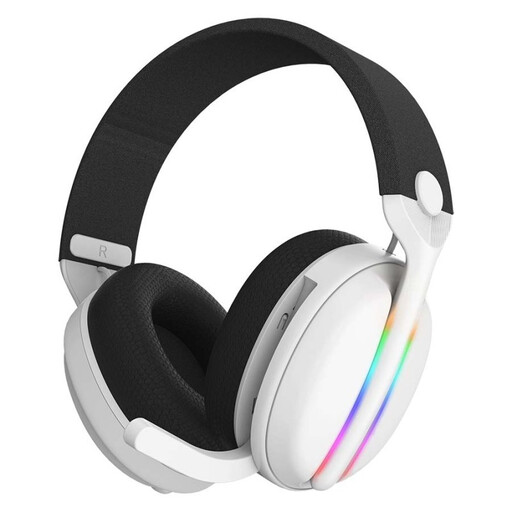
Why it suits this type of player: Its stated compatibility with PS5, PS4, PC, Xbox and Nintendo Switch makes it a good fit for players who want to get started without buying several headsets.
It combines a 2.4 GHz connection with Bluetooth and comes with a USB charging cable. Battery life is stated as up to 40 hours with the LED lighting off.
Stated weight of 205 g, retractable microphone, RGB lighting and emulated 7.1 surround sound.
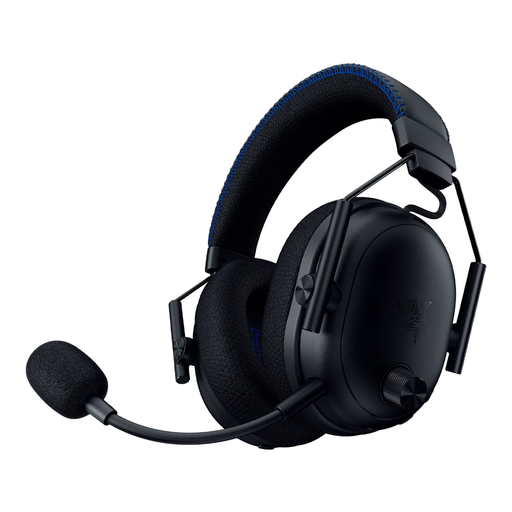
Why it suits this type of player: It’s designed for PC and PlayStation players looking for advanced audio settings, versatile connectivity and active noise cancellation.
The product listing specifies a HyperSpeed 2.4 GHz connection, Bluetooth 5.3 and a 3.5 mm jack, so you’re not tied to a single connection type.
Hybrid ANC, detachable microphone, Tempest 3D Audio on PS5 and THX Spatial Audio on PC.
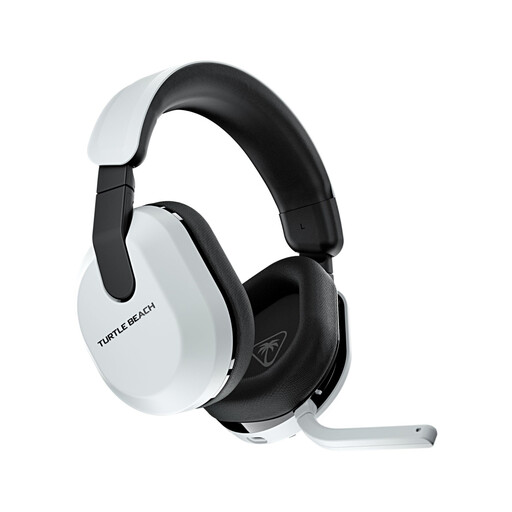
Why it suits this type of player: Its stated battery life of 80 hours makes it a good choice for long sessions on PlayStation, PC, Switch or mobile.
The 2.4 GHz connection is dedicated to gaming, while Bluetooth 5.2 makes it easy to switch to a phone or another device.
Flip-to-mute microphone, 50 mm speakers and a 10-band equaliser available through the Swarm II app.
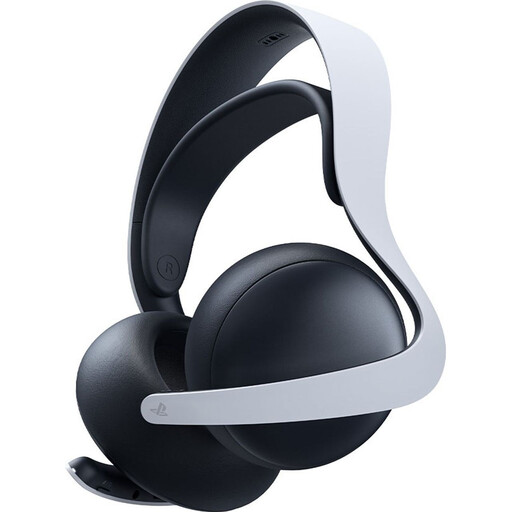
Why it suits this type of player: Its PlayStation Link connection and PS5 compatibility make it a natural choice if your setup is mainly built around the PlayStation ecosystem.
The product listing sets out compatible devices and distinguishes PlayStation Link from Bluetooth, helping you choose the right mode for each use.
Planar magnetic drivers, retractable microphone and up to 30 hours of stated battery life, with USB-C charging.
We’ve put together a comprehensive selection, updated in real time, of products that meet these exacting criteria while complying with European safety regulations.
Yes, as long as the product listing confirms compatibility with both devices and includes a suitable receiver. Bluetooth can be used with mobile devices, while the 2.4 GHz dongle is generally the preferred option for gaming. Also check whether the receiver connects via USB-A or USB-C.
The models featured here have stated battery lives ranging from 25 to 80 hours, depending on the model and how you use them. RGB lighting, ANC and wireless mode can reduce battery life. For everyday use, compare the stated battery life with the charging time and check whether a backup cable is included.
No. A headset with surround sound can help you pick out certain directions more clearly, but the result depends on the game, software and your settings. A well-adjusted stereo headset can work just as well, particularly if you also want to listen to music, chat with others and use it for different activities.