
Livraison le jour même ou le lendemain

Qualité garantie

Débloquez vos offres de bienvenue: Livraison GRATUITE | Jusqu'à -80 % | 30 jours d'essai gratuits à JoyPlus
Téléchargez l'application
Wireless Bluetooth headphones can make commutes, work calls and long listening sessions much more enjoyable. But an impressive specification sheet does not necessarily guarantee the right purchase. Claimed battery life, noise cancellation and USB-C compatibility should all be assessed based on your equipment and listening habits.
A promise of “50 or 60 hours” generally depends on listening volume, the codec used, the distance from your phone and whether ANC is enabled. Active noise cancellation uses more battery power. So, where available, check the figures showing battery life with and without ANC.
Charging also deserves your attention. Long-battery-life headphones can be very convenient thanks to their large battery, provided they have an easily accessible port, a suitable cable and, ideally, a wired mode so you can continue listening once the battery runs flat.
On some models, the USB-C port is for charging only. A USB-C Bluetooth headset may therefore include a USB-C socket without accepting a digital audio signal through it. To avoid unpleasant surprises with a smartphone, tablet or computer, check for Bluetooth, an audio input and the exact compatibility stated by the manufacturer.
Wired USB-C earbuds connect directly to a compatible device. They need neither a battery nor pairing, but not all USB-C ports support audio in the same way.
ANC effectively reduces certain continuous sounds, such as the rumble of a train or the hum of an aeroplane. It does not make conversations, sudden sounds or very close noises disappear. Above all, avoid using it when you need to remain aware of your surroundings, particularly near traffic.
When cycling, walking around town or spending time in busy places, a model without ANC or with a mode that lets ambient sounds through may be more suitable.
A newer version of Bluetooth can help provide a stable connection, but it is not enough to assess audio quality. The supported Bluetooth profiles, the distance between devices and any obstacles along the signal path also matter.
For working from home, choose headphones with a built-in microphone and controls that are easy to find. For versatile use, Bluetooth headphones with a 3.5 mm jack connection remain a sensible choice: they can be used with a device without Bluetooth or allow you to continue listening when the battery is low.
Over-ear headphones completely surround the ears. They often provide better passive isolation and distribute pressure more widely, but they are bulkier. On-ear models rest directly on the ears and are easier to carry, with a different level of isolation.
True Wireless earbuds focus on a compact design that is particularly convenient when you are out and about. However, check how securely they fit, the weight of each earbud, their resistance to moisture and the total battery life including the case. A certification such as IP54 guarantees a defined level of protection against dust and splashes, but it does not automatically make the product waterproof.
Check how long a full charge takes, whether fast charging is available and whether the headphones can be used with a cable. An integrated battery must not be opened or replaced by the user. Use a compatible cable and stop charging immediately if you notice unusual heat, a suspicious smell or swelling.
To protect your hearing, keep the volume at a reasonable level and take breaks during long listening sessions. The battery life and sensitivity stated on the specification sheet are reference figures, not a recommended listening level.
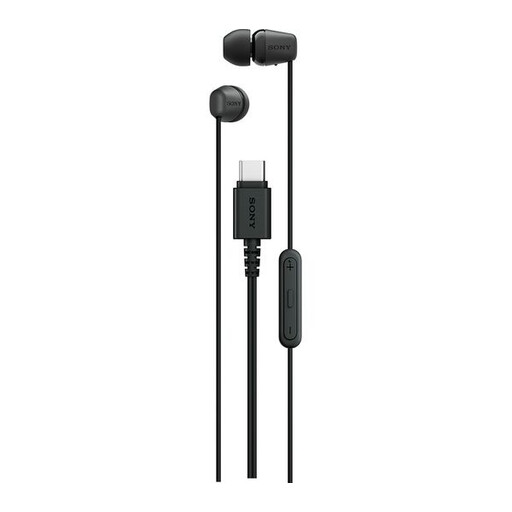
Why this choice suits this profile: These wired USB-C earbuds are ideal for anyone who wants to listen to podcasts or music, or make calls, without worrying about pairing or charging.
There is no endless battery-life promise to live up to: the USB-C connection is direct, and the product has neither Bluetooth nor ANC.
Built-in microphone, volume and playback controls, a claimed weight of 3 g and a 1.2 m cable.
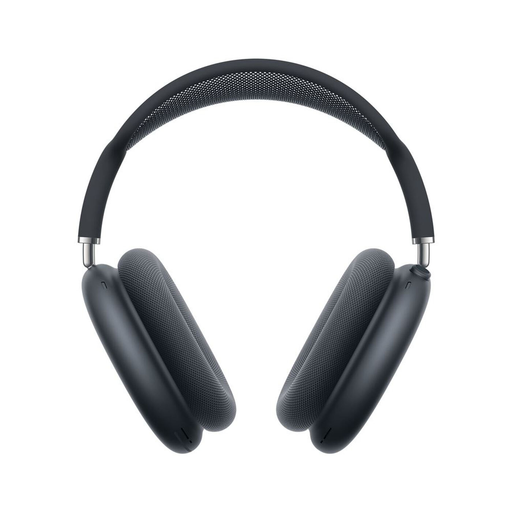
Why this choice suits this profile: These over-ear headphones are designed for users looking for deep integration with the Apple ecosystem, wireless listening and several audio modes.
The specifications state up to 20 hours of battery life and clearly distinguish ANC from Transparency mode, allowing you to compare these figures with your actual usage.
Personalised Spatial Audio, active noise cancellation, Transparency mode, USB-C charging and a storage case included.
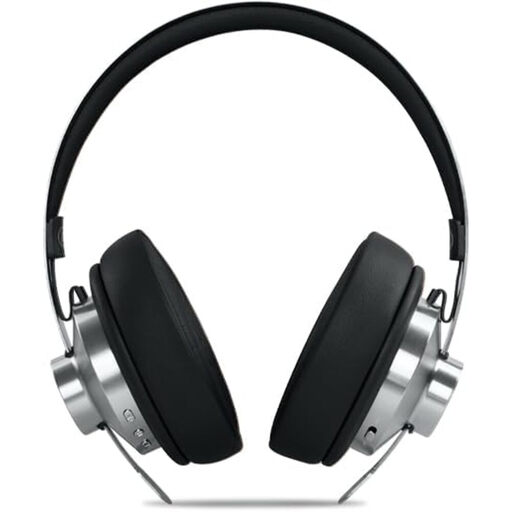
Why this choice suits this profile: The over-ear design, microphone and dual connectivity work equally well for commuting, working from home and long listening sessions.
Battery-life and charging information is listed separately: up to 66 hours of claimed listening time, around 2 hours for a full charge and a jack cable available as a backup.
Bluetooth 5.4, ANC claimed to reduce noise by up to −35 dB, 3.5 mm input, 40 mm drivers and a carry case included.
We have brought together a complete, real-time updated selection of products that meet these strict criteria and European safety requirements.
Yes, provided the computer has Bluetooth and the necessary profiles. Activate the headphones’ pairing mode, open the Bluetooth settings and select their name from the list. For calls, also remember to select the headphones’ microphone in the audio settings. If the connection is unstable, a jack cable or compatible adapter can provide a useful backup.
It depends on the battery, hinges, ear cushions, cable and frequency of use. Protect them from moisture, high temperatures and knocks. When travelling, keep them in their case and clean their surfaces with a dry cloth. As with any rechargeable device, battery performance may gradually decline over the course of repeated cycles.
They require their case to be recharged regularly and may need replacement silicone tips. In return, their compact design slips easily into a pocket or bag. Before deciding, check the price of accessories, the warranty terms and the compatibility of the charging case.