
Livraison le jour même ou le lendemain

Qualité garantie

Débloquez vos offres de bienvenue: Livraison GRATUITE | Jusqu'à -80 % | 30 jours d'essai gratuits à JoyPlus
Téléchargez l'application
A wireless AZERTY keyboard and mouse bundle can declutter a desk, a home office setup or a mobile workstation. But the differences between models are far from trivial: true French layout, connection type, power source, size and compatibility aren't always clearly stated.
The Joybuy Product Recommendation Officer's selection is based on verifiable information and concrete criteria, to help you avoid purchases that don't match your needs.
A photo might show French keys while the product listing refers to a different version. Look explicitly for the mention French AZERTY or FR AZERTY, and check for the essential French characters: « é », « è », « à », « ç », as well as the punctuation keys.
A mechanical QWERTY keyboard designed for gaming can be very convincing for playing, but it isn't necessarily suitable for writing in French. Some compact models sold with a free mouse remain in US QWERTY.
A 2.4 GHz keyboard and mouse set usually works with a shared USB receiver. This is a straightforward solution on a computer with a USB-A port, but you may need an adaptor with some newer laptops.
A Bluetooth keyboard and mouse connect directly to many computers, tablets, smartphones and smart TVs. On the downside, the initial pairing requires a few steps. Models that combine 2.4 GHz and Bluetooth offer more flexibility, provided you check how many devices can be stored.
A rechargeable keyboard and mouse bundle saves you from buying batteries regularly, but you'll need to keep an eye on the cable and charging port. Alkaline battery models remain practical for occasional use or a fixed workstation.
Don't confuse "wireless" with "maintenance-free": charging, replacing batteries, cleaning and storing the receiver all have a direct impact on how long you can use the kit.
For work, study or everyday computer use, a full-size keyboard makes the numeric keypad easily accessible. Conversely, a compact keyboard and mouse bundle frees up space and slips more easily into a bag.
Also consider:
A flat mouse is easy to carry, while a taller model may offer a more comfortable grip during long sessions. However, a product listing doesn't always let you know if the shape will suit you, so dimensions are something to check before ordering.
For a wireless keyboard and mouse for PC, the shared Nano USB receiver is often the simplest solution: just plug it in and both devices connect. Still, check that your device has a compatible port.
Bluetooth is better suited to tablets, smartphones, smart TVs and computers without a USB-A port. Some sets let you switch between devices, while others only handle one connection at a time.
Built-in lithium batteries should be charged with a certified 5 V charger when the product listing specifies this. Avoid exposure to excessive heat, moisture and impacts, and do not disassemble the devices. For battery-powered versions, respect the polarity and don't mix new and old batteries.
The CE, RoHS and REACH markings on some listings indicate product compliance and restrictions on certain substances. At the end of its life, an electronic device and its batteries must be taken to an appropriate collection point, never disposed of with household waste.
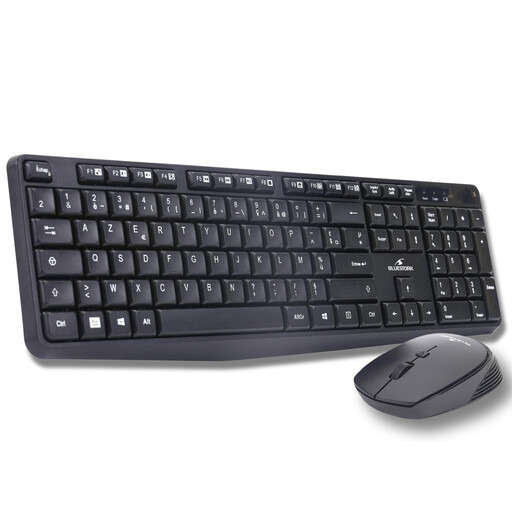
Why this choice suits this profile: This set is ideal for a first office setup on a PC or laptop with a USB-A port. It works with a single Nano USB receiver and requires no additional software.
The 2.4 GHz connection and shared receiver minimise setup steps. However, you'll need to have alkaline batteries to hand, as this model isn't rechargeable.
Full-size keyboard, compact mouse, claimed range of around 10 metres and driver-free installation.
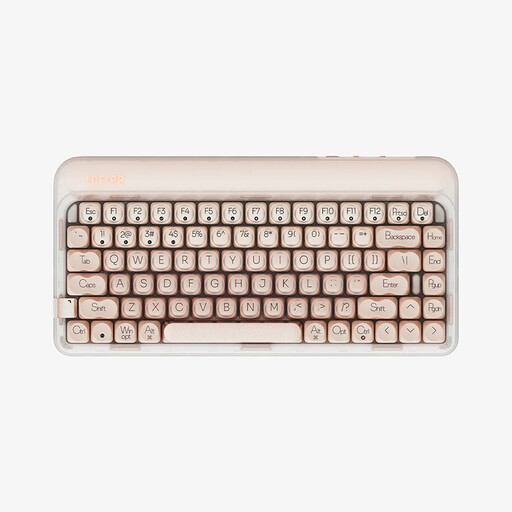
Why this choice suits this profile: This compact mechanical keyboard is aimed at users who want to customise their setup and switch between work, creation or gaming. Please note, its layout is US QWERTY: this is not a standard AZERTY bundle.
The listing clearly states the 84-key format, tri-mode connection and US QWERTY layout. This information prevents you from mistakenly choosing it as a French keyboard.
Solderless hot-swappable switches, USB-C, Bluetooth 5.3 and 2.4 GHz connections, 4,000 mAh battery and a claimed polling rate of 1,000 Hz.
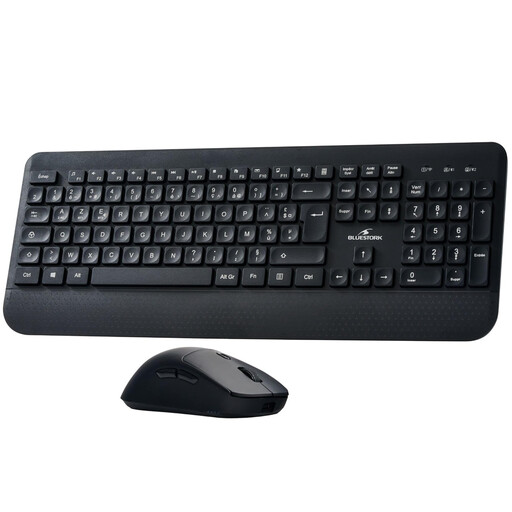
Why this choice suits this profile: This AZERTY keyboard and mouse bundle is ideal for those who switch between a PC, a tablet or a smartphone while wanting to keep a French layout.
The listing clearly distinguishes the Nano USB receiver from Bluetooth and states the ability to switch between three devices. The bundle runs on batteries, not a rechargeable battery.
AZERTY layout, dual connection, claimed compatibility with Windows, tablets and smartphones, with no driver required in USB mode.
We've put together a comprehensive, real-time updated selection of products that meet these demanding criteria and European safety regulations.
Insert the batteries or charge the devices, then plug the Nano USB receiver into an available port. With most 2.4 GHz models, pairing happens automatically. If the computer doesn't respond, check the battery polarity, the USB port you're using and the power switch.
It depends on typing frequency, mouse usage, the condition of the keys and the battery or batteries. Avoid liquids, heat and impacts. Regular cleaning with a soft, dry cloth helps preserve the surfaces. Built-in lithium batteries must not be opened or replaced by the user.
Yes, provided the device accepts compatible Bluetooth peripherals. Activate pairing mode, open the Bluetooth settings, then select the keyboard and mouse. For a smart TV, also check the manufacturer's list of supported devices.