
Livraison le jour même ou le lendemain

Qualité garantie

Débloquez vos offres de bienvenue: Livraison GRATUITE | Jusqu'à -80 % | 30 jours d'essai gratuits à JoyPlus
Téléchargez l'application
From making calls in the street to filming videos on your smartphone and recording impromptu interviews, wireless audio devices cover a wide range of needs. Yet a product that looks appealing on paper can still prove disappointing after a few days of use.
Here are the key points to check before buying, along with a selection designed for different types of creators, students and mobile users.
Maximum battery life often depends on listening volume, the Bluetooth codec used, call frequency and the number of recharges available from the case or charging case. For everyday use, check in particular:
A microphone used for filming also needs to be charged before an interview. A charging case or included case helps prevent you from forgetting, but you should still check the battery level regularly.
Several microphones do not, on their own, guarantee perfectly clear speech. The result also depends on their position, wind, distance from the sound source and software processing.
For calls, directional microphones combined with wind protection can make a real difference. For a vlog or interview, focus mainly on range, transmission stability and the option to record a backup track.
In-ear headphones can become uncomfortable during prolonged use, particularly for people who do not get on well with ear tips. Open-ear Bluetooth headphones allow you to hear more of your surroundings, but offer less isolation when travelling.
A clip-on or open-ring model should stay securely in place without applying excessive pressure. Your ear shape, whether you wear glasses and the ambient noise level should also be taken into account.
In-ear pressure-free headphones sit around or close to the ear, without an ear tip inserted into the ear canal. This design may suit people who want to listen to music or take calls while remaining aware of the sounds around them.
In particular, check:
Safety comes first: do not use headphones while driving, cycling or in an environment that requires constant awareness. Listening at a high volume for prolonged periods can also damage your hearing.
Before choosing a wireless lapel microphone, identify exactly what equipment you use for filming. A microphone intended for vlogging on an iPhone, Android phone or camera may require a different receiver and adaptor.
Check:
For filming with several people, a system with two transmitters makes interviews easier. Creators who work alone may prefer a more compact kit with a USB-C adaptor that is easy to carry.
A microphone with noise reduction can reduce certain background sounds, but its effectiveness varies considerably depending on the surroundings. In a busy street, strong wind or a reverberant room, microphone placement remains crucial.
32-bit float recording provides a useful backup on certain systems. This format gives you plenty of flexibility to recover a signal recorded too quietly or too loudly during post-production. However, it does not remove the need to monitor the sound level or carry out a short test before you begin.

Why this choice suits this profile : For listening to music, attending lessons or taking calls without in-ear tips, this clip-on model focuses on a lightweight fit and easy operation.
Its open-ring design is intended to reduce pressure on the ear. The manufacturer states that the ring can withstand up to 20 000 bends, which should be regarded as a manufacturer specification.
Open design, 12 mm speaker and four microphones with wind and voice processing for calls.
Why this choice suits this profile : The kit with two transmitters is ideal for interviews, multi-person podcasts and videos requiring two separate audio sources.
The two transmitters mean you do not need to buy a second microphone to record two speakers. The case also serves as storage and a charger.
Two-transmitter system, dual-channel receiver and charging case included.

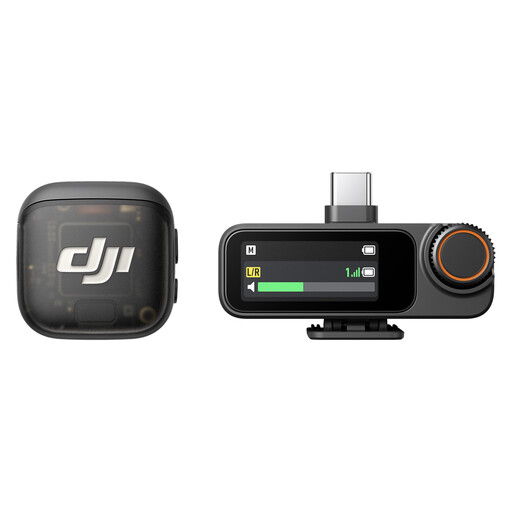
Why this choice suits this profile : This compact format is designed for solo creators who switch between smartphones, cameras and DJI devices for vlogs, reports or interviews on the move.
The USB-C receiver and internal 32 bit float recording provide a backup when wireless transmission is disrupted, provided the device is configured correctly.
Up to four transmitters per receiver, two levels of noise reduction, three voice modes and advertised battery life of up to 28 hours.
We have put together a complete, real-time selection of products that meet these demanding selection criteria, as well as European safety standards.
To avoid any unpleasant surprises, carry out these checks before every session:
For interviews conducted in France, inform the people being recorded and obtain their consent when required. The applicable rules may vary depending on the situation and how the recording is intended to be shared.
The method depends on the connector used by the phone. A system such as the DJI Mic 3 with one transmitter and one receiver uses a USB-C adaptor supplied in the box. Connect the receiver, switch on the transmitter, then check in the video app that the external audio source has been selected. On some iPhones, an adaptor suitable for the model may be required.
This depends on the number of charge cycles, storage conditions, exposure to moisture and the condition of the built-in battery. To protect your equipment, avoid extreme temperatures, do not force hinges or clips, and store the headphones in their case after use. A gradual reduction in battery life is generally caused by battery wear.
This feature can be useful in certain environments, but it cannot replace good microphone placement or a wind muff. For an outdoor vlog, choose a system offering several levels of noise reduction, gain adjustment and, where necessary, internal backup recording. The result will also depend on your editing software and filming location.