
Livraison le jour même ou le lendemain

Qualité garantie

Débloquez vos offres de bienvenue: Livraison GRATUITE | Jusqu'à -80 % | 30 jours d'essai gratuits à JoyPlus
Téléchargez l'application
A wireless 6-button mouse can make navigation, tab switching and access to certain work shortcuts much smoother. But not all models are created equal when it comes to how you'll use them. Whether you're looking at battery-powered versions, rechargeable models or connections via Bluetooth or 2.4 GHz, a few simple checks are all it takes to avoid a purchase you'll regret.
A mouse advertised as having "6 buttons" typically comes with two main buttons, a scroll wheel, a sensitivity adjustment button and two side controls. That doesn't necessarily mean every button is programmable.
For office work, the side buttons are most often used to go back to the previous page or forward in your browser. If you need custom shortcuts for a particular piece of software, check whether a configuration utility is available and whether it's compatible with your system.
A standard wireless mouse runs on batteries. It's ready to go quickly, but you'll need to remember to replace them and dispose of them at an appropriate collection point.
A rechargeable Bluetooth mouse has a built-in battery and charges via a cable. It saves you from buying disposable batteries on a regular basis, but its battery life varies depending on how often you use it and how well it manages standby. Also check whether the cable is included and whether the mouse can still be used while it's charging.
The DPI count alone isn't enough to judge how comfortable the mouse will feel to move. A mouse with adjustable sensitivity lets you adapt the pointer speed to your screen size and the task at hand. For office work, settings like 800, 1,200 and 1,600 DPI already cover most needs.
The surface you're working on also matters. An optical or laser sensor can behave differently on a glossy desk, a textured table or a glass surface. For consistent tracking, it's best to use a mouse mat.
A 2.4 GHz mouse usually works with a small USB receiver. Setup is instant and often requires no drivers at all. This option works well for computers that still have a free USB-A port.
Bluetooth saves you from using up a USB port, which can make a real difference on a laptop or tablet. However, you'll need to check which version your device supports and follow the pairing process. Some dual-connection models even let you switch between devices.
A mouse described as compatible with Windows and Mac guarantees general compatibility, but certain features may vary from one system to another. The main buttons and scroll wheel are normally recognised automatically. Advanced options, such as customising the controls, may depend on software that isn't available on every platform.
For a work computer, also think about how many USB ports you actually have free, especially if a keyboard, external drive or adapter is already plugged in.
An ergonomic wireless mouse should suit the size of your hand and the way you hold it. A compact model is easy to carry between home, university and the office, while a larger shape will often be more comfortable during long sessions.
A silent mouse keeps clicking noise to a minimum in a library, shared space or during a video call. If the same workstation is used by several people, an ambidextrous mouse offers more freedom, as it works just as well for right-handed and left-handed users.
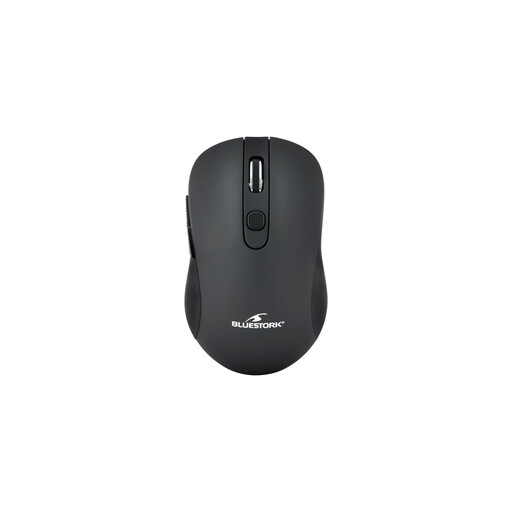
Why this choice suits this profile: With its nano USB receiver, this model is ideal for equipping yourself on a budget, adding a mouse to the family computer or simply setting up a remote-working station.
The three DPI levels are clearly stated and the 2.4 GHz connection works straight away, with no driver installation required.
Six buttons, 800/1,200/1,600 DPI settings, laser sensor and compatibility with Windows and Mac.
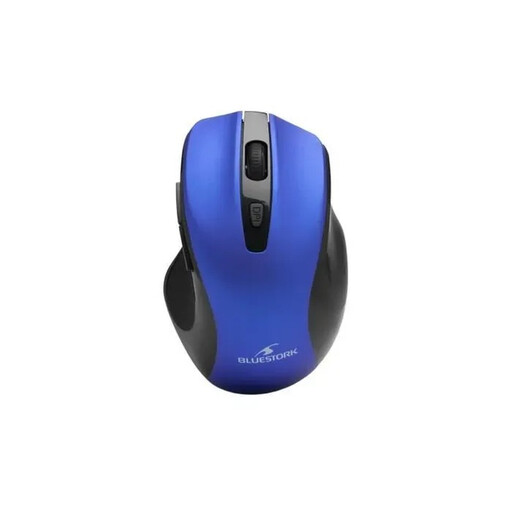
Why this choice suits this profile: Its dual connection and rechargeable battery will appeal to those who regularly switch between computers or want to do away with disposable batteries.
The product page mentions Bluetooth and 2.4 GHz, as well as a rechargeable battery. So you can go without the receiver or favour the USB connection depending on the situation.
Six buttons, three DPI levels, silent clicks, ambidextrous shape and the ability to switch between three devices.
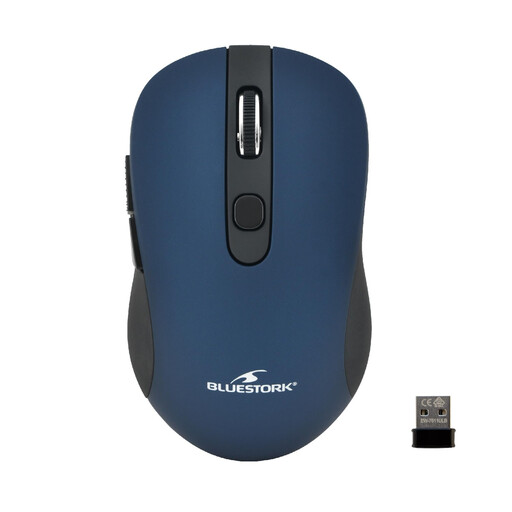
Why this choice suits this profile: This model is aimed at those who frequently use the side buttons for navigation and prefer a dedicated mouse for their workstation.
The product page specifies the connection type, sensitivity levels and battery power. That makes it much easier to anticipate everyday use.
Nano USB receiver, six buttons, laser sensor, adjustable DPI and compatibility with Windows and Mac.
In most cases, yes. Models equipped with a nano USB receiver are generally recognised automatically by Windows and macOS. The essential functions are then available straight away. Advanced customisation, where offered, may require installing dedicated software.
Bluetooth frees up a USB port and is particularly handy with a compatible laptop. 2.4 GHz offers instant setup thanks to a USB receiver. On a desktop computer, both options are generally on a par. If you use several devices, a dual-mode mouse gives you more flexibility.
It all depends on how often you charge it and the lifespan of the built-in battery. A battery-powered mouse means buying new batteries regularly, whereas a rechargeable model runs on electricity and its cable. In both cases, switching the mouse off or letting it go into standby when not in use helps keep power consumption down.