
Livraison le jour même ou le lendemain

Qualité garantie

Débloquez vos offres de bienvenue: Livraison GRATUITE | Jusqu'à -80 % | 30 jours d'essai gratuits à JoyPlus
Téléchargez l'application
A wired headset with microphone can be just as useful for gaming as it is for remote working, following online courses, listening to music or joining a video call. Yet some purchases fall short: incompatible connector, poorly placed microphone, headband that's too tight or a fragile cable.
Before comparing models, it's worth separating the genuinely useful features from those that are mainly there to catch your eye.
A RGB gaming headset easily catches the eye, but the lighting effects say nothing about comfort or sound quality. They can also require a second USB connection, while the audio travels through a 3.5 mm jack. So check the connections needed before placing your order.
A microphone described as noise-cancelling or featuring noise reduction can reduce the capture of certain ambient sounds, depending on its design and the environment. It will never replace a quiet room, positioning a few centimetres from your mouth, or the audio settings in your video conferencing software.
A 3.5 mm headset fitted with a four-pole connector can work with a laptop, console, tablet or compatible phone. However, a desktop computer with two separate jacks for audio and microphone may need a splitter adapter. A USB headset generally works with a computer that has a USB-A port, but it won't necessarily be compatible with all consoles and phones.
Start by identifying the device you'll mainly use the headset with:
A headset advertised as multi-platform doesn't necessarily offer the same controls on every device. Volume adjustment or microphone muting may vary depending on the console or operating system.
For calls and video conferences, a boom microphone is generally easier to position than one built into the cable. A detachable boom is particularly handy if you also use the headset for watching videos or listening to music.
Here are the points to examine:
When choosing a comfortable headset for remote working, weight, the pressure from the headband and the material of the ear cushions matter far more than the look. On-ear models rest on your ears and are often lighter. Over-ear models surround them and can provide a better sense of isolation, but you also need to consider their weight and the heat they may generate.
A foldable headset is practical for travel. Detachable cables also make storage easier and reduce strain during transport. For long sessions, take regular breaks and keep the volume moderate to limit listening fatigue.
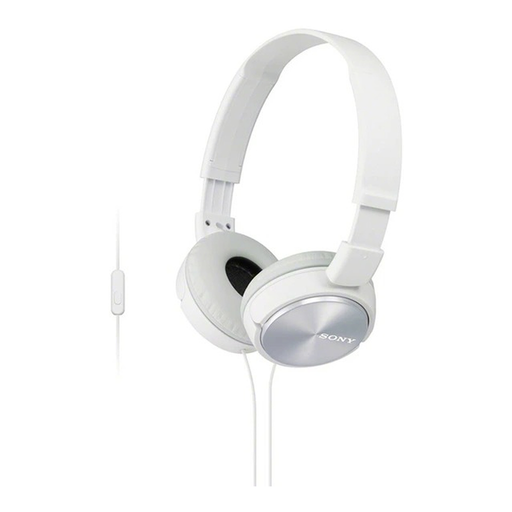
Why this choice suits this profile: At 128 g, with a 3.5 mm jack and a microphone built into the cable, this lightweight model is ideal for calls, music and everyday travel.
The product page clearly states the presence of the microphone and the 3.5 mm connection — you can't accidentally choose a headset without a mic.
Foldable design, 30 mm drivers, one-button control and 1.2 m cable.
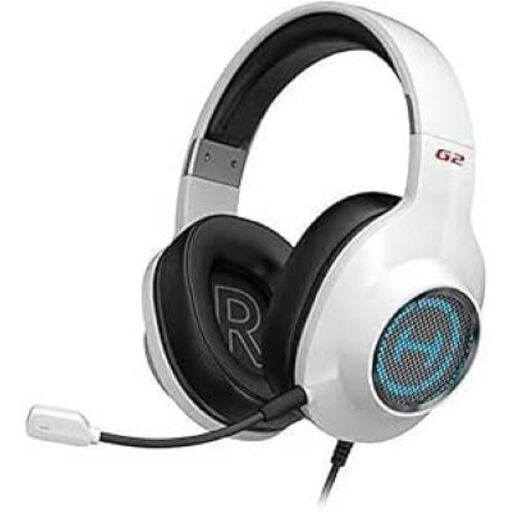
Why this choice suits this profile: This USB headset is aimed at PC and PS4 gamers who want software controls, a detachable microphone and RGB lighting.
The stated compatibility covers PC, PS4 and Mac, but not Xbox — a detail that prevents pairing it with the wrong device.
50 mm drivers, detachable microphone with advertised noise reduction and software-controlled settings.
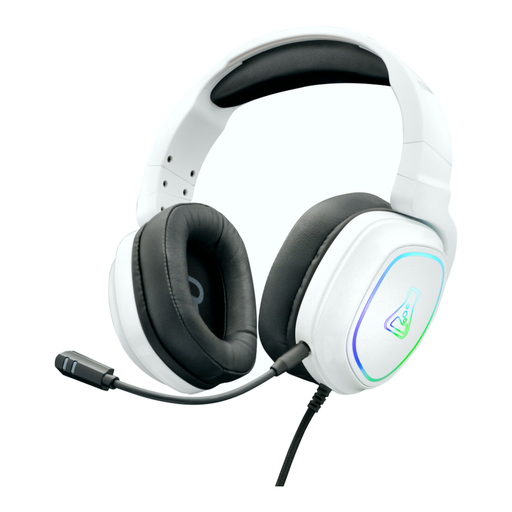
Why this choice suits this profile: Its over-ear design, padded headband and broad compatibility make it suitable for gamers moving between PC, consoles and mobile devices.
The 3.5 mm jack is stated as compatible with PC, PS4, PS5, Xbox One, Nintendo Switch, smartphones, tablets and laptops; USB is reserved for RGB lighting.
Flexible, detachable microphone, in-line controls, memory foam ear cushions and stated weight of 275 g.
We've put together a comprehensive, real-time updated selection of products that meet these demanding criteria and European safety standards.
Yes, provided the laptop has a 3.5 mm jack compatible with both audio and microphone, or a suitable USB port for USB models. On some desktop computers, a splitter adapter may be needed when the audio and microphone jacks are separate.
A USB headset often has its own built-in sound card and is configured as a computer audio device. The 3.5 mm headset is more universal and works with many devices, but the quality of the controls and microphone may depend on the jack and hardware used.
It all depends on its design, the cable, how often you use it and how you store it. Avoid pulling on the cable, unplug it by gripping the connector, protect the headset from moisture and clean the ear cushions with a suitable cloth. A two-year warranty, stated on some models, serves as a commercial benchmark, but it doesn't guarantee the same lifespan for everyone.