
Livraison le jour même ou le lendemain

Qualité garantie

Débloquez vos offres de bienvenue: Livraison GRATUITE | Jusqu'à -80 % | 30 jours d'essai gratuits à JoyPlus
Téléchargez l'application
A wired headset with a microphone may seem straightforward to choose: one plug, two earcups and a headband. However, a few technical details can quickly turn a bargain into a disappointing purchase. A poorly positioned microphone, an incompatible connector or an uncomfortable headband can lead to unpleasant surprises after just a few weeks.
This guide is for home workers, students and anyone who uses a computer every day. The aim is to compare the available models without being swayed by promises that are difficult to verify.
A desktop computer may have two separate ports: one for audio output and the other for the microphone. By contrast, newer laptops, tablets and smartphones often use a combined 3.5 mm four-contact socket.
A PC headset with a single plug will therefore not necessarily work directly with a desktop tower that has two separate inputs. Before ordering, check whether you need a dual-jack adapter for your computer.
‘Noise reduction’ can refer to several different things: a closed-back design that reduces external sounds, a microphone that filters out certain background noises or genuine electronic active noise reduction. The result varies depending on the technology used.
For professional calls, pay particular attention to the microphone’s shape, its adjustable position and its compatibility with the device you use. A simple promise of ‘clear sound’ is no substitute for precise technical specifications.
For meetings that run on, a lightweight wired stereo headset with an adjustable headband and soft ear cushions is preferable. A cable that is too short restricts movement at your desk, while an excessively long cable can quickly become cumbersome and tangled.
Weight, the pressure exerted on your ears and the ability to adjust the microphone are therefore just as important as sound quality.
With a dual-jack headset, make sure the adapter properly separates the audio output from the microphone input. The OFFICE AUDIO Hi-Fi Stereo model with adapter included uses a 3.5 mm four-contact plug for devices with a combined socket, as well as an adapter for computers with separate ports.
A plug-and-play USB-A audio headset may be more convenient on a PC with this type of port. It generally has its own audio interface and does not require an additional driver to be installed, according to the product information provided. However, it will be less suitable for smartphones and tablets without a USB-A port.
An adjustable microphone should be easy to bring closer to your mouth without obstructing your face. For calls, dictation or online lessons, this flexibility makes positioning easier and improves voice pickup. Ideally, position the boom slightly to the side of your mouth and reduce the volume before you start listening.
Product descriptions sometimes refer to an integrated microphone, an adjustable boom or noise reduction. These terms describe the headset’s design, but do not guarantee identical quality across all video-conferencing applications.
Before buying a computer headset, check the ports available on:
An analogue 3.5 mm jack model generally requires no software. It can work with several devices, provided they have a compatible socket. The model with dual-jack adapter shown below is advertised as compatible with PCs, laptops, smartphones, tablets and consoles equipped with a suitable port.
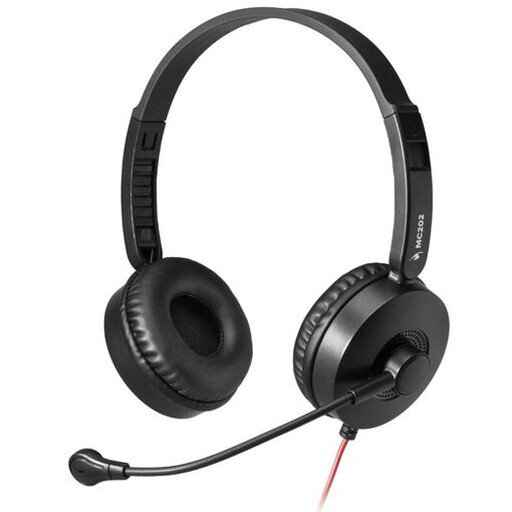
Why this choice suits this profile : Its 3.5 mm connection and included adapter make it easy to switch from a laptop to a PC with two separate sockets.
The dual-jack adapter reduces the risk of buying a headset that cannot be used with a computer whose audio and microphone ports are separate.
3.5 mm four-contact plug, adjustable boom microphone, adjustable headband and soft ear cushions.
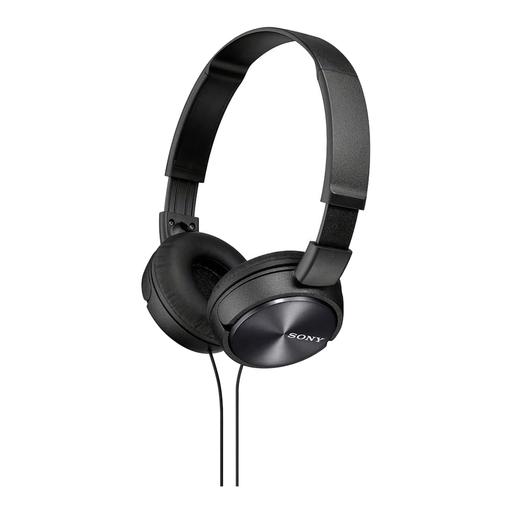
Why this choice suits this profile : Its foldable on-ear design is ideal for people who make calls, listen to music and travel regularly.
Its foldable design keeps it compact, while the remote control with microphone means you do not need to add an accessory for calls on your smartphone.
Standard 3.5 mm wired connection, 1.2 m cable, foldable design and microphone integrated into the controls.
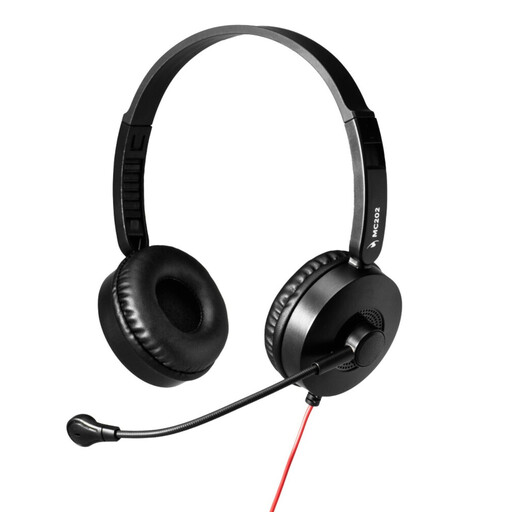
Why this choice suits this profile : Its USB-A plug is ideal for frequent meetings, webinars and online learning on a compatible PC.
The USB-A plug and integrated audio interface help avoid issues caused by a faulty sound card or analogue ports, with no additional driver required according to the product information.
Adjustable boom microphone with advertised noise reduction, plug-and-play USB-A connection, lightweight headband and soft ear cushions.
We have put together a complete, real-time updated selection of products that meet these strict selection criteria and European safety regulations.
For first use, plug in the headset before opening your calling application, then select it as the input and output device in the audio settings. On Windows, macOS or ChromeOS, it may be recognised automatically as soon as it is connected.
A few simple habits can help extend its lifespan:
Models equipped with electronic components or a USB interface should be taken to a collection point for waste electrical and electronic equipment at the end of their service life, rather than thrown away with household rubbish.
Plug the headset connector into the adapter, then insert the two connectors into the corresponding audio and microphone ports. If the computer has a single combined socket, use the 3.5 mm four-contact plug directly, without the adapter.
Yes, provided the device has a compatible headphone socket. Some newer smartphones do not have one, in which case you will need to use a suitable adapter. Also check that the adapter retains microphone functionality.
This depends on how often it is used, the quality of the cable, how it is stored and how it is handled. The most vulnerable areas are the plug, the cable connection and the microphone boom. Storing it without twisting the cable and cleaning it regularly will help limit premature wear.