
Livraison le jour même ou le lendemain

Qualité garantie

Débloquez vos offres de bienvenue: Livraison GRATUITE | Jusqu'à -80 % | 30 jours d'essai gratuits à JoyPlus
Téléchargez l'application
A wired headset with microphone can be used for working from home, VoIP calls, online lessons, listening to music or gaming. However, some purchases fall short because the connectivity has not been checked properly, the microphone is awkward to use or the headband is uncomfortable.
Before comparing models, start by reviewing your devices and how long you expect to use the headset for. A wired PC headset used for a few calls a week will not have the same requirements as a wired gaming headset worn for several hours every day.
A 3.5 mm jack headset may have either a combined four-contact plug or two separate plugs: one for audio and one for the microphone. The Logitech H111, for example, has two separate 3.5 mm plugs. It is therefore suitable for computers with separate ports, although an adaptor may be essential for some laptops.
By contrast, a USB headset with microphone generally has its own built-in audio interface. It connects directly to a USB-A port, but may not be compatible with a smartphone, tablet or console without this connector.
Labels such as “Hi-Fi”, “noise reduction” or “immersive” are not enough to assess a product. Instead, look at the specific details: microphone type, driver diameter, cable length, weight and whether controls are included.
Passive isolation provided by ear cushions that surround the ear should not be confused with active noise cancellation. It can reduce certain ambient sounds, but its effectiveness depends on both the shape of the cushions and your surroundings.
A lightweight headset can be easy to forget about at your desk, while a model that is too tight or has poorly ventilated cushions will quickly become uncomfortable during a long video call. Check the weight, headband adjustment and wearing style: on-ear, sitting on the ears, or over-ear, completely surrounding them.
The cable also deserves your attention. Avoid pulling it to unplug the headset, keep it away from the castors of your chair and store it without bending it at an overly sharp angle.
The specification sheet does not guarantee that every control will work with every device. Volume adjustment and the microphone mute button may depend on the system being used.
For calls and video conferencing, choose an adjustable or flexible microphone positioned a few centimetres from your mouth. A microphone built into the cable can be suitable for mobile calls, but it is generally less straightforward to position than a boom microphone.
A volume or mute control built directly into the headset makes meetings and gaming sessions easier. Also check whether the microphone is detachable. This makes storage easier, but small parts should be kept out of reach of young children.
A lightweight wired stereo headset is suitable for frequent calls and everyday listening. For extended use, look for an adjustable headband, soft cushions and moderate pressure around the ears.
A foldable model is easier to carry in a bag. That does not necessarily mean it will withstand every strain, however: store it in a dry place and avoid putting pressure on the hinges.
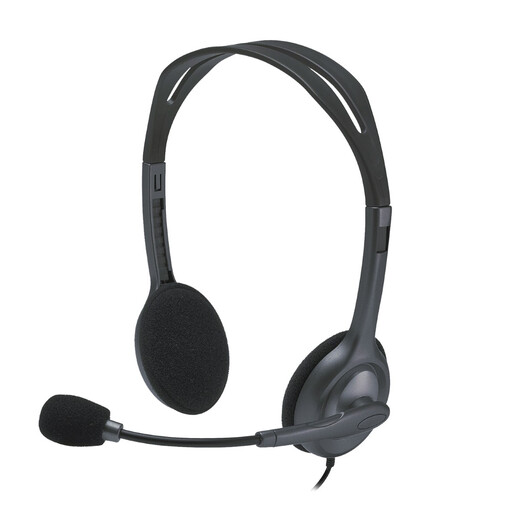
Why this choice suits this user profile : This headset offers a straightforward wired connection, a 180° adjustable microphone and a 2.35 m cable, making it suitable for calls, listening to music and office use.
The audio and microphone plugs are clearly separated, reducing the risk of confusion on a PC with separate ports.
Stated weight of 74 g, frequency response from 20 to 20,000 Hz, and compatibility with Windows and macOS.
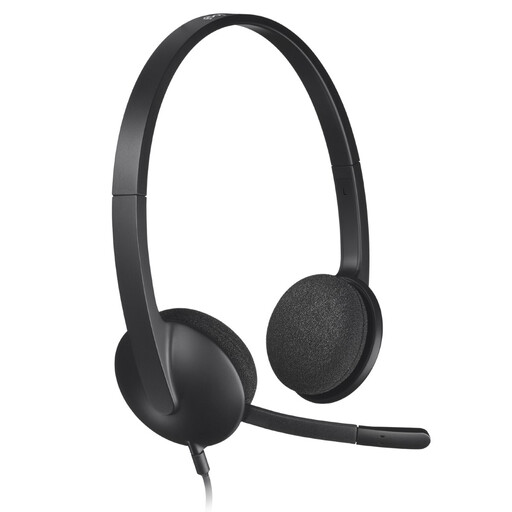
Why this choice suits this user profile : Its USB-A connection and microphone designed to reduce ambient noise simplify meetings, remote lessons and computer calls.
It avoids confusion between audio input and output through a single USB interface, with no driver installation required according to the product details.
1.8 m cable, stereo sound and adjustable headband with swivelling cushions.
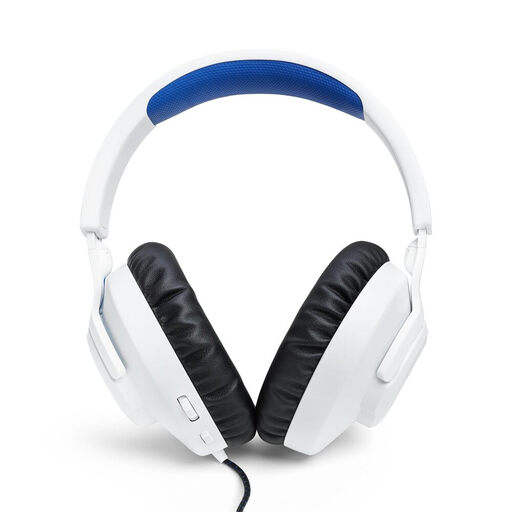
Why this choice suits this user profile : Its over-ear design, 40 mm drivers and compatibility with PS5, PS4, PC and Nintendo Switch make it a versatile model.
The product details specify the four-contact 3.5 mm jack connection, volume control and microphone mute function from the earcup.
Detachable microphone, stated weight of approximately 220 g and memory foam cushions.
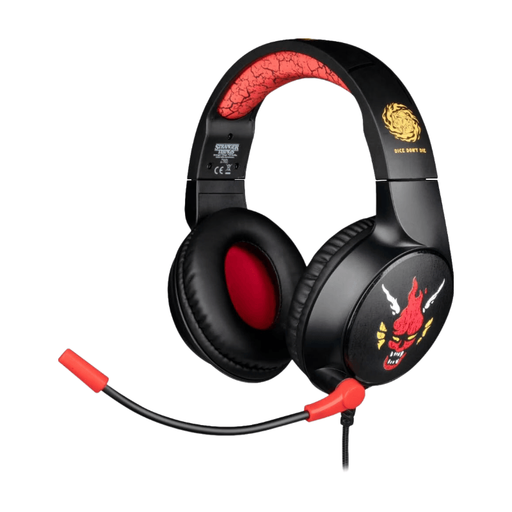
Why this choice suits this user profile : Its over-ear design and 3.5 mm plug are suitable for gamers who want to switch easily between a PC and a compatible controller.
The description mentions a plug-and-play connection and an over-ear design, reducing the need for additional accessories.
1.5 m cable, built-in microphone and soft covering, as stated in the product details.
We have put together a complete, real-time updated list of products that meet these strict selection criteria and European safety regulations.
Yes, provided that the computer has a compatible port. A combined 3.5 mm plug will generally work with devices equipped with a single socket. If the computer has two separate ports, choose a dual-jack model or use the appropriate adaptor.
The USB headset with microphone is convenient for PC and Mac, as its connection is often recognised automatically. The 3.5 mm jack offers greater versatility with smartphones, tablets and controllers. The right choice therefore mainly depends on the devices you use.
This depends on how often it is used, how it is handled and how it is stored. To protect the cable and connectors, always grip the plug when unplugging the headset, avoid moisture and clean the cushions with a soft cloth. Listening at a moderate volume and taking regular breaks will also reduce the strain associated with prolonged use.