Whether for remote work, intense gaming sessions, or simply listening to music, a good wired headset is an essential tool. Unlike wireless models, it offers a stable, latency-free connection and, most importantly, it never runs out of battery. However, the market is flooded with marketing promises, and it's easy to make the wrong choice. To help you cut through the noise, let's review the pitfalls to avoid and the key criteria to ensure you won't regret your purchase.
The 3 Pitfalls to Avoid When Buying a Headset
Packaging and product descriptions can be misleading. Here are three red flags to watch out for to avoid throwing your money away.
- The "Universal Compatibility" Myth: Many headsets claim to be compatible with PCs, consoles, and mobile devices. In reality, many come with only a single 4-pole 3.5mm jack, which is perfect for console controllers and smartphones. If your desktop PC has separate mic and audio ports, you'll need a Y-splitter adapter, which is rarely included in the box.
- The "High-Sensitivity" Mic That Picks Up Everything: A microphone is supposed to capture your voice, not your keyboard clicks or the neighbor's dog. A poorly designed mic, without a directional boom or noise isolation, will turn your conversations into a nightmare for the people you're talking to, whether in a meeting or mid-game.
- Comfort That Vanishes After an Hour: A headset might feel comfortable for the first few minutes. But an overly rigid headband, low-quality leatherette earcups that flake, or excessive weight can quickly turn a long gaming or work session into a torture session.
Key Criteria for Choosing Your Headset
To avoid these nasty surprises, focus on a few key technical points.
Connectivity: 3.5mm Jack, USB, and Adapters
Connectivity is the first thing to check. The majority of wired headsets use a 3.5mm jack.
- Single Jack (4-pole): This is the standard for console controllers (wired PS5 headset, Xbox), portable consoles, smartphones, and modern laptops. It handles both audio and the microphone.
- Dual Jack (3-pole): Some PCs, especially desktop towers, have two separate ports: a green one for audio and a pink one for the mic. If this is your setup, make sure the headset comes with a Y-splitter adapter; otherwise, you'll have to buy one separately. This is a crucial detail if you're looking for a PC headset for a tower.
The Microphone: Boom Arm or Integrated Mic?
The quality of your voice depends heavily on the type of microphone.
- Boom Microphone: This is the most common option on a wired gaming headset. The boom, often flexible, allows you to position the mic close to your mouth for clear voice capture and background noise reduction. Some models offer the convenient "flip-to-mute" feature: just flip the boom up to mute the mic.
- In-line Microphone: More discreet, this type is common on music- or travel-oriented headsets. Its performance is often inferior to a boom mic, but it gets the job done for occasional calls.
Comfort and Design: Over-Ear, On-Ear, and Materials
Comfort is subjective, but certain objective criteria can guide you.
- Circumaural (Over-ear): The earcups completely enclose the ear. This design offers better passive noise isolation (it naturally blocks out external sounds) and is often considered more comfortable for extended use.
- Supra-aural (On-ear): The earcups rest on the ears. These headsets are generally lighter and more compact, making them a good choice for a foldable headset intended for use on the go.
- Materials: Fabric or velour earcups are preferable for long sessions as they prevent overheating. Leatherette offers better isolation but tends to get warmer.
Recommended Wired Headset Picks
Here are a few options tailored for specific uses, selected based on the criteria we've just covered.
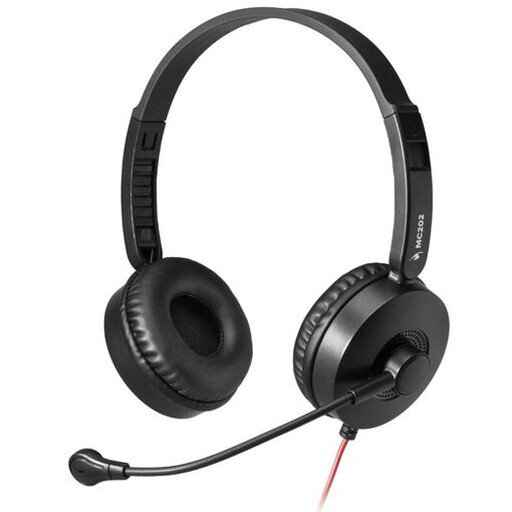
IDEAL FOR: THE VERSATILE REMOTE WORKER
Why we chose it: A simple and incredibly effective solution for video conferences and office work. Its lightweight design and adjustable boom mic are perfect for daily professional use.
How it avoids the pitfall
It comes with the dual jack adapter. No more compatibility headaches with desktop PCs, and no need for a separate purchase.
Key advantage
Plug-and-play on a desktop PC right out of the box. Its adjustable boom ensures your voice will always be clear and intelligible in meetings.
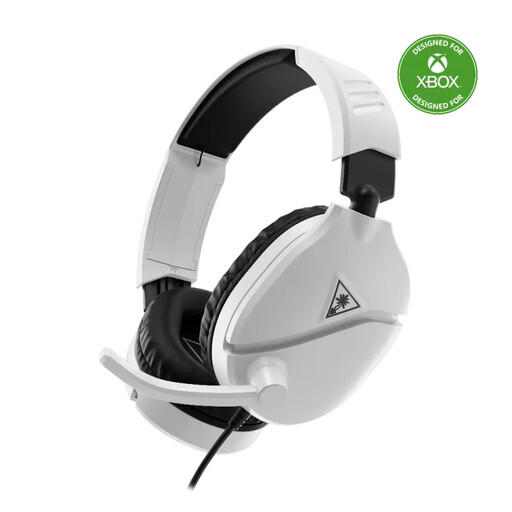
IDEAL FOR: THE MULTI-PLATFORM GAMER
Why we chose it: Built for gaming, this headset combines a lightweight design with comfort, even during marathon sessions. Its strength? Total compatibility (Xbox, PS5, Switch, PC), making it a Swiss Army knife for gamers who juggle multiple machines.
How it avoids the pitfall
Its high-sensitivity mic mutes with a simple flip-up gesture (the famous "flip-to-mute" feature). This guarantees crystal-clear communication without subjecting your teammates to your keyboard clicks.
Key advantage
The "flip-to-mute" function and the comfort of its leatherette earcups make it a powerful ally for long gaming sessions.
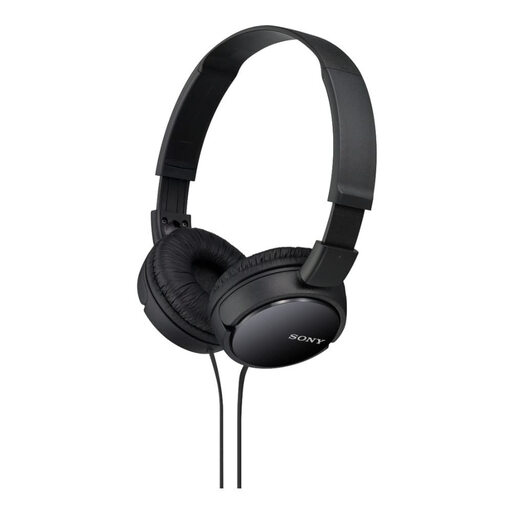
IDEAL FOR: LISTENING ON THE GO
Why we chose it: Perfect for those who prioritize portability and good sound quality on the move. Lightweight and foldable, it slips easily into any bag. The Sony audio signature ensures a balanced sound, ideal for music.
How it avoids the pitfall
With its on-ear format and foldable design, it's a true on-the-go companion. It's nothing like bulky gaming headsets that are often impossible to fit in a backpack.
Key advantage
The perfect balance between a quality wired audio headset for music and the convenience of an in-line mic for taking calls. All in an ultra-compact package.
Looking for other options?
We've selected a full range of products that meet our standards for quality and performance.
Frequently Asked Questions
My PC doesn't recognize my headset. What should I do?
This is a very common issue. Here are the points to check:
- Connections: If your PC has two ports, make sure everything is in the right place (pink for the mic, green for audio).
- The Y-Splitter Adapter: If your headset has a single jack and your PC has two inputs, this adapter is non-negotiable.
- System Settings: Go to the audio settings in Windows or macOS and check that your headset is set as the default input (microphone) and output (audio) device.
How do I maintain my headset's ear pads to extend their lifespan?
It all depends on the material.
- Leatherette: A regular wipe with a soft, dry cloth is enough to remove sweat and oils. Above all, avoid moisture and harsh cleaning products.
- Fabric or velour: A soft brush can be used to remove dust. If they are removable, consult the manufacturer's instructions for a deep clean (sometimes hand washing is possible).
Is a wired gaming headset compatible with both PS5 and Xbox?
Yes, most of the time. If the wired gaming headset uses a 3.5mm jack, it plugs directly into the PS5 controller as well as the Xbox controller. Game audio and voice chat will work seamlessly on both consoles. It's the ideal solution for players who switch between the two ecosystems.