
Livraison le jour même ou le lendemain

Qualité garantie

Débloquez vos offres de bienvenue: Livraison GRATUITE | Jusqu'à -80 % | 30 jours d'essai gratuits à JoyPlus
Téléchargez l'application
Headphones or earphones shouldn’t be chosen based solely on their looks or a promise of “immersive sound” on the packaging. With headphone sockets disappearing from many smartphones, microphones that aren’t always practical and battery life measured under very specific conditions, small details can turn an appealing purchase into a disappointing expense.
Before comparing models, it’s worth checking three things: compatibility with your devices, how comfortable they really are over time and which features will genuinely be useful in your day-to-day life.
Wired headphones with a 3.5 mm jack work with many computers, consoles and smartphones that still have this socket. However, newer phones often rely on USB-C. In that case, you may need an adapter, and the microphone or controls might not be compatible.
USB-C earphones transmit a digital signal and may have their own audio converter. Even so, check that your phone, tablet or computer supports USB audio output.
A wide frequency range, certification or speaker size isn’t enough to predict how good a pair will sound. The result also depends on noise isolation, the shape of the ear cushions, the fit and the audio source.
On-ear headphones rest on your ears and are generally lightweight, while over-ear models completely enclose them. In-ear earphones are compact, but how securely they fit depends on the shape of the tips and your ears.
For working from home, online classes or calls, headphones with a microphone are about more than simply having a mic. Its position, how easy the controls are to use and compatibility with your device all matter just as much.
Bluetooth headphones offer greater freedom, but you’ll need to keep the battery charged. Wired headphones don’t have this limitation, which can be useful at a desk or during long listening sessions.
For headphones for PC and smartphone, check the connector type, cable length and whether a dual-jack adapter is included. On some desktop computers, the audio output and microphone input are separate.
When assessing Bluetooth headphones, look at the Bluetooth version, connection stability, whether they support multipoint and the stated battery life. Multipoint lets you switch between a computer and a phone without having to pair them again each time.
Foldable headphones are easy to slip into a bag, but the hinges should move without needing to be forced. Weight, headband pressure and the material of the ear cushions often have more impact on comfort than the design.
For travelling, a lightweight pair may be preferable. At home, for longer listening sessions, wider ear cushions generally spread the pressure more evenly. Passive noise isolation also helps reduce some outside noise without using any battery.
Active noise cancellation uses microphones and electronic processing to reduce certain background noises. It can be very useful on public transport or in a shared office, but should be switched off in situations where you need to stay aware of your surroundings.
Where the information is available, compare battery life with and without ANC. For wired headphones, focus instead on cable durability, whether there’s an inline remote and whether a suitable socket is available.
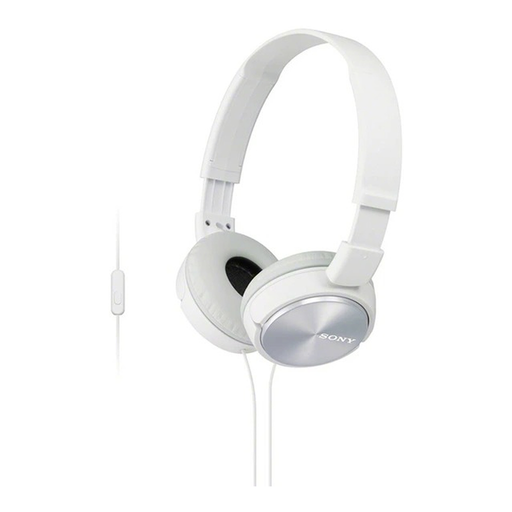
Why it suits this type of user : These wired on-ear headphones keep things simple, with a 3.5 mm jack, a weight of 128 g and a foldable design. They’re suitable for music, videos and calls on compatible devices.
The wired connection means no charging or Bluetooth settings to worry about. You’ll need a 3.5 mm socket or a compatible adapter, though.
30 mm drivers, 1.2 m cable, built-in microphone and inline controls.
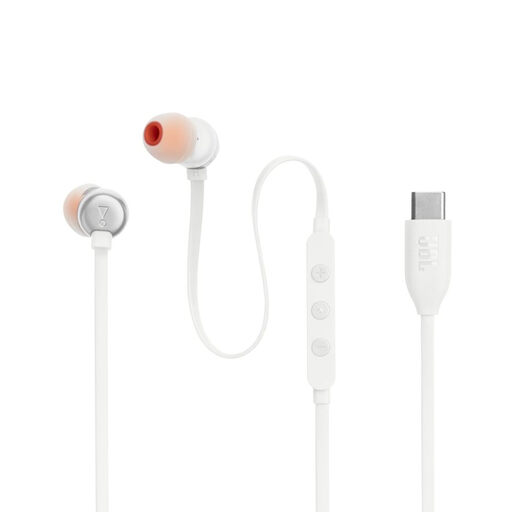
Why they suit this type of user : These USB-C earphones are designed for people with smartphones, tablets and computers that have this connection. They’re a practical choice for journeys and calls.
The product listing mentions a built-in converter and specifies that the source device must support USB audio.
Microphone, three-button remote, 1.1 m cable and Bass, Standard and Treble EQ settings.
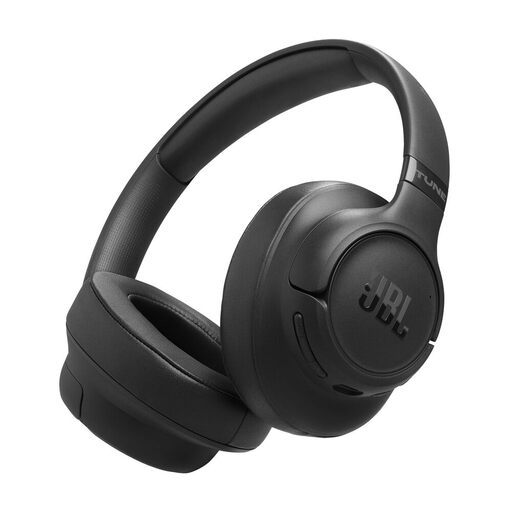
Why they suit this type of user : These over-ear Bluetooth headphones are for anyone looking for wireless listening, active noise cancellation and a foldable design for travelling.
Stated battery life is listed separately with ANC switched on. You can turn this feature off depending on your surroundings and needs.
Bluetooth, multipoint not specified on this product listing, 40 mm dynamic drivers, USB-C and up to 45 hours of stated battery life with ANC.
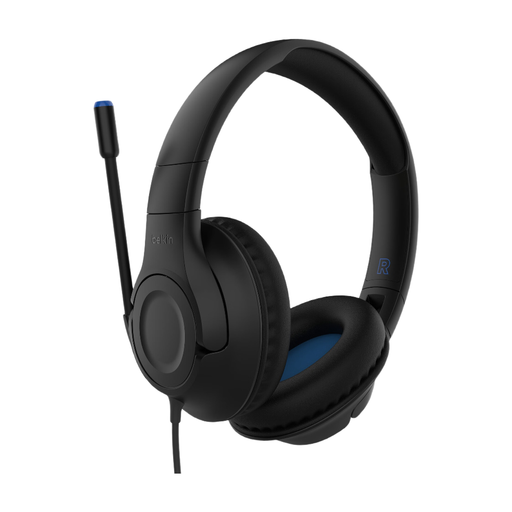
Why it suits this type of user : These children’s headphones are a good choice for families looking for a foldable wired model with a detachable microphone and a volume limiter rated at 85 dB.
The volume limit helps reduce the risk of setting the sound too high, but adult supervision and regular breaks are still important.
USB-C or 3.5 mm jack connection, depending on the cable used, foldable headband, detachable microphone and audio sharing.
We’ve put together a comprehensive, regularly updated selection of products that meet these exacting criteria and comply with European safety regulations.
Bluetooth is a good choice if you want to do away with cables and move around freely. Wired headphones don’t need charging and reduce audio latency, which can make a difference during calls or some computer activities. Just check that your device has a compatible headphone socket or USB-C port.
It depends on the quality of the hinges, cable and ear cushions, as well as how you use them. Fold and store your headphones without forcing the hinges, unplug them by holding the connector and clean the surfaces with a soft cloth. On Bluetooth models, the built-in battery can become the main limiting factor after many charging cycles.
Yes. ANC uses microphones and electronic processing, so battery life is generally shorter than when listening without this feature. To charge less often, switch it on only when it makes a real difference, such as on a train or in a noisy workspace.