
Livraison le jour même ou le lendemain

Qualité garantie

Débloquez vos offres de bienvenue: Livraison GRATUITE | Jusqu'à -80 % | 30 jours d'essai gratuits à JoyPlus
Téléchargez l'application
A wired headphone lets you listen to music, join a meeting, game online or watch videos without worrying about charging or pairing. Yet some purchases end in disappointment: an incompatible connector, a microphone that won't work with your computer, or a headband that becomes uncomfortable after a few hours.
Before comparing prices, it's worth sorting the genuinely useful features from the vaguer marketing claims.
A 3.5mm jack headphone isn't necessarily compatible with every device or every use. A console, smartphone, laptop and desktop PC can all use different configurations.
A four-contact connector, usually called TRRS, can carry both sound and microphone signal through a single socket. Conversely, some computers have two separate ports: one for audio output and another for microphone input. In that case, you'll need a dual-jack adaptor.
A specification like "20 Hz to 20 kHz" is a theoretical range. On its own, it doesn't tell you about sound quality, comfort or the balance between bass and treble. For music listening, look instead at the transducer type, whether the design is closed or open, and whether there's an in-line remote on the cable.
A headphone with a microphone can work well for calls, but the mic's position, flexibility and mute system make all the difference. For online gaming, a flip-up boom arm with a mute function is often more practical than a simple in-line microphone.
Weight, cushion shape and the pressure from the headband also play a big role. A lightweight, comfortable headphone will be far more pleasant for remote working or long study sessions.
For a wired headphone for PC, start by checking the available ports and cable length. A 1.2m cable works well with a smartphone or tablet, while a length of 2m or more gives you more freedom at a computer.
For a headphone compatible with PS5, Xbox and Switch, make sure the product listing confirms it can connect to the controller or console. Models with a 3.5mm jack are generally straightforward to use with consoles, but chat functions may depend on the controller and system settings.
A wired stereo headphone without a microphone is fine for music, videos and audiobooks. For calls, choose a model with a built-in mic or an adjustable boom microphone.
The Logitech H111, for example, uses two separate jack plugs for audio and microphone on a computer. In contrast, some gaming headsets connect via a combined socket and feature a flip-up mic with automatic mute.
On-ear headphones rest on your ears and are often more compact. Over-ear models fully enclose your ears and can block out more ambient noise, but they generally take up more space.
A foldable headphone, like some Sony models, slips easily into a bag. To protect the cable, always unplug the connector by holding the plug itself, avoid bending it at sharp angles, and store the headphone in a dry place.
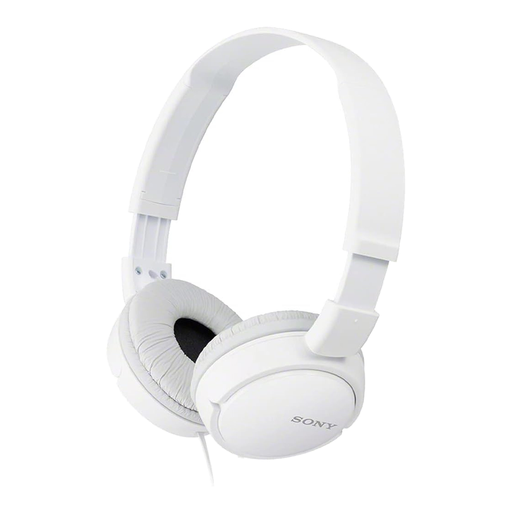
Why this suits this profile: This headphone is ideal for everyday listening on a smartphone, tablet or computer with a 3.5mm output. Its foldable design makes it easy to carry, and its stated weight of 120g keeps it unobtrusive.
The listing clearly states it's a wired model with a 1.2m cable and no microphone. So you won't accidentally buy it for calls that need a mic.
30mm drivers, closed-back design, 3.5mm jack cable and foldable construction.
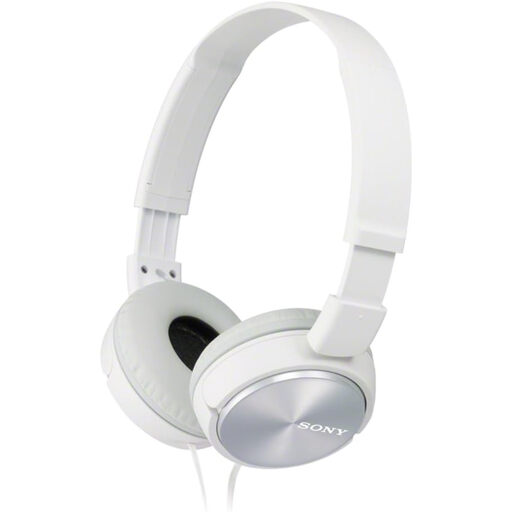
Why this suits this profile: Music lovers who want detailed specs get a stated frequency response of 10 to 24,000 Hz, a sensitivity of 98 dB and 30mm neodymium drivers.
The listing clearly states it's a model without a microphone. So it's fine for listening, but not for meetings without an extra accessory.
In-line volume control, passive noise isolation, 1.2m cable and foldable design.
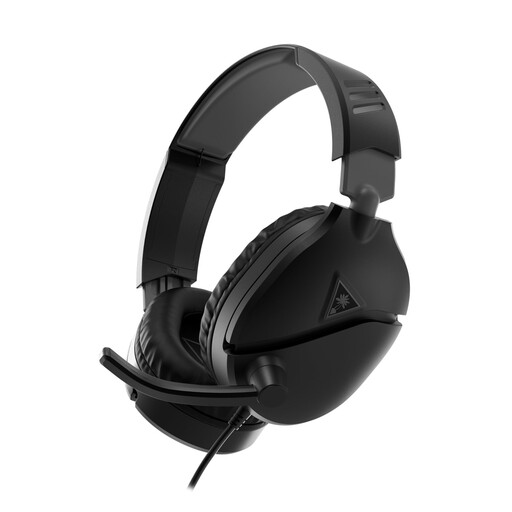
Why this suits this profile: This wired gaming headset is aimed at players on PC, PS5, Xbox, Switch and mobile devices. Its flip-up boom microphone, volume wheel and PC splitter adaptor meet the needs of those who communicate regularly.
The 2m cable and PC splitter reduce the risk of connection errors on computers with separate ports. The mic automatically mutes when flipped up.
40mm speakers, 3.5mm jack connection, flip-up microphone and leatherette ear cushions.
We've put together a comprehensive, real-time selection of products that meet these demanding criteria and European safety standards.
Not always. If your smartphone doesn't have a 3.5mm output, you'll need an adaptor compatible with its USB-C or Lightning port. Also check that the adaptor supports the microphone if you plan to make calls.
It depends on the durability of the headband, the ear cushions and, most importantly, the cable. Avoid pulling on the wire, coiling it too tightly or leaving the headphone under heavy objects. Storing it in a dry place and cleaning it regularly with a soft cloth will also help extend its lifespan.
It doesn't need a battery or charging, so you avoid replacing a worn-out battery or buying charging accessories. However, the cable can wear out over time and limits your freedom of movement. The choice really comes down to your device, your environment and your priority: simplicity or mobility.