
Livraison le jour même ou le lendemain

Qualité garantie

Débloquez vos offres de bienvenue: Livraison GRATUITE | Jusqu'à -80 % | 30 jours d'essai gratuits à JoyPlus
Téléchargez l'application
Choosing a wired gaming headset might seem straightforward: you plug it in, and you're ready to play. However, the market is flooded with models that make boastful marketing claims, which sometimes hide deal-breaking flaws. Disappointing sound, comfort that vanishes after an hour, or a mic that picks up your keyboard clicks more than your voice… disappointments are common.
My role, as a product expert at Joybuy, is to help you see things more clearly. Let's set aside the marketing jargon and focus on the concrete aspects that make all the difference in daily use. Here are the most common pitfalls and the objective criteria to help you get equipped without making a mistake.
The 3 Pitfalls to Avoid When Buying a Gamer Headset:
To avoid falling into these traps, you just need to focus on a few simple but fundamental technical characteristics.
The 3.5mm jack is the very symbol of simplicity and reliability. It guarantees broad compatibility without having to juggle complex drivers or software.
PS5 headset, Xbox headset, Nintendo Switch headset): Simply plug the headset directly into the controller or the console. Power and audio (game and voice chat) are transmitted through this single cable.PC gamer headset): Most modern PC cases have a single compatible jack. For older setups with separate mic and audio inputs, a simple Y-splitter adapter (often included with headsets designed for PC) will do the trick.A multi-platform headset that relies on this connection ensures you can switch between your devices without any hassle.
Comfort is a non-negotiable criterion for an audio gamer headset. Two elements to watch for:
For online gaming, the microphone's quality is just as crucial as the headphones'. The "flip-to-mute" feature (raising the boom arm to mute the sound) has become a must-have for convenience. It allows you to mute the mic on the fly, intuitively, without fumbling for a switch on the cable. A unidirectional (or cardioid) microphone with ambient noise reduction is also a major asset to ensure your teammates only hear the sound of your voice.
Keeping these criteria in mind, here are a few options that cater to different player profiles.
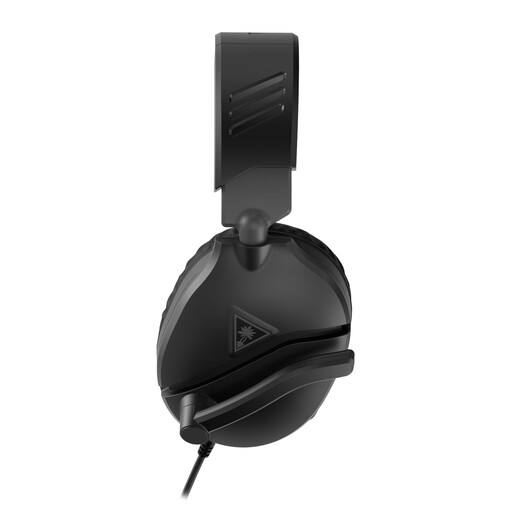
Why we chose it: The Recon 70 is a reliable choice for anyone looking for a simple, effective, and affordable headset. It gets straight to the point with very decent audio quality for gaming, a reliable microphone, and flawless compatibility, making it a great entry-level option for most gamers.
It avoids the false compatibility trap thanks to its 3.5mm jack, which ensures plug-and-play connection on PC, PS5, Xbox, and Switch. Its flip-to-mute mic is a guarantee of simplicity and reliability.
Exemplary multi-platform compatibility. Ultra-convenient flip-to-mute mic. Excellent value for money.
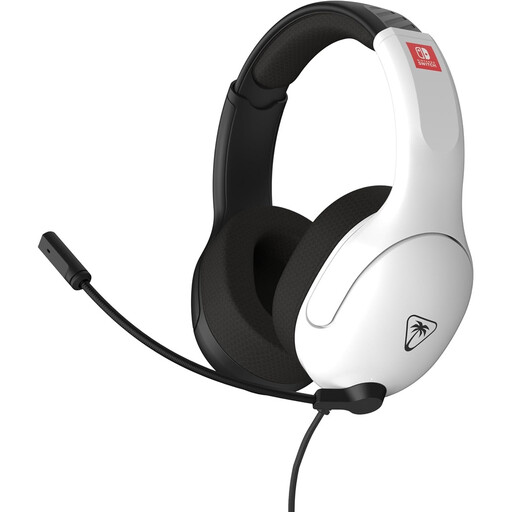
Why we chose it: Designed for gamers who play for hours on end, especially on **Nintendo Switch**. Its feather-light design and breathable fabric earpads make it a prime ally for marathon sessions, where comfort takes priority over everything else.
It directly tackles the discomfort trap. Its jersey fabric ear cushions promote air circulation, preventing the feeling of heat and pressure that leatherette can cause after several hours.
Comfort optimized for long sessions thanks to its light weight and breathable materials. Officially licensed by Nintendo, ensuring perfect integration.
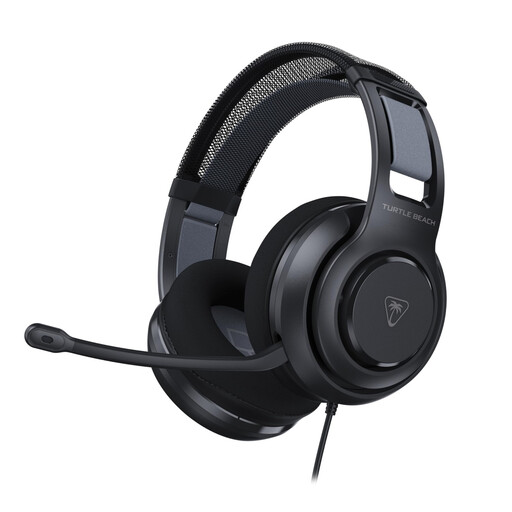
Why we chose it: Aimed at PC gamers seeking a punchier sound for total immersion. Its integrated amplification system provides a richer and more powerful audio experience than entry-level passive models.
It avoids the trap of "flat" or weak sound thanks to its battery-powered amplification. This boosts bass and sound clarity, whether you're on PC or console. The memory foam earpads enhance passive isolation.
Amplified audio for more powerful and detailed sound. Increased comfort with memory foam earpads. High-sensitivity mic with flip-to-mute function.
We have selected a full range of products that meet our criteria for quality and reliability.
Yes, in the vast majority of cases. On consoles like the PS5, Xbox Series X|S, and Nintendo Switch, the 3.5mm jack on the controller or console handles both game audio and the microphone. On PC, if your tower has separate mic and audio ports, you will need a splitter cable, which is very often included with headsets designed for this purpose.
Maintenance is simple. For the earpads, whether they are leatherette or fabric, a soft, dry cloth is enough to regularly wipe away sweat and dust. Absolutely avoid liquids and harsh cleaning products. Finally, coil the cable without twisting it and always pull on the plug to disconnect it, never on the wire.
Yes, it should be adapted to your setup. A length of 1.2m to 1.5m is generally sufficient for plugging into a console controller. For a PC gamer headset, if your tower is under the desk or a bit far away, aim for at least 2m (or plan for an extension cable) so you're not restricted in your movements.