
Livraison le jour même ou le lendemain

Qualité garantie

Débloquez vos offres de bienvenue: Livraison GRATUITE | Jusqu'à -80 % | 30 jours d'essai gratuits à JoyPlus
Téléchargez l'application
Watching over your baby during their nap, keeping an eye on an elderly parent, or simply making sure the cat isn't redecorating the living room in your absence… There are plenty of reasons to want peace of mind at home. An indoor Wi-Fi security camera is the simplest and most effective solution to stay connected to what matters most.
But faced with an overwhelming number of options and often cryptic spec sheets, it's hard to know where to start. This guide is here to give you the keys to an informed choice, with practical advice and a selection of relevant models, all without any unnecessary jargon.
Before we present our selection, here are a few key points to consider to find the model that will precisely meet your expectations.
It's fundamental: a clear image is essential for effective monitoring. Most recent models offer 2K resolution, a real leap forward from the traditional Full HD 1080p. The benefit? The ability to zoom in on the image to distinguish a face or a specific detail.
The other key point is night vision. While infrared (in black and white) remains the standard, colour night vision is a real game-changer. Thanks to more sensitive sensors and sometimes a small fill light, it captures colour images even in near darkness. A decisive advantage for identifying a person or a crucial detail.
Most cameras operate on Wi-Fi. First, check its compatibility with your network. More and more models are compatible with dual-band Wi-Fi (2.4 GHz and 5 GHz). The advantage is a more stable and faster connection, perfect for smooth, lag-free video streaming.
Are you a renter or simply allergic to drills? Then easy, drill-free installation is an essential criterion. The good news is that many cameras can simply be placed on a piece of furniture or attached with strong (but residue-free) adhesives, even to a window pane.
Today, a camera does more than just record. AI motion detection (Artificial Intelligence) sorts between humans, animals, and vehicles. No more false alerts triggered by a passing shadow or a moving curtain!
Some models go further and integrate communication features, like direct video calling that can be activated with a simple button on the camera. This is extremely practical for children or seniors to reach you easily. Finally, to cover an entire room without blind spots, a motorised 360° camera (also called PTZ for Pan-Tilt-Zoom) is the premium choice.
We have selected three models that stand out from the crowd, each meeting very specific needs.

Its standout feature: Its integrated screen and video call function make it a true family video intercom, much more than just a security camera.
Highlights:
Who is it for? Ideal for monitoring the elderly or as a next-generation 2K video baby monitor. Its ultra-simple call function allows children or seniors to contact a loved one without even touching a phone.
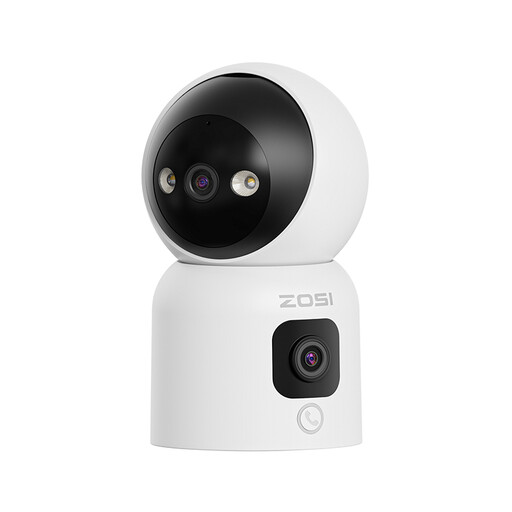
Its standout feature: Its dual lens films from two angles at the same time: a fixed panoramic view and a controllable mobile view. The result: unprecedented coverage.
Highlights:
Who is it for? Perfect for pet owners who want to keep an eye on multiple areas at once, or for families with young children who will love the gesture-activated calling. A truly comprehensive pet monitoring and family security solution.

Its standout feature: Its anti-glare technology, specially designed for filming through glass, eliminates distracting reflections day and night.
Highlights:
Who is it for? The ideal solution for apartment renters or anyone who wants to monitor the outside (a driveway, an entrance, a garden) from inside, without undertaking any installation work. This anti-glare window camera solves a problem that conventional models can't handle.
This selection highlights very specific models. If your criteria are different or if you simply want to explore a wider range of products, many other solutions exist.
1. What's the difference between 2.4 GHz and 5 GHz Wi-Fi for a camera? The 2.4 GHz band has a longer range and penetrates walls better, but its speed is lower and it's more susceptible to interference. The 5 GHz band offers much higher speed and a more stable connection, but its range is shorter. A dual-band camera is the best of both worlds: it automatically connects to the best-performing frequency.
2. SD card storage or cloud subscription: which to choose? Storing on an SD card (usually up to 128 or 256 GB) is the most economical and private solution: your data stays with you. Its weakness: if the camera is stolen or destroyed, so are the recordings. Cloud storage (often via a paid subscription after a trial period) saves your videos on secure servers. They are then accessible from anywhere and safe from any physical incident. The choice therefore depends on your budget and the level of security you're looking for.
3. Is installing an indoor camera complicated? Absolutely not! Almost all indoor Wi-Fi cameras are designed for ultra-simple installation. Generally, you just need to plug it in, download the manufacturer's app on your smartphone, create an account, and then scan a QR code to connect it to your Wi-Fi network. No tools or technical skills are required.