
Livraison le jour même ou le lendemain

Qualité garantie

Débloquez vos offres de bienvenue: Livraison GRATUITE | Jusqu'à -80 % | 30 jours d'essai gratuits à JoyPlus
Téléchargez l'application
Automating your patio lights at dusk, turning on the garden fountain with a simple voice command, or programming your Christmas lights without ever braving the cold: the promise of a WiFi garden socket is certainly appealing. But be warned, the market is flooded with models featuring vague specifications that can quickly turn your dream into a nightmare. To prevent your smart purchase from becoming a source of frustration, here are the pitfalls to avoid.
The two most common mistakes? Being fooled by superficial waterproofing and underestimating compatibility headaches. An inadequate protection rating, and your socket will give up the ghost at the first downpour. A finicky connection, and it becomes a dumb block of plastic, unable to communicate with your network or your voice assistant.
To avoid buying blind, don't rely solely on design or price. Three technical criteria are crucial to guarantee the performance and safety of your setup.
The Ingress Protection (IP) rating is an international standard that assesses a device's resistance to dust and water. For outdoor use, an IP44 rating is the absolute minimum.
A smart outdoor socket is only as smart as its ability to communicate flawlessly with your network.
The ideal model will depend on your habits and your comfort level with technology. To help you see more clearly, here are two typical user profiles.
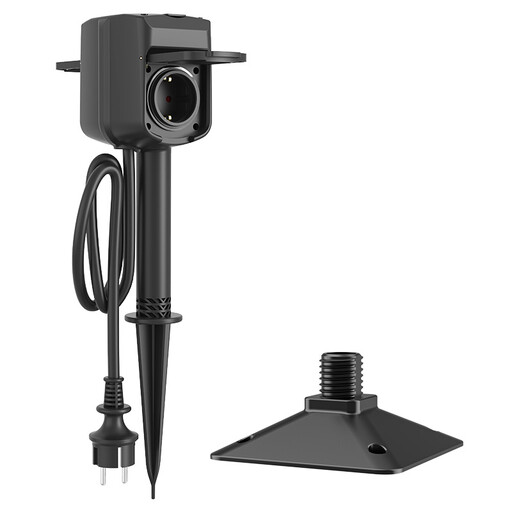
Why it's the right fit for you: Ideal if you're looking for seamless integration into your smart home ecosystem. Its Alexa and Google Assistant compatibility lets you create advanced routines (e.g., "Hey Google, turn on garden party mode") and centralise everything in a single app.
This model checks all the boxes: it avoids the trap of non-independent outlets by offering two sockets that can be controlled separately (via app or voice) and ensures a stable connection on 2.4 GHz WiFi. No more random disconnects.
Its ground stake format is incredibly practical for a discreet installation in a flowerbed or lawn. The 1.4m cable provides just enough flexibility to find the perfect spot.
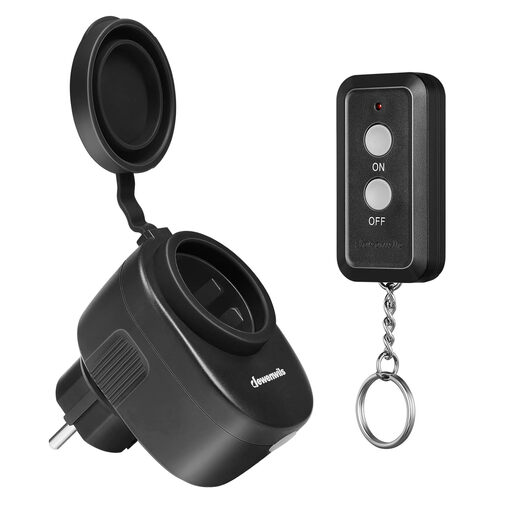
Why it's the right fit for you: The perfect solution if you want to avoid the complexity of WiFi and apps. This is pure plug-and-play: you plug it in, press the remote, and it just works. Period.
This model brilliantly sidesteps WiFi connection and compatibility issues. By operating on radio frequency (RF), it guarantees a rock-solid link to its remote control, without ever asking for a password or an update.
Its stunning simplicity. The socket is pre-paired at the factory and remembers its state even after a power outage. With a 30-meter range, it easily covers most gardens.
Once your socket is installed, pay attention to the details. For a clean and secure installation of your string lights or spot lighting, think about cable management. Solutions like Command Outdoor Round Cable Clips are perfect for guiding and securing wires along a wall or gutter, without drilling and while resisting the elements.
We have selected a complete range of products for you that meet these quality criteria and French safety standards.
No, and this is a crucial point. The overwhelming majority of these devices only work on a 2.4 GHz WiFi network. Before you buy, dive into your internet router's settings to verify that this frequency band is enabled. It's standard on all routers but is sometimes disabled in favour of the faster but shorter-range 5 GHz band.
A WiFi socket connects to your home network. You control it via a smartphone app or by voice (Alexa, Google). It allows for advanced scenarios (scheduling, remote control...). An RF socket is more basic: it communicates directly with a dedicated remote control via radio waves. No internet is needed, but control is limited to the remote's range (usually about 30 meters).
Yes, models certified IP44 (or higher) are designed for this. To maximise their lifespan, it's still wise to install them in a somewhat sheltered location (under an eave, along a wall) to protect them from driving rain and heavy frost. Also, remember to always keep the protective covers on any outlets you are not using.