
Livraison le jour même ou le lendemain

Qualité garantie

Débloquez vos offres de bienvenue: Livraison GRATUITE | Jusqu'à -80 % | 30 jours d'essai gratuits à JoyPlus
Téléchargez l'application
A Wi-Fi smart plug lets you control a lamp, a fan or any other appliance from an app, on a schedule or by voice. But not all models are created equal, and they don't all meet the same needs. Incompatible network, insufficient power or vaguely advertised compatibility – a purchase meant to simplify your daily life can quickly become a disappointing gadget.
Here are the essential points to check before choosing a smart plug, a smart multi-socket extension lead or an additional accessory for your home in the UK.
Many smart plugs only work on 2.4 GHz Wi-Fi. This band generally offers better range around the home, but installation can become tricky if your router favours 5 GHz. Before ordering, check the network compatibility and the pairing procedure in the app.
Models that work with Smart Life or Tuya often require a 2.4 GHz network during the initial pairing. Bluetooth can make this step easier, but it doesn't necessarily replace the Wi-Fi connection for controlling the plug remotely.
A plug advertised at 16 A or 3,680 W isn't automatically suitable for all appliances used continuously. You need to consider the total power draw, the duration of use and the type of load. For a heater, a pump or garden equipment, consult the manual and never exceed the stated limits.
Manufacturers may also recommend a lower power rating for certain appliances that run for several hours at a time. A smart plug with an energy monitor helps you track usage, but it doesn't replace basic electrical safety rules.
An indoor IP20 plug has no place in an area exposed to water or splashes. For a patio, garden or outdoor pump, choose an IP44 outdoor smart plug and plug it into a properly protected outdoor wall socket. The IP44 rating guarantees protection against solid objects larger than 1 mm and water splashes, but not against immersion.
Make sure the plug supports Alexa, Google Home, Siri Shortcuts or an app like Smart Life and Tuya. An Alexa-compatible smart plug will fit naturally into a home already equipped with that assistant, while a Google Home smart plug will be more at home in a Google environment.
Voice control should remain a bonus feature. The app must at least allow you to turn the plug on and off, set schedules and manage connected appliances.
A smart plug with an energy monitor typically shows the real-time power draw and, depending on the model, a history in kilowatt-hours. This data lets you compare the habits of different appliances and spot the most energy-hungry ones. However, check what is actually being measured: a single socket, both outlets of a twin model, or the entire multi-socket extension lead.
A plug-in smart socket simply goes into a wall socket – ideal for tenants. A built-in smart socket, such as a UK Type G model, requires work on the wiring. Its installation should be carried out by a qualified electrician or a competent person, after switching off the power at the circuit breaker.
For a smart E27 bulb, check the cap type, wattage, colour temperature and whether it's intended for indoor or outdoor use. A wireless switch for a smart plug or a remote control for a KYF plug can also let you control an appliance without a smartphone, as long as you check compatibility carefully.
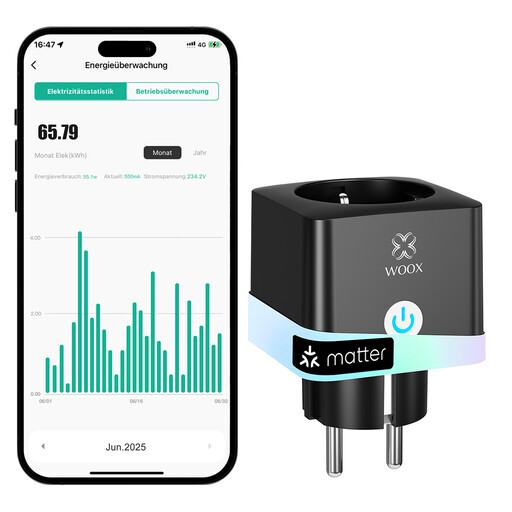
Why this choice suits this profile: This plug-in socket installs without any wiring changes. It's ideal for those who want to get started gradually with Alexa, Google Assistant or Tuya.
The 2.4 GHz connection is clearly stated, and installation is done through the app without any work on the electrical circuit.
Energy monitoring, scheduling and a child safety shutter. Maximum load stated: 16 A or 3,680 W.
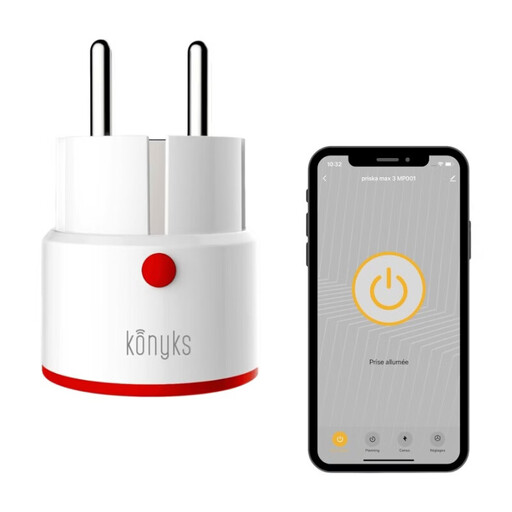
Why this choice suits this profile: Users who want to combine app control, Bluetooth, scenes and voice assistants get plenty of settings, in a format compatible with UK sockets.
The plug's behaviour after a power cut is configurable, preventing unwanted restarts.
Energy monitor with history, child lock, random scheduling and compatibility with Alexa, Google Home and Siri Shortcuts.
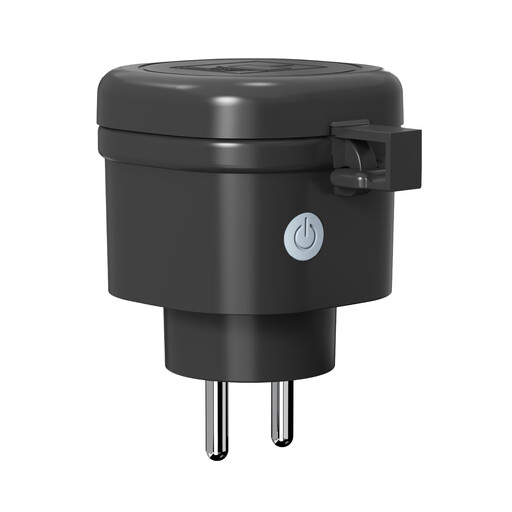
Why this choice suits this profile: This model is designed for garden lighting, tools and patio equipment used with a suitable outdoor installation.
Its IP44 rating is clearly stated, but the cover must remain closed and the outdoor wall socket must also be protected.
Energy monitor, scheduling, Tuya or Smart Life app and a stated power rating of 16 A.
To control your appliances without a phone, the KYF remote control and the wireless switch for smart plug are designed exclusively for the KYF-PLUG-001 and KYF-PLUG-002 plugs. Their stated range reaches 30 m in open space, but walls can significantly reduce it.
Home workers can also complete their setup with the EMEET 1080p HD USB Webcam, which offers a plug-and-play USB connection, Full HD at 30 frames per second and built-in microphones.
We've compiled a full list, updated in real time, of products that meet these demanding selection criteria as well as European safety standards.
Depending on the model, a Wi-Fi smart plug can retain some local controls. Bluetooth, an RF remote control or a physical button may allow you to use it without an internet connection. However, remote control from outside the home generally requires a Wi-Fi connection and the associated app.
It all depends on the model's specifications. Several plugs in this selection are rated at 16 A and 3,680 W at 220-240 V, but it's best to avoid running them permanently at their maximum load. Check the power of your appliance and follow the manufacturer's recommendations, especially for heaters, pumps and very energy-hungry equipment.
A smart plug consumes a small amount of energy to stay on standby and communicate with the network. The cost depends on the model, how long it's used and your electricity tariff. The built-in energy monitor lets you track the consumption of the plugged-in appliance, but it won't reduce your bill on its own. It's the scheduling and reduction of running times that can genuinely lower your total energy consumption.