
Livraison le jour même ou le lendemain

Qualité garantie

Débloquez vos offres de bienvenue: Livraison GRATUITE | Jusqu'à -80 % | 30 jours d'essai gratuits à JoyPlus
Téléchargez l'application
Keeping an eye on your home while you're away, making sure the kids got home safely, or checking that the cat isn't redecorating the living room: peace of mind is priceless. The Wi-Fi security camera has become the simplest and most accessible solution for watching over your home. But faced with the jungle of available models, it's easy to get lost among the different resolutions, storage options, and other smart features.
This guide is here to break down the essentials and present our selection of the best cameras, all without overwhelming technical jargon.
Price is a factor, but it's far from the only one. Here are the essential criteria to scrutinize to find the camera that perfectly meets your needs.
The first question to ask is simple: where will you install it?
For a video to be truly useful, the details must be perfectly sharp. 2K surveillance (approximately 2560 x 1440 pixels) offers far superior clarity than the Full HD standard (1080p), which is essential for identifying a face or reading a license plate.
At night, two technologies compete:
Most cameras send an alert to your smartphone via their dedicated app as soon as an event is detected. AI motion detection (Artificial Intelligence) refines this system by distinguishing between humans, animals, or vehicles, which prevents you from receiving unnecessary notifications every time a leaf moves.
For video recording, you have two options:
After our tests, here are the models that particularly caught our attention, each meeting a specific need.
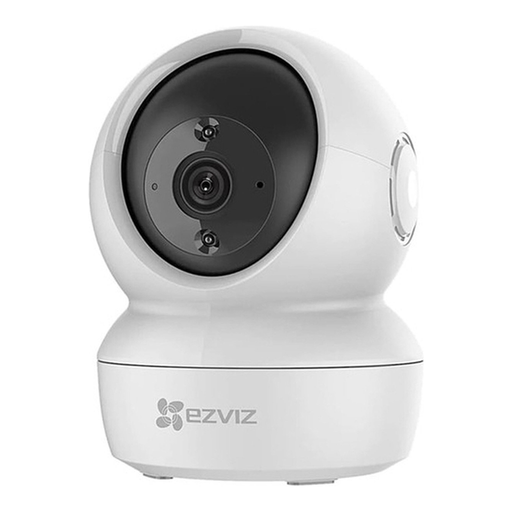
Why we love it: It's the Swiss Army knife of indoor surveillance. Its motorized head scans the entire room with a simple swipe in the app, eliminating blind spots. Its 2K+ resolution ensures incredibly sharp images, day or night.
Highlights:
Who is it for? Ideal for families wanting to monitor a large living area, a playroom, or keep an eye on a curious pet.
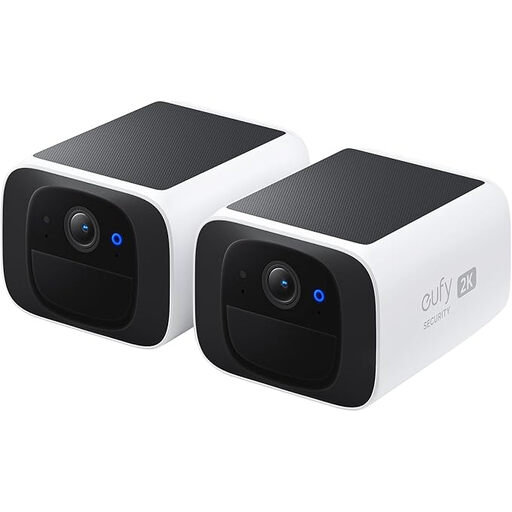
Why we love it: Its main advantage is its autonomy. Completely wireless, it integrates a solar panel that continuously recharges its battery. According to the manufacturer, just a few hours of sunlight per day are enough to power it indefinitely. A practical, cost-effective, and "set it and forget it" solution with no hidden fees.
Highlights:
Who is it for? Perfect for those who want an easy-to-install wireless outdoor camera to monitor a garden, driveway, or entrance, without worrying about cables or subscriptions.

Why we love it: Filming through a window is a real headache due to reflections, especially at night with infrared. The ZOSI C680 is the solution to this problem. Its anti-reflection technology and color night vision allow for a clear view of the outside while the camera stays safe and warm indoors, without any need to drill through walls.
Highlights:
Who is it for? The ideal solution for renters or anyone who can't (or doesn't want to) drill through their walls to install an outdoor camera, but still wants to keep an eye on their entryway or parking spot.
If you're less interested in securing your home and more in observing nature, other types of cameras exist. To catch your garden's nocturnal visitors, like hedgehogs or foxes, a trail camera will be much more suitable.
? Discover our selection of motion-activated night vision cameras for wildlife.
1. Does a Wi-Fi security camera work without the internet? A connection is essential for most features: receiving alerts, viewing the live feed remotely, and saving videos to the cloud. However, a model with a microSD card slot can continue to record locally even during an outage. You can then review the videos once the connection is restored.
2. How are videos stored, and is it secure? Videos are stored either locally on a microSD card (usually not included) or on the manufacturer's cloud via a subscription. Local storage gives you complete control over your data, while the cloud protects it if the camera is stolen or damaged. Reputable manufacturers use encryption protocols to secure the data, but the first line of defense is always to use a strong password for your account.
3. Is installing a smart camera complicated? No, installation is a breeze these days. Simply plug in the camera, download the manufacturer's app on your smartphone, create an account, and follow the steps to connect it to your Wi-Fi network. The whole process rarely takes more than a few minutes.