
Livraison le jour même ou le lendemain

Qualité garantie

Débloquez vos offres de bienvenue: Livraison GRATUITE | Jusqu'à -80 % | 30 jours d'essai gratuits à JoyPlus
Téléchargez l'application
The quest for the perfect gaming mouse is a real challenge. It must combine flawless responsiveness, surgical precision, and absolute comfort, all while elevating the aesthetics of your setup. For fans of clean, minimalist environments, a white wireless gaming mouse is more than just a peripheral: it's the centerpiece. But between DPI, weight, and sensor type, navigating the jungle of tech specs can quickly become a headache.
This guide is here to shed some light. Our mission: to decode the technical jargon and select the models that stand out from the crowd, based on their performance and your playstyle.
Before diving into our selection, let's review the essential criteria that will guide your choice.
The sensor is the heart of the mouse. Today, the wireless optical mouse has established itself as the gaming standard thanks to its reliability on most surfaces. You will inevitably hear about DPI (Dots Per Inch), which measures the mouse's sensitivity.
Be careful, a high-DPI gaming mouse doesn't necessarily mean better performance. On the contrary, excessively high sensitivity can hurt your precision. For reference, professional gamers often set their DPI between 400 and 1600. The key is to choose a quality sensor that offers a wide adjustment range, allowing you to find the perfect sensitivity for your playstyle and screen resolution.
Weight has a direct impact on handling. A lightweight gaming mouse (usually under the 80-gram mark) is favored for fast-paced shooters (FPS), as it facilitates swift, sweeping movements while reducing fatigue. Conversely, heavier mice can offer a better sense of control and stability, an asset in strategy games (RTS) or MMOs. Ergonomics (right-handed, left-handed, or ambidextrous shape) are just as crucial to ensure optimal comfort, even after hours of gaming.
Wireless technology has made giant leaps. For a wireless gaming mouse, you have two main options:
More and more models are offering dual or even triple connectivity (2.4 GHz, Bluetooth, and wired), combining the best of both worlds.
Here are three models that stand out for their performance and immaculate design.
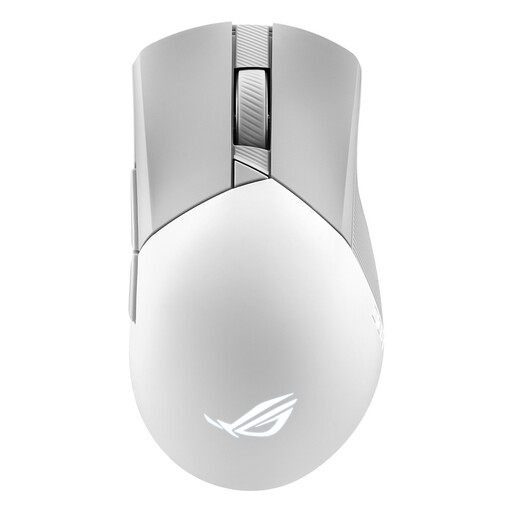
The ROG Gladius III Wireless Aimpoint is the worthy successor to a fan-favorite lineup. It goes all-in on precision and customization, in an ergonomic, asymmetrical right-handed design.

The Kone XP Air from Turtle Beach is aimed at gamers who want maximum control and features at their fingertips. Its ergonomic design and RGB lighting shining through its translucent shell make it a peripheral that is a real head-turner.
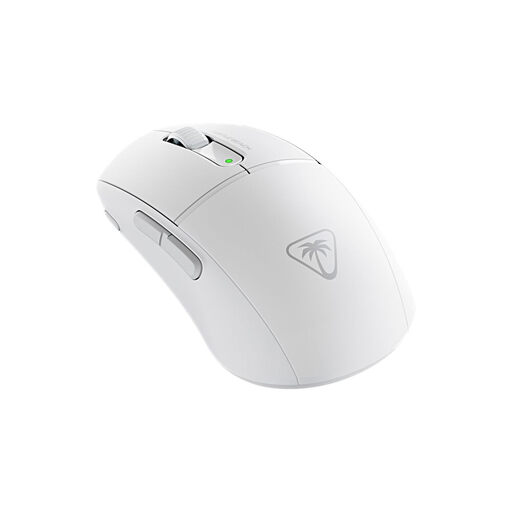
The Burst II Air is Turtle Beach's answer for gamers where speed and agility are the name of the game. Its symmetrical design and feather-light weight make it a formidable weapon for the swiftest movements.
This selection highlights three models with very different profiles, but the market is full of options. If you haven't found your perfect match yet in terms of design, button count, or ergonomics, don't worry!
Discover our complete collection of white gaming mice to find the model that will perfectly complement your playstyle and your desk.
Not necessarily. A very high DPI makes the cursor ultra-sensitive, which can even be counter-productive. The intrinsic quality of the sensor (tracking accuracy, lack of hardware acceleration) is far more important than the maximum DPI number. It's best to choose a mouse with an adjustable DPI range to find the setting that gives you optimal control.
Over time, white plastic can yellow due to UV exposure and contact with skin. To preserve its whiteness, clean it regularly with a slightly damp microfiber cloth. Avoid harsh cleaning products and don't leave your setup in direct sunlight for extended periods.
Both technologies rely on light to track movement: an LED for optical sensors, and a laser beam for the others. While in the past, laser sensors had the advantage of working on more surfaces (including glass), modern optical sensors have become the gaming standard. The reason? Superior tracking accuracy and the absence of unwanted acceleration issues on standard mouse pads.