
Livraison le jour même ou le lendemain

Qualité garantie

Débloquez vos offres de bienvenue: Livraison GRATUITE | Jusqu'à -80 % | 30 jours d'essai gratuits à JoyPlus
Téléchargez l'application
A killer gaming setup is all about balancing performance and aesthetics. And for the perfect finishing touch to a pristine desk, a white wireless gaming headset is the ultimate choice. But between the promise of near-zero latency, a crystal-clear mic, and unbeatable comfort, how do you navigate the jungle of available models?
Don't worry, we're here to guide you step-by-step to find that hidden gem. Whether you're an esports pro, an up-and-coming streamer, or simply a gamer looking for a headset that's as good as it looks, follow our guide!
Before diving into our selection, let's review the criteria that make all the difference.
This is the heart of the matter for a wireless headset.
Obviously, audio quality is paramount. 40mm or 50mm drivers have become the norm, ensuring rich and detailed sound. For total immersion, look for models that offer 7.1 virtual surround sound or spatialization technologies like THX Spatial Audio. It's ideal for hearing opponents sneaking up behind you!
And for team play or streaming, a quality microphone is simply non-negotiable. Make sure it has good noise cancellation (active or passive) to filter out the clicks of your mechanical keyboard and let only your crystal-clear voice through.
Choosing a white gaming headset is a style statement. But looks aren't everything. Details like customizable RGB gaming headset lighting or an out-of-the-ordinary design (yes, we're thinking of the famous cat ear gaming headset) can be the extra touch that wins you over.
Comfort, however, is not a detail: it's essential for powering through long gaming sessions without sore ears. Weight, earcup cushion materials (breathable fabric or leatherette for isolation?), and headband adjustment should be closely examined. Finally, wireless means battery. Aim for at least 20 hours of battery life to be safe. Gaming marathoners will even look for endurance models that push 70 hours!
Time for our selection! We've picked some gems that check all the boxes, for every type of gamer.
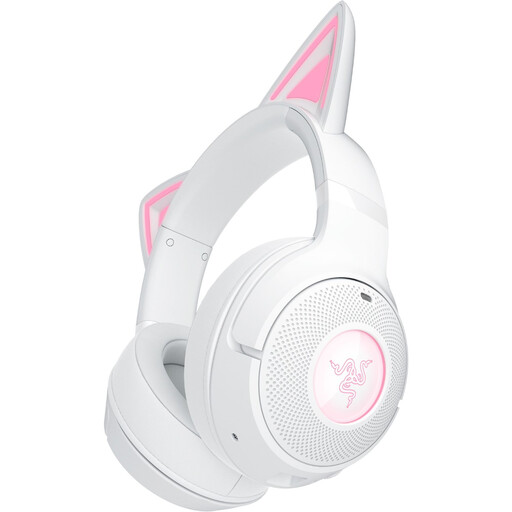
Why it stands out: More than a headset, it's a fashion accessory. With its iconic cat ears and Razer Chroma RGB lighting, it's tailor-made for personalities who want to shine on stream. But don't be fooled, the look doesn't come at the expense of sound: its Bluetooth 5.2 connection and good battery life make it a very capable gaming companion.
Pros:
Who is it for? For streamers, content creators, and gamers who want a headset with a strong personality, without compromising on audio performance for mobile and PC gaming.
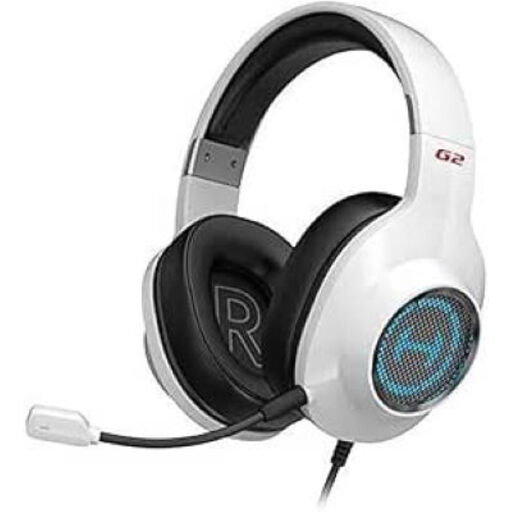
Why it stands out: Yes, it's a wired model (USB), but its unbeatable price-performance ratio and minimalist white design earn it a prime spot in our guide. It packs features often reserved for much more expensive headsets, like 7.1 surround sound.
Pros:
Who is it for? The smart choice for PC and PS4 players looking for immersive surround sound and wired reliability, all on a tight budget.
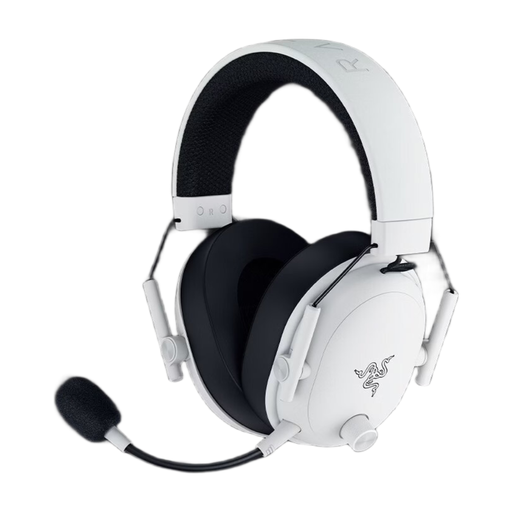
Why it stands out: This white Razer headset is a true competitive beast. It's all about pure performance: near-zero latency with its HyperSpeed Wireless technology and exceptional vocal clarity thanks to its HyperClear mic. Add to that a feather-light weight and monstrous battery life, and you have the ultimate weapon for long gaming sessions.
Pros:
Who is it for? For demanding PC and console gamers (PS5, PS4, Switch) for whom every millisecond counts. If you're looking for flawless responsiveness, crystal-clear communication, and absolute comfort, look no further.
Our selection is just a taste of what the market has to offer. To explore other styles, brands, or features, feel free to check out our complete category of lightweight PC accessory to find your perfect match.
The difference comes down to two things: latency and compatibility. The 2.4 GHz connection (via USB dongle) guarantees minimal latency, ideal for competitive gaming. Bluetooth, being more universal, connects to almost anything without a dongle, but its latency, while much improved in recent versions (5.2 and up), is still slightly higher.
Generally, yes. Most wireless headsets with a 2.4 GHz USB dongle work seamlessly with the PS5. Be careful with Bluetooth, however: Sony's console is very picky and accepts very few third-party models. The rule of thumb: always check for PS5 compatibility on the headset's spec sheet before buying.
White is chic, but it requires a little maintenance to stay that way. First tip: avoid leaving it to bake in the sun, as UV rays are its worst enemy. For cleaning, a simple soft, dry cloth is enough. If a stain persists, dampen the cloth very slightly with water, but most importantly, no harsh chemicals! Finally, when you're not using it, store it in a place safe from dust and moisture.