
Livraison le jour même ou le lendemain

Qualité garantie

Débloquez vos offres de bienvenue: Livraison GRATUITE | Jusqu'à -80 % | 30 jours d'essai gratuits à JoyPlus
Téléchargez l'application
The pristine gaming setup is the biggest trend right now. Clean, modern, and all-white… it has become a true aesthetic signature for many enthusiasts. But be warned: the task is more complex than it seems. Assembling a white PC build that is both cohesive and powerful can sometimes be a real headache. Between clashing shades of white, finicky RGB lighting, and components that prioritise looks over performance, it's easy to feel overwhelmed.
No need to worry! This guide is here to provide you with the keys, practical tips, and a selection of products to design the white gaming setup of your dreams. Our mission at Joybuy: to guide you with objective recommendations to make the right choices, hassle-free.
Before you start choosing components, keep a few fundamental principles in mind. They are the secret to a final result that meets your expectations, both in terms of aesthetics and performance.
Did you know? Not all whites are created equal. Some components have a cool, almost bluish-white finish, while others lean towards warmer, even cream-coloured tones. For a truly aesthetic white PC build, the easiest approach is often to stick to a single brand as much as possible. Otherwise, scour photos and reviews to compare shades before you buy.
Lighting is the other crucial element. The success of a white RGB gaming PC depends on the perfect synchronisation of its colours. Ecosystems like Corsair's iCUE are fantastic for this: they allow you to control the lighting of all your components (case, fans, RAM...) from a single piece of software. Harmony guaranteed!
Looks are good. Performance is better. One should never overshadow the other. A white PC case, no matter how beautiful, must first and foremost ensure exemplary airflow to keep your components cool. Prioritise models with a mesh front panel and enough mounts for your fans or a water-cooling kit.
The same goes for sound: white PC gaming speakers are not just decorative objects. Sound immersion is crucial to fully enjoy your games. Pay attention to the driver size, connectivity (USB, Bluetooth, 3.5mm jack), and the little extras that make a difference, like EQ modes dedicated to gaming, music, or movies.
To help you get started, here are a few products that have caught our eye, perfect as a foundation for your project.
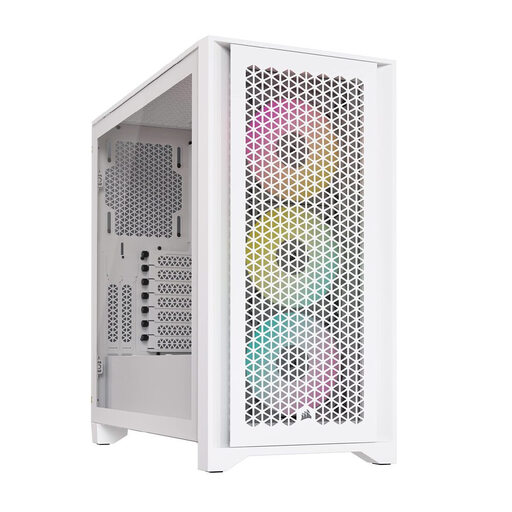
Why it stands out
The Corsair 4000D RGB Airflow is THE benchmark for anyone seeking the perfect balance between refined aesthetics and top-tier cooling. Its optimised mesh front panel, combined with the three included AF120 RGB ELITE fans, ensures massive airflow right out of the box. Its clean white design and tempered glass panel showcase your white PC build.
Key Features
Who is it for?
For all PC builders, from beginners to experts, who want a spacious, easy-to-build case that keeps components cool, with style to boot.
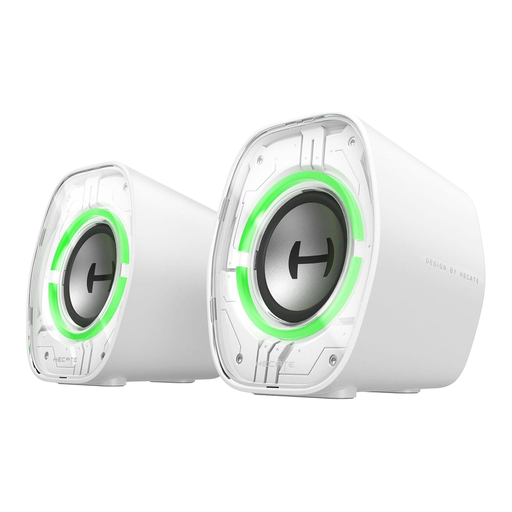
Why they stand out
The Edifier G1000 II are proof that you can get quality sound without taking up your entire desk. With their compact and futuristic design, they fit perfectly into a minimalist white gaming setup. They shine with their versatility, offering triple connectivity and multiple RGB lighting modes.
Key Features
Who is it for?
Perfect for gamers who are short on space but don't want to compromise on quality. Their plug-and-play simplicity and rich connectivity make them practical daily companions.
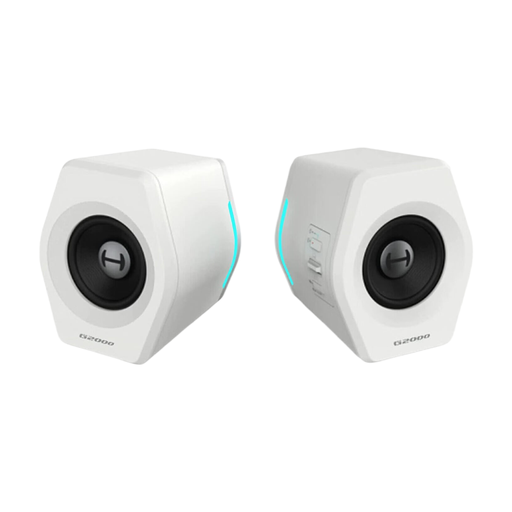
Why they stand out
For those who want to turn things up a notch, the Edifier G2000 take it to the next level. They feature a DSP chip that acts as a sound card, capable of simulating 7.1 surround sound (via Edifier software) for massively enhanced immersion. With 32W of peak power and passive bass radiators, the soundstage becomes significantly wider.
Key Features
Who is it for?
For gamers and multimedia enthusiasts who place audio quality at the top of their priority list and are looking for room-filling sound, whether for gaming, movies, or music.
Building the perfect setup is a quest. To continue it, explore our other selections of pristine keyboards, mice, headsets, and mouse pads.
Find a complete selection of products in our dedicated white desktop computer category.
White's greatest enemy? Yellowing, often caused by UV rays from the sun and heat. To prevent it, choose high-quality, UV-treated components. Don't place your tower in direct sunlight and ensure it has excellent ventilation to limit heat buildup. Wiping it down with a slightly damp microfibre cloth from time to time will also help preserve its original whiteness.
There was a time when the "white tax" was a reality, due to lower production volumes. Today, this price gap has almost disappeared. While some special editions may still be more expensive, it's entirely possible to build a white gaming PC without breaking the bank, thanks to the wide range of components now available.
The easiest way is to stick to a single brand and its software ecosystem (Corsair iCUE, NZXT CAM, etc.). The other solution is to use your motherboard's software (ASUS Aura Sync, MSI Mystic Light, Gigabyte RGB Fusion...). It can usually control components from different brands, provided they are compatible. So be sure to check this point carefully before heading to checkout.