
Livraison le jour même ou le lendemain

Qualité garantie

Débloquez vos offres de bienvenue: Livraison GRATUITE | Jusqu'à -80 % | 30 jours d'essai gratuits à JoyPlus
Téléchargez l'application
Building a PC is an art that blends performance with aesthetics. For an immaculate white PC build, a white 360mm AIO cooler is often the centrepiece. It promises to keep the most demanding processors cool while enhancing the machine's design. The problem: the market is flooded with marketing promises that too often lead to buyer's remorse. Before pulling out your credit card, it's crucial to know how to avoid the pitfalls to find THE high-performance, reliable CPU liquid cooler that's perfectly suited to your setup.
This guide is here to arm you with the right information and help you avoid any nasty surprises.
The appeal of an AIO is undeniable, but watch out for hidden flaws that can quickly turn the dream into a nightmare. Here are the three key things to watch out for.
The Myth of "Absolute Silence": Many brands boast of near-silent operation. The catch is that these measurements are often taken in lab conditions under a light load. During intense gaming or a video export, the reality is quite different: the pump can turn into a persistent hum, and the fans, once at full speed, can generate a particularly annoying whining sound. In short, a flattering dBA number on the box is no guarantee of peace of mind once the PC is on.
Software Complexity and Proprietary Connectors: An ARGB AIO or a cooler with a customisable screen is tempting. The trap? These gadgets almost always depend on proprietary software. And that's where the trouble begins: it can be bloated, unstable, or worse, conflict with other utilities on your system (like your motherboard's software). To top it all off, the use of non-standard connectors locks you into a brand's ecosystem and turns cable management into a real obstacle course.
Nasty Installation Surprises: A 360mm radiator is big. Very big. The classic rookie mistake? Forgetting to check its compatibility with the case. The thickness of the radiator, combined with that of the fans, can interfere with RAM modules or the motherboard's heatsinks. Add to that some overly complicated mounting systems and a forest of cables to tame, and an installation that looked simple turns into a headache.
To avoid these disappointments, you need to get back to basics: objective technical specifications. Here are the three non-negotiable criteria to scrutinize.
This is the absolute basics, the starting point. Your AIO must be compatible with your processor's socket: for recent builds, make sure it is listed as LGA 1700 compatible (Intel) or AM5 compatible (AMD). Next, get out the measuring tape (or the spec sheet): check the exact dimensions of the 360mm water cooling kit (radiator + fans) and compare them to your case's specifications. Remember to leave some clearance for routing tubes and cables.
The pump is the heart of your AIO. Some designs, like dual-chamber ones, separate the incoming cool liquid from the outgoing hot liquid to improve efficiency. But the most important thing remains the sacred performance-to-noise ratio. Also, look at the specs of the included fans:
Our advice: prioritise models that opt for universality with standard connectors: a 4-pin PWM connector for the fans and pump, and a 3-pin ARGB connector (5V) for the RGB. This approach ensures maximum compatibility with most motherboards and their management software (Asus Aura Sync, MSI Mystic Light, etc.). This frees you from relying on an often finicky proprietary application.
To illustrate our point, here is a selection that meets a specific user profile, keeping our criteria of performance, reliability, and simplicity in mind.
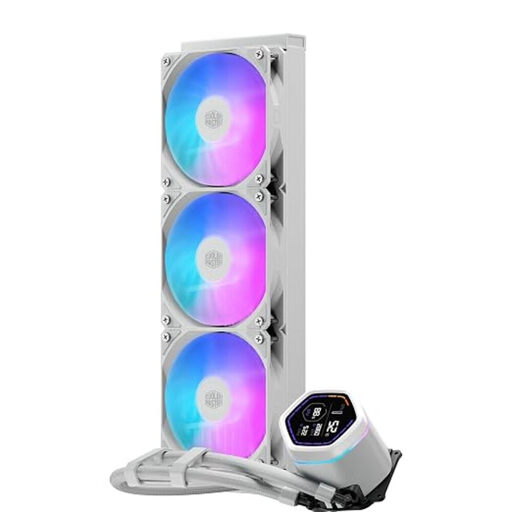
Why this one? Perfect for those who demand total control and real-time data display. Its integrated screen lets you keep an eye on CPU stats without cluttering your in-game display, while its fully customisable AIO ARGB lighting is the ideal finishing touch for an immaculate white PC build.
It tackles the pitfall of complex installation with its pre-installed fans, pre-applied thermal paste, and pre-mounted brackets. The wiring has also been simplified for a cleaner and faster build.
The digital screen on the pump is clearly its standout feature. It ensures broad compatibility (LGA 1700 and AM5 compatible) and comes with a 5-year warranty, a true sign of peace of mind.
We have selected a full range of products for you that meet our rigorous selection criteria and safety standards.
1. What is the lifespan of an AIO water cooler? A quality AIO is built to last. Most reputable brands offer warranties of 3 to 6 years, which is an excellent indicator of the product's reliability. The known weak points are the pump and the slow evaporation of liquid through permeation in the tubes. In practice, you can expect a lifespan of 5 years or more before thinking about a replacement.
2. Is a 360mm AIO water cooler difficult to install? Installation has become much simpler in recent years. Models like the Cooler Master ML Core Nex Digital make life easier with their pre-installed fans and well-designed mounting hardware. The only real difficulty is ensuring your case has enough space to accommodate a 360mm radiator. The golden rule: read the manuals for your case and the AIO before clicking "Buy".
3. Is the screen on the pump really useful? A cooler with a screen has a dual purpose. On one hand, it's practical: it lets you glance at critical info (like CPU temperature) without an in-game overlay. On the other, it's an undeniable aesthetic asset to push customisation to the max. Its usefulness, therefore, depends on what you're looking for: a handy monitoring tool or pure eye candy.