
Livraison le jour même ou le lendemain

Qualité garantie

Débloquez vos offres de bienvenue: Livraison GRATUITE | Jusqu'à -80 % | 30 jours d'essai gratuits à JoyPlus
Téléchargez l'application
Are your vacation, sports, or family videos ruined by shaky footage that makes them almost unwatchable? Whether you're a content creator looking to professionalize your vlogs, a sports coach wanting to analyze gameplay, or a traveler eager to capture flawless memories, image stability isn't an option—it's a necessity. But with an overwhelming number of options, it's hard to know where to start.
As the Head of Product Recommendations at Joybuy, I'm here to guide you. This guide breaks down the key features and presents a selection of the best current models to help you find the video stabilizer that truly meets your needs in 2026.
Before diving into our selection, it's essential to understand the criteria that will make all the difference. Here are the key points to consider to make the right choice.
This is the starting point: do you prefer to equip your smartphone or opt for an all-in-one solution?
Most high-performance models use a motorized 3-axis stabilizer. Each axis (pan, tilt, roll) compensates for a different type of movement, ensuring impressively smooth footage, even when you're walking or running.
The automatic subject tracking (AI tracking) feature is a real game-changer. It allows the camera to lock onto a person or object and keep it centered in the frame automatically. This is a crucial advantage for solo vlogging or filming sports action without needing a camera operator.
For those on the go, whether travelers or vloggers, weight and size are key criteria. A foldable, lightweight model will slip more easily into a bag. Battery life is another critical point: check the advertised usage time and the ability to recharge the device on the move with a power bank. Finally, don't underestimate the companion mobile app. It's the central hub of your experience: its user-friendliness and the richness of its creative modes will often make the difference in daily use.
Let's get practical with a few models that stand out from the crowd, each tailored for a specific use case.
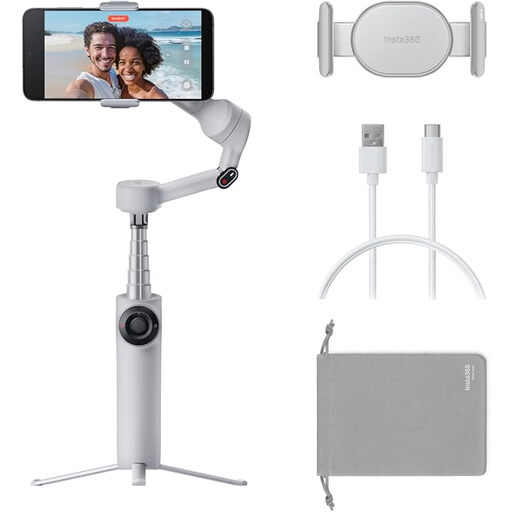
Why it stands out: The Insta360 Flow 2 is designed to be much more than a simple smartphone stabilizer. It integrates a tripod, a selfie stick, and even a power bank to charge your phone. Its AI tracking system, which the brand calls "Active Zoom Tracking," is designed to follow fast-moving subjects with incredible precision, even while zoomed in.
Key features:
Who is it for? Social media content creators, vloggers, and families looking for an all-in-one solution to turn their smartphone into a professional-grade mini camera.
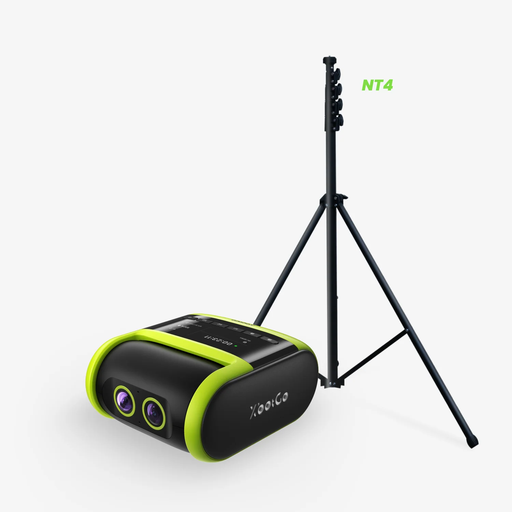
Why it stands out: This AI sports camera is specifically designed for tracking sports like soccer or basketball. Unlike a traditional stabilizer, its artificial intelligence is trained to follow not only the players but also the ball. Its dual-lens system combines a 4K recording lens with a second lens dedicated to tracking for maximum precision.
Key features:
Who is it for? Coaches, parents of young athletes, and amateur clubs who need a reliable "automated camera operator" to film practices and games without any intervention.
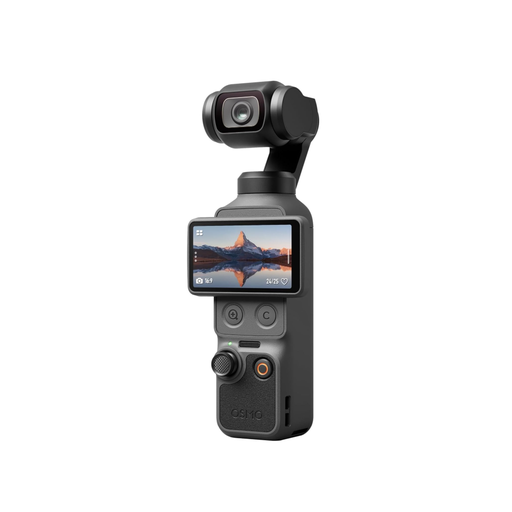
Why it stands out: The DJI Osmo Pocket 4 is an all-in-one stabilized camera that focuses on image quality and extreme portability. With its 1-inch CMOS sensor, it delivers stunning low-light performance and an extended dynamic range. Its ability to shoot in 4K at up to 240 frames per second allows for spectacular slow-motion shots, all in a format that literally fits in your pocket.
Key features:
Who is it for? Travelers, demanding videographers, and vloggers who prioritize image quality and discretion above all else. It's an excellent tool for those who want to capture cinematic shots without being weighed down by heavy equipment.
Every video project is unique, and the ideal gear depends entirely on your ambitions. If your perfect match isn't in this selection, don't worry: other solutions exist.
Explore our complete collection of Camera Equipment to discover a wider range of stabilizers, cameras, and accessories.
1. What's the difference between a stabilizer and a gimbal?? The two terms are often used interchangeably. Technically, a "gimbal" refers to the motorized 2 or 3-axis mechanism that provides stabilization. A "stabilizer" is the complete device that incorporates this mechanism. In common usage, the two terms have become synonymous.
2. Do I really need a 4K stabilizer?? It depends on your use case. 4K resolution offers a more detailed image, which is a valuable asset in post-production (for cropping into the image without losing quality) and for viewing on large screens. For quick sharing on social media, 1080p resolution is often sufficient. However, shooting in 4K is also a good way to future-proof your content: your memories will maintain optimal quality over the years.
3. Is a smartphone stabilizer difficult to use?? Modern models are designed to be incredibly intuitive. The initial setup is usually done in a few minutes via an app. Features like magnetic phone mounts, automatic balancing, and built-in tutorials make them accessible to everyone, including complete beginners.