
Livraison le jour même ou le lendemain

Qualité garantie

Débloquez vos offres de bienvenue: Livraison GRATUITE | Jusqu'à -80 % | 30 jours d'essai gratuits à JoyPlus
Téléchargez l'application
Choosing a video baby monitor is about more than comparing the resolution or range printed on the box. Between models with a dedicated screen, cameras controlled from a smartphone, and devices that do not use Wi-Fi, the day-to-day experience can vary considerably. A product that looks appealing on paper can quickly become frustrating if the connection drops, the screen is difficult to read, or notifications keep appearing for no clear reason.
Here are the main pitfalls to avoid, the technical criteria to consider, and a selection of models suited to different needs in France.
A range of 300 m generally refers to measurements taken in an open area. In an apartment or house, walls, floors, and electronic devices can significantly reduce the distance. With a non-Wi-Fi baby monitor, therefore, check the stated indoor range whenever this information is provided.
A Wi-Fi baby monitor, on the other hand, depends on the quality of your home network. A camera installed far from the router or in an area with weak coverage may experience dropouts, even if your internet connection is fast.
Cry detection, motion detection, automatic tracking, or cloud recording can all be useful, but they are not essential for monitoring a room located just a few metres away.
A baby camera with an app may also require you to create an account, install updates, and subscribe to a paid storage plan. Before choosing a connected baby monitor, check whether local recording to a memory card is supported and whether notifications can be finely adjusted.
Even a high-performance baby camera is no substitute for direct supervision by an adult. The camera and its cable must remain out of the child’s reach and, where specified in the instructions, at least one metre from the cot. Also avoid placing the device on an unstable surface or near water.
When buying in France, consult the instructions, the information supplied by the manufacturer, and whether an economic operator established in the European Union is identified. The product documentation should in particular make it possible to verify the applicable requirements concerning electrical safety and data protection for connected models.
A 1080p baby camera generally provides enough detail to monitor a cot or play area at close range. A higher resolution may be worthwhile if you plan to use digital zoom or cover a larger room, but it does not, on its own, guarantee smoother video.
For night-time monitoring, look carefully at the type and range of baby night vision provided. Infrared lets you see in the dark, while some models add a colour mode using supplementary lighting. Make sure that any indicator lights or emitted light will not disturb your baby’s sleep.
A baby monitor with a screen and direct connection is suitable for parents who want to monitor their child without an app or online account. This approach avoids relying on the home router for use indoors, but it generally does not allow you to view the video feed from outside the home.
By contrast, a Wi-Fi baby monitor with camera lets you view the video feed from a smartphone, including when you are away from home, provided that both the camera and phone have internet access. To protect your privacy, look for encryption, a privacy mode, regular updates, and options for disabling the microphone or camera.
Cry detection should be adjustable so that background noise does not trigger unnecessary notifications. Motion detection can be useful in a child’s bedroom, provided that you can define activity zones or adjust its sensitivity.
Two-way audio lets you speak to your child from the parent unit or app. Compare the speaker volume, transmission delay, and ease of activation. In some households, long battery life in audio-only mode will be more useful than a screen that remains switched on at all times.
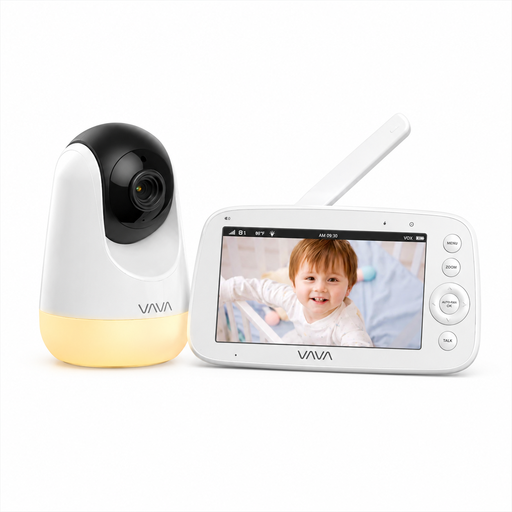
Why it suits this profile: its private 2.4 GHz connection, 5-inch screen, and lack of an app to configure make it straightforward to use every day.
It depends neither on your home Wi-Fi nor on an online service. The 300 m range is specified for open areas, so it should be viewed with caution inside a home.
720p screen, infrared night vision, two-way audio, 2× and 4× digital zoom, and up to 10 hours of stated battery life with the screen switched on.
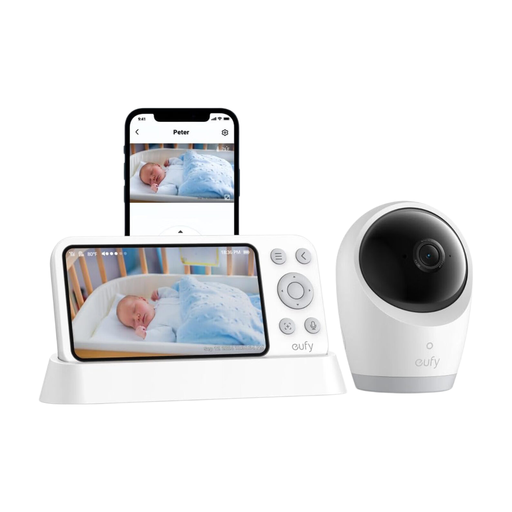
Why it suits this profile: its dual-mode design lets you switch from a local connection to app-based access, depending on whether you are at home or away.
Local access reduces reliance on the network when monitoring your baby at home. The SD card is sold separately if you want to record footage locally.
Camera advertised as 4K, 5-inch screen, 330° horizontal rotation, 60° tilt, 8× zoom, and a 5,000 mAh battery.
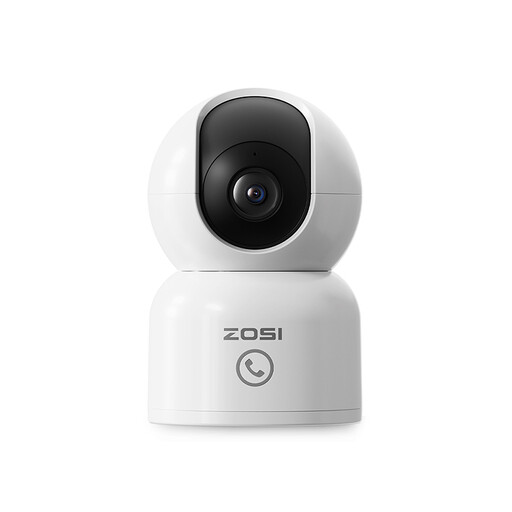
Why it suits this profile: this camera is designed for families who want to keep an eye on their home, a pet, or a loved one from their phone.
Human detection and automatic tracking can reduce alerts triggered by ordinary movement, provided that you take the time to configure the device correctly.
Advertised 4 MP resolution, 360° rotation, night vision up to 10 m, app access, two-way audio, and local or cloud storage.
We have brought together an up-to-date selection of products suited to different home-monitoring needs, including connected and non-Wi-Fi solutions.
Yes. Models that use a direct connection between the camera and parent unit, such as certain VAVA or Philips Avent devices, do not need a home internet router. They are perfectly suited to monitoring your baby at home. However, they generally do not allow you to view the footage remotely.
It depends on the model. If you want to record footage locally, purchasing a memory card may be all that is required. Some manufacturers also offer optional cloud-storage services under varying terms. Remember to factor in electricity consumption as well: the camera generally remains connected to mains power.
Place it on a stable surface or mount it according to the instructions, always out of the child’s reach. Aim the lens towards the cot, but never install the device inside it. Cables should be secured and kept away from the sleeping area. Before the first night, test the image, sound, alerts, and night vision so that you can fine-tune any necessary settings.