
Livraison le jour même ou le lendemain

Qualité garantie

Débloquez vos offres de bienvenue: Livraison GRATUITE | Jusqu'à -80 % | 30 jours d'essai gratuits à JoyPlus
Téléchargez l'application
For a flight simulation enthusiast, choosing a peripheral isn't just an expense: it's an investment in immersion. A good HOTAS (Hands On Throttle-And-Stick) system can transform a session on Microsoft Flight Simulator into a strikingly realistic experience. The problem? The market is flooded with marketing promises that too often lead to buyer's remorse. To avoid falling into this trap, it's essential to know how to sidestep the common pitfalls and focus on the features that truly make a difference.
This guide breaks down the crucial points to check before you buy, using a model that's generating a lot of buzz among demanding virtual pilots as our example: the HOTAS Turtle Beach VelocityOne Flightdeck.
The excitement of a new purchase fades quickly when the hardware doesn't go the distance. Here are three issues that seasoned virtual pilots know all too well.
To make an informed choice, you need to look under the hood, beyond the marketing speak. Here are the specifications that distinguish an excellent flight simulation peripheral from an overpriced gadget.
A joystick's precision is all about its sensors. Unlike potentiometers, a Hall effect HOTAS uses contactless magnetic sensors.
In modern simulators like Star Citizen or DCS World, systems management is just as crucial as piloting itself. A good HOTAS must put a true dashboard at your fingertips.
Rather than focusing on the raw number (in this case, 139 programmable buttons), you need to analyse the diversity and relevance of their placement:
The layout of these controls must be intuitive enough to allow for "eyes-off" operation, without ever taking your eyes off the action.
An integrated screen is only useful if it communicates perfectly with the software. A screen worthy of the name should allow you to:
Analysing a spec sheet is one thing. Seeing how a product actually meets expectations is another. Here is our recommendation for a very specific pilot profile.
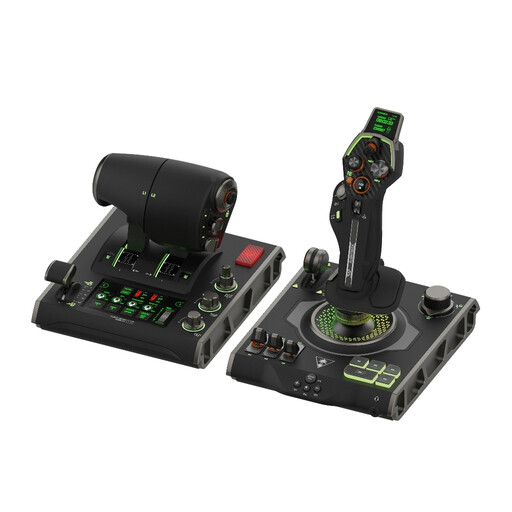
Why it's the right fit for them: This profile seeks absolute immersion and total control over the most complex aircraft. For them, no compromises on precision and durability are acceptable. They need equipment that can adapt to various simulators, from commercial aviation in Microsoft Flight Simulator to space combat.
This system integrates Hall effect sensors on the main stick and throttle axes, thus avoiding the pitfall of potentiometer wear. Far from being a gimmick, its OLED touchscreen allows for real-time configuration of axes and buttons. Finally, its 139 programmable functions are intelligently distributed for optimal ergonomics.
Its main advantage is its Flight Touchscreen, a first-of-its-kind feature that offers an unparalleled level of customisation without ever leaving the virtual cockpit. Paired with the precision of magnetic sensors, it becomes a formidable tool for seasoned virtual pilots.
We have compiled a complete and up-to-date list of products that meet our strict selection criteria.
Here are the answers to questions often asked before investing in a high-end flight simulation system.
As a rule, modern peripherals like this one are natively recognised by major simulators, including Microsoft Flight Simulator. The initial setup is therefore often plug-and-play. For advanced customisation of the 139 programmable buttons and the screen, expect a short learning curve to master the dedicated application (Flight Hangar), but the flexibility it offers in return is immense.
For a casual pilot, the difference may not be immediately obvious. However, for fans of formation flying, mid-air refuelling, or helicopter piloting, the reliability and lack of a dead zone with Hall effect sensors are a game-changer. It's a long-term investment that will save you from having to buy new hardware every couple of years due to wear and tear.
It all depends on your simulator of choice and the type of aircraft you fly. For a simple general aviation aircraft, a handful of these buttons will be more than enough. However, at the controls of a modern airliner (like an A320) or a fighter jet (like the F/A-18), where managing multiple systems (radar, weapons, navigation, communication) is essential, this arsenal of controls becomes indispensable for never having to touch your mouse or keyboard again, ensuring total immersion.