For quick clean-ups of small patches of dirt, choose a cordless stick vacuum if its battery life on the setting you’ll use is long enough for your needs. A robot vacuum suits scheduled cleaning when its routes are clear; an auto-empty station means you need to empty the bin less often, but it doesn’t eliminate the need to maintain the robot. If carpets, rugs or more demanding cleaning are your priority, keep a compact cylinder vacuum: Que Choisir highlights how effective cylinder vacuums are at removing dust.
What is each type of vacuum best suited to ?
Quick, almost-daily clean-ups
A cordless stick vacuum is easy to grab for crumbs, dust or pet hair between activities, without having to unwind a cable. Que Choisir describes it as a good choice for quick clean-ups; just make sure its battery life on the setting you need is long enough for the job.
Regular, scheduled cleaning
A robot vacuum can clean while you get on with other things, as long as its routes are clear. The type of flooring, edges and layout of your home all matter: Que Choisir assesses how robot vacuums perform on different floor coverings.
Rugs, carpets and more demanding cleaning
If cleaning carpets and hard-to-reach areas well matters more to you than having a vacuum ready to go at a moment’s notice, consider a compact cylinder model. Que Choisir highlights how effective cylinder vacuums are at removing dust; a robot or stick vacuum can then take care of quick clean-ups.
What should you check before choosing ?
Start with the task you want to avoid or make quicker: cleaning straight away, scheduling regular cleaning or spending more time on difficult floors. Then compare the practical considerations for each type of vacuum.
| Priority | What to check | What matters to me |
|---|
| Quick access |
For a cordless stick vacuum, consider its weight, how comfortable it is to use and how much storage space it needs. Check the battery life on the power setting you’ll use, rather than relying on the maximum run time quoted. |
I want to be able to pick up crumbs or pet hair as soon as they appear, without having to prepare a cleaning route. |
| Results on different floors |
Look for results that match your carpets, tiles or wooden floors, as well as edges and corners. Que Choisir assesses these surfaces separately in its robot vacuum tests; a quoted power figure alone doesn’t tell you how well a vacuum picks things up. |
If I have different types of flooring or my corners get dirty quickly, scheduling alone won’t be enough: I also need to check how well it cleans those areas. |
| Scheduling |
For a robot vacuum, check the scheduling options, customisable zones and access to the rooms it needs to clean. If these features rely on an app, check that your phone and network are compatible; Roborock Support says that the models covered by its guidance do not connect to 5 GHz Wi-Fi. |
I’d rather schedule regular cleaning while I get on with other things, as long as I can set up the robot in my home. |
| Emptying and maintenance |
Compare the robot’s bin capacity and the maintenance required by any station it comes with. An auto-empty station means you need to empty the robot’s bin less often, but the brushes, filters and containers still need looking after. |
Having to empty a small bin after every clean would be inconvenient, but I can make space for a station and keep it maintained. |
| Parts and battery |
Find out the part numbers for the filters and brushes and, for a cordless model, the replacement battery. Check availability for the exact variant rather than for the brand in general. |
I plan to keep my vacuum in working order and want to know which parts I’ll be able to replace. |
What buying mistakes should you avoid ?
-
Choosing a stick vacuum based only on its maximum battery life
The quoted run time may not reflect how long it will last at the power setting needed for your floors. Que Choisir points out that quoted battery life is measured at the lowest power setting.
Compare run times on the setting you plan to use, and check the replacement battery for the exact model.
-
Expecting a station to eliminate all maintenance
Auto-emptying means handling the robot’s bin less often, but you’ll still need to clean the brushes and filters. For robot mops, Que Choisir also notes that mopping results vary between models.
Check exactly which tasks the station takes care of and which ones you’ll still need to do yourself.
-
Overlooking your network before buying a connected robot
Incompatibility could prevent you from setting up the features you expect. Roborock Support says that the models covered by its guidance do not connect to 5 GHz Wi-Fi.
Check the manual for your chosen model to find out which Wi-Fi band and phone it supports, and what you need to use the app.
-
Assuming parts from a brand will fit all its models
A battery, brush or filter must match your vacuum’s model number. Dyson lists parts for several of its cordless vacuums, but the part numbers and availability vary by model.
Look up parts by their exact reference before you decide.
A few brands to consider
Rowenta
Its ranges sold in France include X-Plorer robot vacuums, as well as other types of vacuum cleaner.
- Rowenta highlights connectivity and scheduling features on some X-Plorer robots, as well as a range of parts and accessories.
- The brand advertises 15 years of repairability for some models. Check this claim, the connected features and the accessories for the exact model.
Roborock
Worth considering if scheduling and app controls are among your priorities for a robot vacuum.
- Roborock’s app offers scheduling, mapping and the option to set no-go zones.
- Roborock Support says that the models covered by its guidance do not connect to 5 GHz Wi-Fi. Navigation and station features should also be checked for each model.
Dyson
A brand to consider if you’re looking for a cordless stick vacuum for quick clean-ups.
- Dyson lists batteries, filters, brushes and other parts for some of its cordless vacuums.
- Check the part number and availability for the model you’re considering.
Models for quick or scheduled cleaning
This Joybuy selection includes four robot vacuums with stations for scheduled cleaning, plus a cordless stick vacuum for quick clean-ups of small patches of dirt. First, choose the type of cleaning that suits your home: this list doesn’t replace considering a cylinder vacuum if carpets or more demanding cleaning are your priority.
 Image unavailable
Eureka E20 Plus with auto-empty station
For scheduled cleaning, with the station emptying the bin. The product listing quotes suction power of 8 000 Pa and a run time of 180 minutes; consider whether this is enough for the cleaning mode you plan to use. Make room for the station and check that it’s compatible with your home network.
View on Joybuy
 Image unavailable
ECOVACS Deebot T30C OMNI Gen2 with station
For scheduling vacuuming and using the mopping function, provided these features suit your floors. The product title quotes suction power of 25 000 Pa and mop washing at 75 °C; these figures alone don’t prove how well it will perform on your floor coverings. Check app compatibility and remember to maintain the station.
View on Joybuy
 Image unavailable
roborock Q7 L5+ with auto-empty station
For regular, app-controlled cleaning, with the bin emptied automatically. The product title mentions LiDAR navigation, a mopping function and quoted suction power of 8 000 Pa. Check that your network and phone are compatible with this model, and consider how well it will clean your carpets and edges.
View on Joybuy
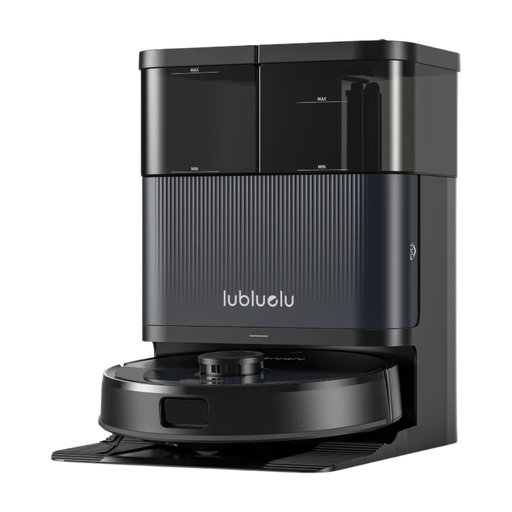 Image unavailable
Lubluelu S1000 with station — listed as S1000 Ultra+
For scheduling cleaning with a robot that comes with a station. The product title mentions LiDAR, a mopping function and quoted suction power of 10 000 Pa. It uses both S1000 and S1000 Ultra+ in the name: confirm the exact variant, the space needed for the station and app compatibility before ordering.
View on Joybuy
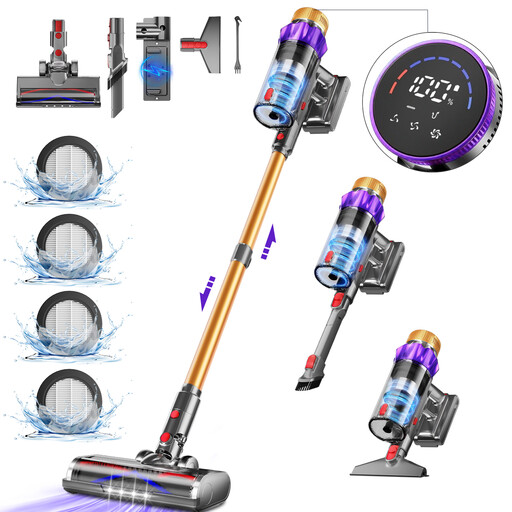 Image unavailable
Daynee AZA63 cordless stick vacuum cleaner
For quick clean-ups without having to unwind a cable. The product title mentions suction power of 65 kPa and an anti-tangle brush; these specifications alone don’t show how well it will perform on every type of flooring. Check the battery life on the setting you plan to use and the availability of parts for the AZA63.
View on Joybuy
Frequently asked questions
Can a cordless stick vacuum be my only vacuum cleaner ?
It could be, if its battery life on the setting you use and its performance on your floors are enough for all your cleaning needs, not just quick clean-ups. Que Choisir describes these vacuums as suitable for everyday touch-ups, so check how they perform on carpets and how long they’ll run before deciding not to buy another type.
Is a robot vacuum enough for carpets and corners ?
Don’t assume so: performance depends on the model, the flooring and the area to be cleaned. Que Choisir tests robot vacuums on different types of flooring; check how well they clean edges and corners too if those areas matter in your home.
What should I check before scheduling a robot through an app ?
Check the features of the exact model, and make sure your phone and Wi-Fi network are compatible. Roborock Support says that the models covered by its guidance do not connect to 5 GHz Wi-Fi; check the manual for the robot you’re considering rather than assuming this applies to every model.
Where can I dispose of a vacuum battery at the end of its life ?
Take it to a suitable collection point rather than putting it in your household rubbish. The ministry responsible for the environment lists supermarkets and electronics shops among the places where you can drop off batteries.


