
Livraison le jour même ou le lendemain

Qualité garantie

Débloquez vos offres de bienvenue: Livraison GRATUITE | Jusqu'à -80 % | 30 jours d'essai gratuits à JoyPlus
Téléchargez l'application
Tangled cables behind your desk, chargers hogging every outlet, devices charging at a snail's pace... Does this scenario sound familiar? The solution to end this chaos is a modern USB power strip. It will not only organize your connections but also protect your devices and optimize their charging.
But with an overwhelming number of options on the market, how do you make the right choice? This guide is here to shed light on the essential criteria and present our selection of the best models, whether you're working from home, relaxing in your living room, or tinkering in your workshop.
Before you jump on the first model you see, it's crucial to understand the few details that make all the difference. Here are the three criteria to scrutinize to find the perfect power block for your needs.
The days when a power strip only accommodated standard AC plugs are long gone. Today, USB ports have become the norm.
Distributing power is good. Protecting your precious devices is even better.
Don't underestimate the design and cord length; these details make all the difference in daily use.
To move from theory to practice, here are three models that caught our attention. Each one meets a specific need.
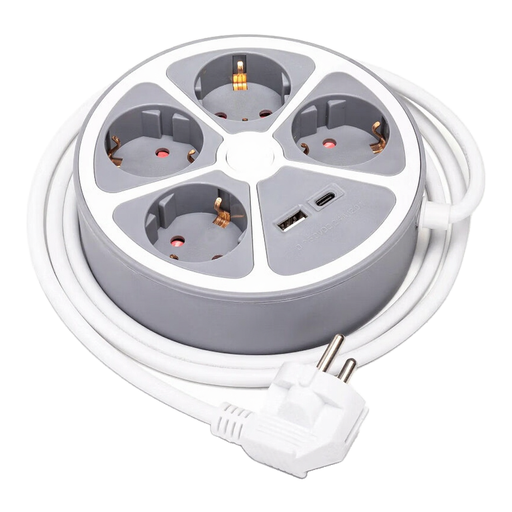
Why We Love It
This Aigostar model stands out with its disc shape, which is both original and very compact. It cleverly combines four AC outlets and two USB ports (one USB-A and one USB-C) delivering up to 2.4?A. The central switch lets you cut power to everything in an instant. On the safety front, it's well-equipped with child-proof safety shutters and a sturdy polypropylene construction. Its 1.5-meter cord is perfect for a desk or a nightstand.
Pros
Who Is It For? For those looking for a solution that is both stylish and functional for a desk, bedroom, or living room, without needing to plug in a myriad of devices.
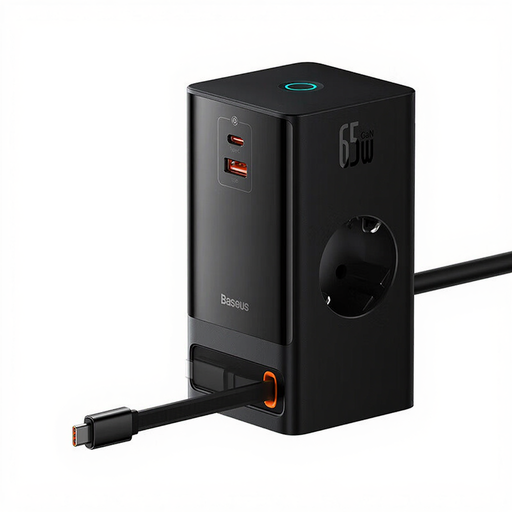
Why We Love It
The Baseus PowerCombo isn't just a power strip; it's a true power station for pros and tech enthusiasts. Thanks to GaN technology, it packs impressive power into an ultra-compact form factor. Its main advantage? A USB-C port that delivers 65?W, enough to easily power a laptop with fast charging. It goes even further by integrating a 15?W wireless charger on top, two AC outlets, a USB-A port, and a very clever retractable USB-C cable. The touch controls and smart auto-shutoff add a touch of modernity and safety.
Pros
Who Is It For? The perfect ally for remote workers, creatives, and anyone who wants a clutter-free desk. It's the all-in-one solution for simultaneously charging a laptop, a smartphone (wired or wirelessly), a tablet, and other accessories.
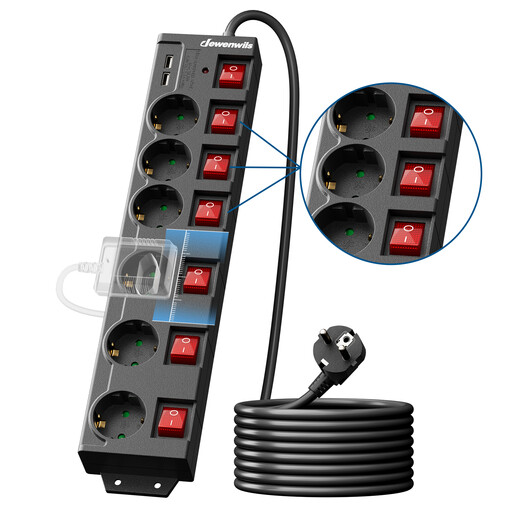
Why We Love It
This Dewenwils model focuses on durability and versatility. With its six AC outlets, each equipped with its own individual switch, it offers total control over your power consumption. It's the ideal power strip with switches for complex setups like a loaded media center or a workstation with multiple peripherals. Its extra-long 5-meter cord makes it a perfect extension cord power strip for large rooms or workshops. It doesn't forget the essentials, featuring surge and overload protection, child safety shutters, and mounting holes for a clean wall installation.
Pros
Who Is It For? The go-to solution for complete multimedia setups (TV, console, cable box, sound system), workshops, or any situation requiring numerous connections, a long reach, and precise control over each device.
If our selection doesn't check all your boxes, or if you're simply curious to discover other form factors and features, many other solutions exist. To explore a wider range, take a look at our complete category.
? Discover more surge protector power strips
USB-A is the rectangular connector everyone knows: universal, but slower. USB-C is its successor: smaller, oval-shaped, and, most importantly, reversible (no more plugging it in the wrong way!). It's the new standard that allows for much higher charging speeds, especially with Power Delivery (PD) technology, which can power energy-hungry devices like a laptop.
Yes, and it's even essential if you're plugging in valuable devices. A power surge, even a very brief one, can "fry" the components of a computer, TV, or gaming console. A surge protector power strip acts as a shield that absorbs this current spike and protects your equipment. It's a low-cost insurance policy.
Absolutely not! It is strongly advised not to plug power strips in a series (or "daisy-chaining"). This practice can cause an electrical overload on the first power strip and the wall outlet, creating a real risk of overheating or even fire. The golden rule: a power strip should always be plugged directly into a wall outlet.