
Livraison le jour même ou le lendemain

Qualité garantie

Débloquez vos offres de bienvenue: Livraison GRATUITE | Jusqu'à -80 % | 30 jours d'essai gratuits à JoyPlus
Téléchargez l'application
With the rise of remote work and online meetings, one accessory has become the cornerstone of our workday: the USB headset. Yet, finding the perfect one can often feel like an uphill battle. Between marketing promises and obscure technical specs, it's easy to end up with an unsuitable product that crackles, picks up every background noise, or becomes uncomfortable after just an hour.
Our mission, as editors, is to help you see clearly. Let's cut through the jargon and focus on the essentials to make an informed choice. Here are the most common pitfalls to avoid and the criteria to check to find the remote work headset that will be your best daily companion.
To make the right choice, three points deserve your full attention. They are your guarantee of a smooth experience and audio quality that meets your professional standards.
For a remote work headset, the clarity of your voice is non-negotiable. To achieve this, two elements make all the difference:
The key advantage of a wired USB headset with a microphone lies in its effortless simplicity. Unlike 3.5mm jacks, whose quality depends on your computer's (often mediocre) sound card, a USB connection offers decisive benefits:
A headset worn for several hours a day should be unnoticeable. Check the following points:
To move from theory to practice, here is an example of a product that checks all the boxes for intensive professional use. It's not a one-size-fits-all miracle solution, but it represents the type of reliable and effective headset we recommend for remote or office work.
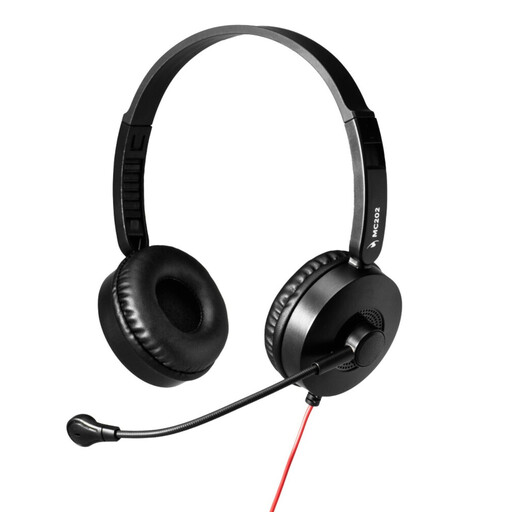
Why it's a great fit: Perfect for the user who wants a "no-fuss" solution. It prioritizes the stability of a wired connection and a crystal-clear voice for meetings, without ever worrying about battery life or finicky Bluetooth pairing.
Thanks to its adjustable boom mic and noise cancellation, your voice will no longer be drowned out by background noise. Its lightweight design and adjustable headband ensure optimal comfort, even after several hours.
"Plug-and-Play" USB-A Connectivity: You plug it in, it works. Instantly. Perfectly Clear Voice: The boom mic isolates your voice for crystal-clear professional conversations, without the background noise.
Our editors have selected a range of products for you that meet these quality criteria and current regulations.
Yes, and that's one of their biggest advantages. Almost all USB-A headsets are universally compatible with Windows, macOS, and Linux, with no installation required. If your laptop only has USB-C ports, a simple and affordable USB-A to USB-C adapter will do the trick perfectly.
Much longer than a wireless model! Lacking a battery, a wired USB headset with a microphone is not threatened by battery degradation. Its longevity mainly depends on the durability of its materials and the care you take with the cable. By handling it gently, a good headset can last you for many years.
No, and that's the beauty of "Plug-and-Play." Modern PC headsets are automatically recognized by your operating system. Plug it in, and a few seconds later, it's ready to use in all your video conferencing applications (Teams, Zoom, Google Meet, etc.).