
Livraison le jour même ou le lendemain

Qualité garantie

Débloquez vos offres de bienvenue: Livraison GRATUITE | Jusqu'à -80 % | 30 jours d'essai gratuits à JoyPlus
Téléchargez l'application
By Joybuy, Your Product AdvisorPublished July 15, 2026
With the arrival of USB-C on the iPhone 15 and 16, Apple has finally embraced universal connectivity. This is excellent news, but it raises a very practical question: what should you do with the mountain of Lightning cables, headphones, and car chargers you've collected? Do you really have to throw them all away?
Rest assured, the answer is no. A simple USB-C to Lightning adapter or a hybrid cable is all it takes to bridge the gap between the two worlds without breaking the bank. This guide is here to help you make sense of the options and choose the perfect accessory for your needs, whether it's for charging, data transfer, or the essential CarPlay.
Before we dive into our top picks, here are the key things to check to make the right choice.
The first decision is about the form factor.
MFi (Made for iPhone) certification is Apple's official seal of quality. An MFi-certified adapter guarantees perfect compatibility, safe charging, and long-lasting performance. In contrast, non-certified products can overheat, damage your iPhone, or simply stop working overnight after an iOS update. For peace of mind, choosing a certified product isn't an option—it's a necessity.
Be careful, as not all adapters are created equal when it comes to features.
To help you navigate the options, we've selected three reliable products, each tailored to a specific need.
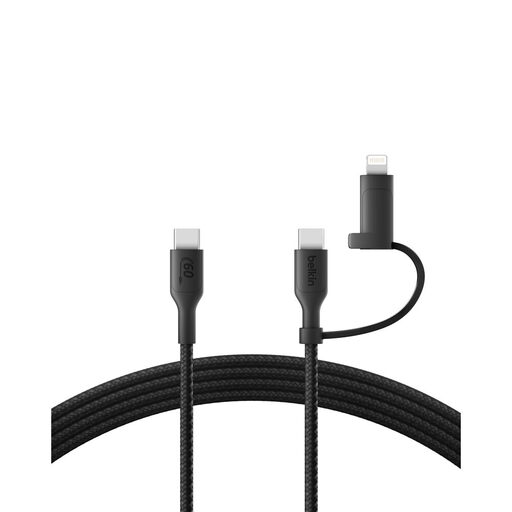
Why it stands out: This Belkin cable is the very definition of versatility and durability. Its key feature? A dual connector that lets you switch from USB-C to Lightning in a flash. Its robust design and eco-friendly touch make it a top-tier choice.
Advantages:
Who is it for? For those who juggle recent devices (iPhone 15/16, iPad Pro) and older ones (iPhone 14, AirPods). It's the perfect single cable to keep in your bag, whether at home or on the go.
See the price of the Belkin 2-in-1 Cable
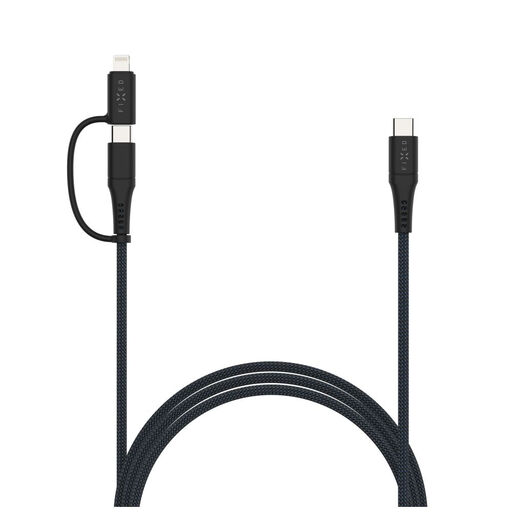
Why it stands out: The FIXED cable takes a generous approach with its 2-meter length and clever storage accessories. It's a USB-C to USB-C cable with a clip-on MFi Lightning adapter, offering maximum flexibility.
Advantages:
Who is it for? For anyone who always finds their cables too short and likes to keep things tidy. Its modularity (USB-C cable + adapter) makes it a true Swiss Army knife.
See the price of the FIXED 2m Braided Cable
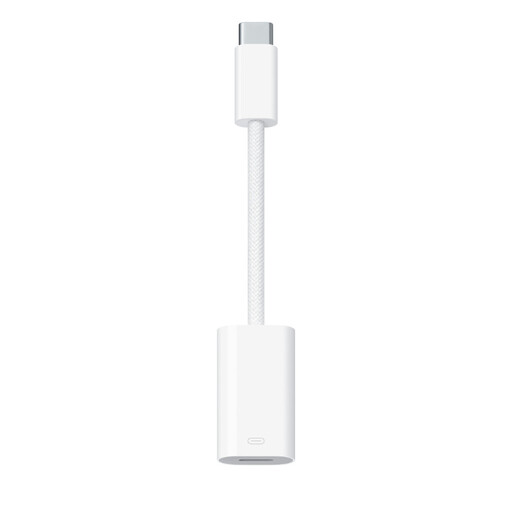
Why it stands out: It's the official Apple product. That says it all. It is THE gold standard for compatibility and reliability. Minimalist and high-performing, it's a safe bet, especially for critical use cases like CarPlay.
Advantages:
Who is it for? The essential purchase for heavy CarPlay users and for anyone who swears by the reliability of official products. It's the simplest and safest solution for continuing to use your old cables and headphones.
See the price of the Apple Adapter
Our selection covers the most common needs, but the accessory market is a vast ocean. Are you looking for a length, color, or feature not covered in this guide? Don't worry, other solutions exist.
To explore a wider range of tested and approved products, take a look at our complete category.
Discover our full range of USB-C Lightning Cables
1. Does a USB-C to Lightning adapter slow down charging? No, as long as you choose a quality adapter (ideally MFi-certified) and pair it with a cable and charger that support fast charging (Power Delivery). In this case, the adapter is not a bottleneck at all.
2. Does any adapter work with CarPlay? Unfortunately, no. The CarPlay connection is far more sensitive than simple charging and requires a perfectly stable data stream. Many low-end or non-certified adapters cause random disconnects. For a seamless experience, the official Apple adapter or a third-party MFi-certified model that is CarPlay-compatible is practically a must.
3. Adapter vs. 2-in-1 Cable: What's the difference? The adapter is a small dongle that you plug onto a standard Lightning cable to convert it to USB-C. Its downside: it's tiny and easy to lose. The 2-in-1 cable, on the other hand, is an all-in-one solution that integrates both connectors on the same cable (often with a small, tethered adapter). It's more convenient because there's only one piece to manage.