
Livraison le jour même ou le lendemain

Qualité garantie

Débloquez vos offres de bienvenue: Livraison GRATUITE | Jusqu'à -80 % | 30 jours d'essai gratuits à JoyPlus
Téléchargez l'application
By the Joybuy editorial team, high-tech experts – Published July 5, 2026
Modern laptops and tablets, like MacBooks, iPads, or ultra-portable PCs, favour thinness at the expense of connectivity. The USB-C port has become the standard, but it often leaves users with a dilemma: how do you connect an external display, a USB drive, and charge your device all at the same time?
If you're a professional, a content creator, or simply a user looking to optimise your workspace, a USB-C to HDMI adapter is an essential accessory. However, the market is flooded with options, ranging from simple connectors to full-fledged docking stations. This guide is here to help you cut through the noise and identify the product that truly fits your daily needs.
Before diving into our selection, it's crucial to understand the criteria that set one model apart from another. Here are the three key points to check to make the right choice.
The most common mistake is underestimating your needs. Ask yourself the right questions:
Not all HDMI adapters are created equal when it comes to image quality. For a smooth and detailed visual experience, especially on modern monitors, opt for a 4K USB-C adapter. Pay close attention to the refresh rate:
Many multiport hubs and adapters include a USB-C port compatible with Power Delivery (PD). This feature allows you to charge your laptop through the adapter itself, freeing up the single USB-C port on your machine. Check the maximum supported wattage (W). A power output of 100W is generally enough to power most laptops, even under heavy use.
Based on these criteria, we have selected three products that cater to distinct user profiles, from the most basic to the most comprehensive.
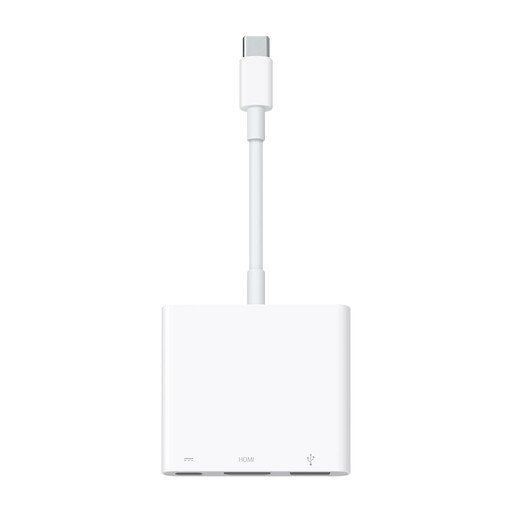
Why It Stands Out
This official adapter is designed by Apple to work in perfect harmony with the brand's ecosystem. It offers a simple and reliable solution for essential needs: connecting a display, a USB peripheral, and handling charging. Its main strength lies in its compatibility and its ability to deliver a 4K at 60Hz video output on compatible recent Mac, iPad, and iPhone models.
Advantages
Who Is It For?
This is the quintessential adapter for MacBook, iPad, or iPhone users who prioritise simplicity, reliability, and seamless integration with their Apple hardware. It's ideal for those who need the three basic connections without being weighed down by extra ports.
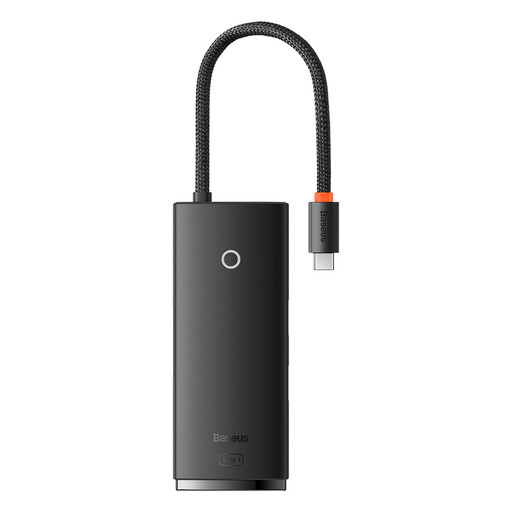
Why It Stands Out
The Baseus Lite Series hub strikes an excellent balance between versatility and portability. It transforms a single USB-C port into five convenient connections, including three USB 3.0 ports, which is a notable advantage for connecting multiple peripherals simultaneously (keyboard, mouse, hard drive). Its 100W PD charging capability is a major asset.
Advantages
Who Is It For?
This hub is the smart choice for mobile professionals, students, and users who need more USB-A ports than basic adapters offer. It's perfect for turning a laptop into a more functional workstation, whether at the office or at home.
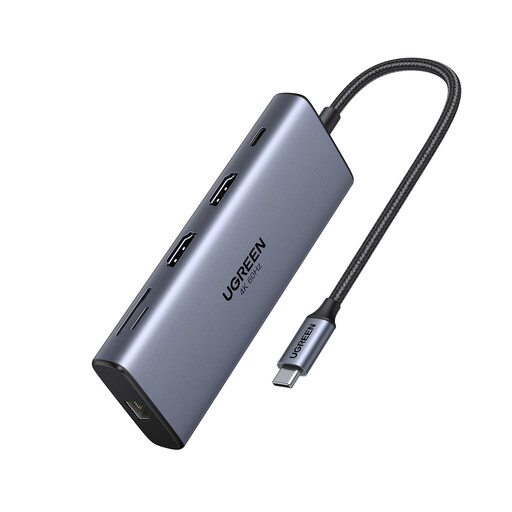
Why It Stands Out
This UGREEN docking station is a true connectivity powerhouse. With 10 ports, it meets the needs of the most demanding users. Its ability to drive two 4K at 60Hz displays simultaneously is a major asset for multitasking. The addition of an Ethernet port, card readers, and ultra-fast USB ports makes it a complete desktop solution.
Advantages
Who Is It For?
This docking station is aimed at content creators, developers, video editors, and any professional who needs an advanced desktop setup. If you work with multiple displays, transfer large files, and demand a flawless network connection, this model is made for you.
Our selection covers three common user profiles, but every need is unique. If you're looking for an adapter with a different combination of ports or specific features, we invite you to explore our full catalogue.
? Explore our full range of adapters on Joybuy.fr
1. Does a USB-C to HDMI adapter work with all USB-C devices?
No, and this is a crucial point. To transmit a video signal, the USB-C port on your device (laptop, tablet, smartphone) must support DisplayPort Alternate Mode. Most modern laptops offer this, but it's less common on entry-level smartphones or tablets. Always check your device's specifications before purchasing.
2. What's the difference between a USB-C hub and a docking station?
Although the terms are often used interchangeably, there is a nuance. A USB-C hub is generally more compact, portable, and powered directly by the computer's port. A USB-C docking station is often larger, designed for stationary use, and sometimes has its own external power supply to support a greater number of power-hungry ports and peripherals.
3. Can I use two displays with one USB-C to HDMI adapter?
This depends entirely on the adapter. A simple model with a single HDMI port can only drive one display. To connect two screens, you must choose a hub or docking station that has two video ports (like two HDMI ports or an HDMI/DisplayPort combination), such as the UGREEN 10-in-1 model featured above. Also, make sure your computer supports managing multiple external displays via USB-C.