
Livraison le jour même ou le lendemain

Qualité garantie

Débloquez vos offres de bienvenue: Livraison GRATUITE | Jusqu'à -80 % | 30 jours d'essai gratuits à JoyPlus
Téléchargez l'application
Between your laptop, smartphone, tablet, and countless peripherals, your desk can quickly turn into a tangled mess of cables and chargers. Finding a free outlet becomes a challenge, not to mention protecting your valuable devices from the unpredictability of the power grid. The USB-C surge protector power strip is the all-in-one solution to organise, power, and protect your setup with complete peace of mind.
This guide will walk you through the key criteria to consider before making a purchase and introduce our top picks, whether you're working from home or simply aiming for a more organised workspace.
Before you dive in, let's review the key technical features that will make all the difference in your day-to-day use.
First and foremost, a good power strip must protect your devices. Opt for a model that includes overload protection and a surge protector. The latter absorbs sudden voltage spikes (caused by lightning or grid fluctuations) that could fry your electronic equipment. Ensure it has safety certifications like CE and NF, which guarantee compliance with European and French safety standards.
USB-C has become the standard for fast charging. Thanks to Power Delivery (PD) technology, a USB-C port can deliver significantly more power than a traditional USB-A port, allowing you to rapidly charge a compatible laptop, tablet, or smartphone. Check that the total power output of the USB-C ports (measured in watts, W) is sufficient for your most power-hungry devices.
A power strip must, above all, be practical. The cord length is a key factor in placing it exactly where you need it. Also, consider the spacing and orientation of the outlets: blocks angled at 45° or 90° are perfect for plugging in bulky power adapters without blocking neighbouring outlets. Finally, a power strip with a master switch—or even better, individual switches—will allow you to manage your energy consumption by cutting power to devices in standby mode.
To help you make an informed choice, we've reviewed several models currently on the market. Here is our selection of standout products, each designed to meet specific needs.
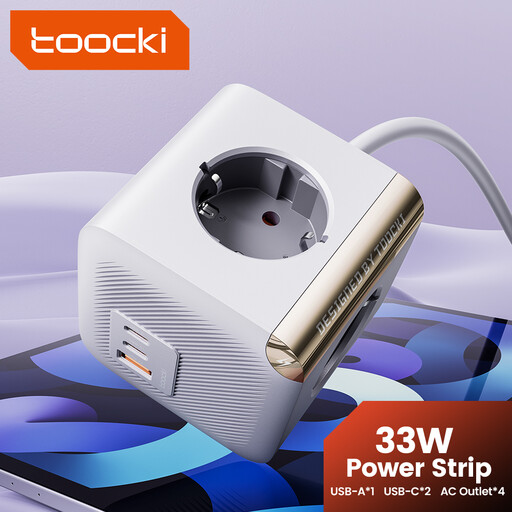
Key Features
This Toocki power strip is an excellent all-rounder for any modern workspace. It combines traditional AC outlets with fast-charging USB-C ports, all in a compact and secure design.
Highlights
Who is it for? Ideal for remote workers and students who want to centralise all their desk connections (computer, monitor, smartphone, tablet) while benefiting from fast charging and reliable protection.
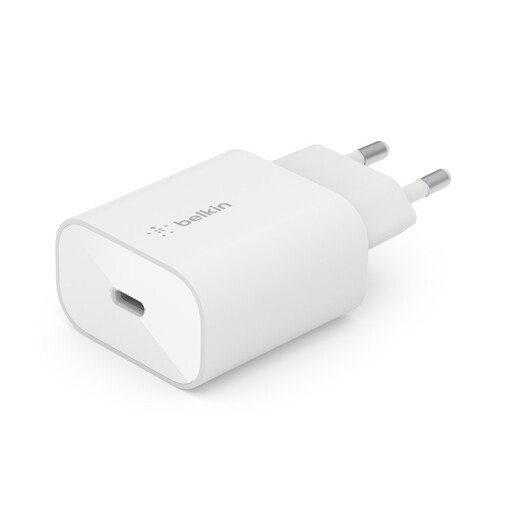
Key Features
While not a power strip in the traditional sense, this Belkin wall charger is an excellent alternative for those who primarily need ultra-fast, portable USB-C charging. It focuses on a single mission and executes it flawlessly.
Highlights
Who is it for? Perfect for frequent travellers or anyone who already has enough AC outlets but needs a dedicated, high-performance, and reliable USB-C charging port for their smartphone or tablet.
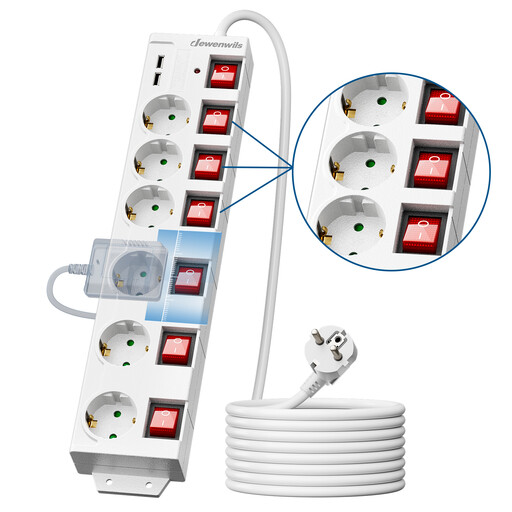
Key Features
This model from Dewenwils is all about control and outlet capacity. With its six sockets and individual switches, it's designed for complex setups where each device needs to be managed independently.
Highlights
Who is it for? For those with numerous devices to plug in (multimedia setups, workshops, large desks) who want total control over the power supply to each piece of equipment. A robust option for anyone who prioritises the number of outlets and cord length over fast USB-C charging.
If our recommendations don't quite meet your needs, feel free to explore our other categories to find the perfect fit. And for your other projects, take a look at our selection of white doors for your home improvement needs.
1. What's the difference between a basic power strip and a surge protector power strip? A basic power strip, as its name suggests, simply multiplies the number of available outlets. A surge protector power strip (or surge suppressor) also includes an electronic circuit that absorbs voltage spikes and power surges. It thus provides active protection for your sensitive electronic devices against the unpredictability of the electrical grid.
2. How do I know if a USB-C power strip is compatible with my laptop? It's simple—just check two things. First, make sure your laptop can be charged via its USB-C port. Second, compare the power required by your device (indicated in watts on its original charger) with the maximum power output of the power strip's USB-C port. For most ultrabooks, a power output of 30W to 65W is required.
3. Can you plug one power strip into another? No, it is strongly advised not to plug power strips into each other. This practice, known as "daisy-chaining," can cause an overload on the first power strip, creating a serious risk of overheating and fire. Always plug your power strip directly into a wall outlet.
Written by JoybuyOur Product Specialist