
Livraison le jour même ou le lendemain

Qualité garantie

Débloquez vos offres de bienvenue: Livraison GRATUITE | Jusqu'à -80 % | 30 jours d'essai gratuits à JoyPlus
Téléchargez l'application
By our Joybuy product experts, July 10, 2026
Modern laptops, led by the MacBook Pro and Air, are all about sleek design... often at the expense of connectivity. If you've ever pulled your hair out trying to connect a monitor, a USB drive, and your charger at the same time, you're not alone. The USB-C multiport adapter is the magic bullet to reclaim a robust set of ports.
But with an overwhelming number of options on the market, it's hard to find your way. This guide is here to help you see things more clearly, understand the criteria that truly matter, and choose the model that's perfectly suited to your needs.
Before you pull out your credit card, take a moment to assess your needs. Here are the key points to check to find the USB-C hub that's right for you.
An adapter's primary mission is to give you back the ports you've lost. Think about the peripherals you connect on a daily basis:
One of the greatest advantages of USB-C is its ability to carry both data and power. A hub with Power Delivery (Passthrough charging) allows you to charge your laptop directly through the hub. You plug your USB-C charger into the hub, and it powers your machine while running all your other peripherals. Check the maximum power supported (expressed in watts, W). A power rating of 60W to 100W is generally sufficient for most ultrabooks, including MacBook Pro models.
This is a crucial point, especially for Mac owners. Apple's chips (M1, M2, M3) have a major limitation: external display management. While the M Pro and M Max chips can handle multiple displays, the base M chips natively support only a single external monitor. Some adapters work around this limitation with specific technologies (like DisplayLink), but it's essential to read the product's technical specifications carefully to avoid any nasty surprises.
To help you make a clear choice, here are three models that cater to very different uses, from the most portable to the most comprehensive.
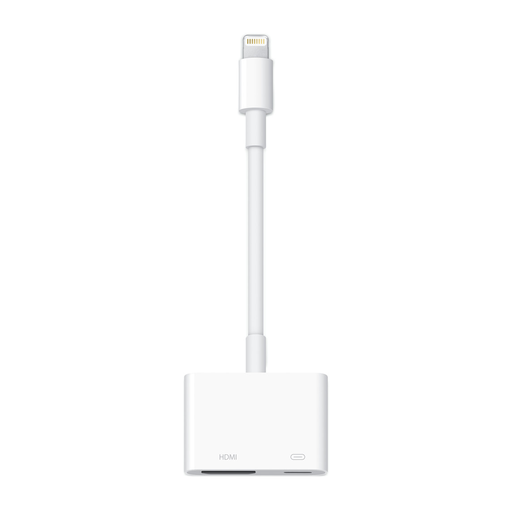
Why it stands out: It's Apple's official solution. A guarantee of perfect compatibility and integration with the brand's ecosystem. Simple, clean, and gets straight to the point.
Pros:
Who is it for? The MacBook or iPad user looking for a reliable and simple solution to connect a monitor, a USB peripheral, and their charger. It's the choice for peace of mind for presentations, streaming, or a minimalist desk setup.
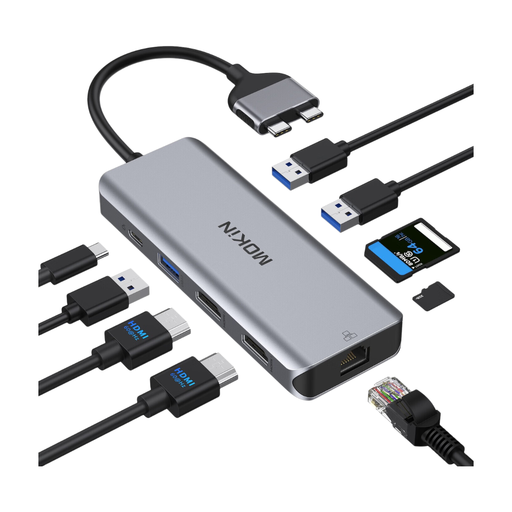
Why it stands out: Specifically designed for MacBook Pro and Air models with two side-by-side USB-C ports, this hub transforms your ultrabook into a true USB-C docking station for your desk, capable of driving two external monitors.
Pros:
Who is it for? The professional, creative, or remote worker on a MacBook Pro/Air (Intel, M Pro/Max) who wants a dual-screen setup and a maximum number of ports at their desk.
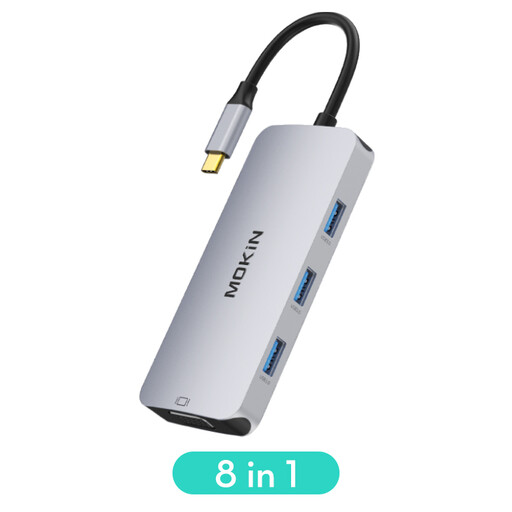
Why it stands out: This is the Swiss Army knife of our selection. The addition of a VGA port alongside the HDMI makes it compatible with a myriad of displays and projectors, whether they're brand new or from a bygone era.
Pros:
Who is it for? The nomad, student, or professional who travels a lot and needs to be able to connect to any projector or monitor in a meeting room or lecture hall, without ever being caught off guard.
This selection covers the most common use cases, but the world of USB-C accessories is much larger. If you have specific needs or simply want to compare other models, explore our complete collection.
? Explore our full range of USB adapters on Joybuy.fr
1. What is the difference between a USB-C hub and a docking station? The line is increasingly blurry. Generally, a USB-C hub is more compact, portable, and connects via a short cable. A USB-C docking station is often larger, more stationary, and may require its own power supply to offer a maximum number of ports and power.
2. Can a USB-C multiport adapter slow down my computer? A high-quality adapter will have no noticeable impact on your computer's performance. However, simultaneously using many power-hungry peripherals (like multiple external hard drives) can increase resource consumption. Using an adapter with Power Delivery and an adequate charger helps to offset this consumption.