
Livraison le jour même ou le lendemain

Qualité garantie

Débloquez vos offres de bienvenue: Livraison GRATUITE | Jusqu'à -80 % | 30 jours d'essai gratuits à JoyPlus
Téléchargez l'application
Your new laptop is sleek and powerful, but it's missing one key thing: ports. The widespread adoption of USB-C, as convenient as it is, often leaves you stranded when faced with an HDMI monitor, a standard USB drive, or an Ethernet cable. A USB-C hub is the perfect solution to get back the connectivity you deserve.
To help you make an informed decision, we're breaking down the essential criteria for choosing the right multiport USB-C adapter. We'll then present a selection of products that cater to different needs, whether you're an on-the-go professional, a demanding creative, or simply a user looking to streamline their desk setup.
Before you jump on the first model you see, let's review a few crucial technical points to ensure your future hub perfectly meets your needs.
The number and type of ports are obviously the number one criterion. Take inventory of the peripherals you use daily:
If your main goal is to connect a monitor, video performance is crucial.
The Power Delivery (PD) feature turns your hub into a charging station. You plug your laptop's power adapter into the hub's USB-C PD port, and it powers both your machine and the connected peripherals. The supported wattage (W) is a key detail not to be overlooked: a power output of 85W to 100W is recommended for most modern laptops.
Here is a selection of four USB-C hubs that cater to a range of uses, from the most portable to the most comprehensive.
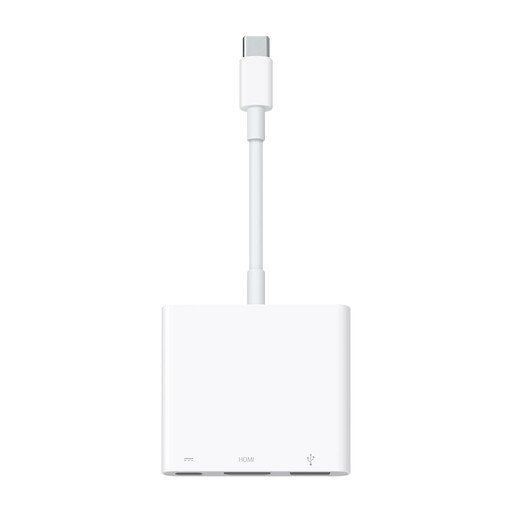
Why it stands out This official Apple adapter is the simplest and most reliable solution for users within the brand's ecosystem. It focuses on three essential connectors in an ultra-compact form factor.
Advantages
Who is it for? For the Apple device user looking for a minimalist solution to connect an HDMI display and a USB-A peripheral, while still being able to charge their device.
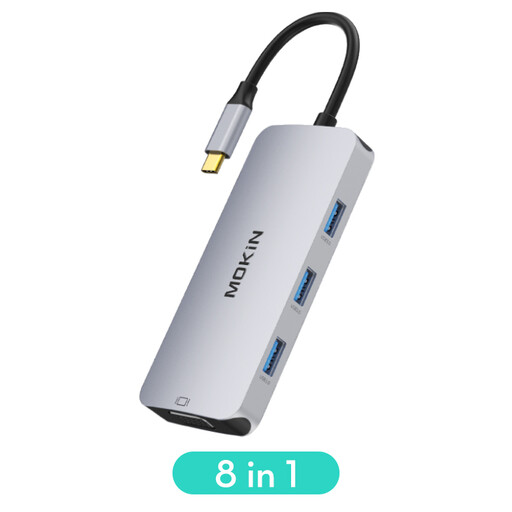
Why it stands out Its versatility is its main strength, thanks in particular to the inclusion of a VGA port that ensures compatibility with older monitors or projectors.
Advantages
Who is it for? For the user who needs to connect a wide variety of peripherals, including an older VGA monitor, and is looking for a comprehensive solution for the office or presentations.
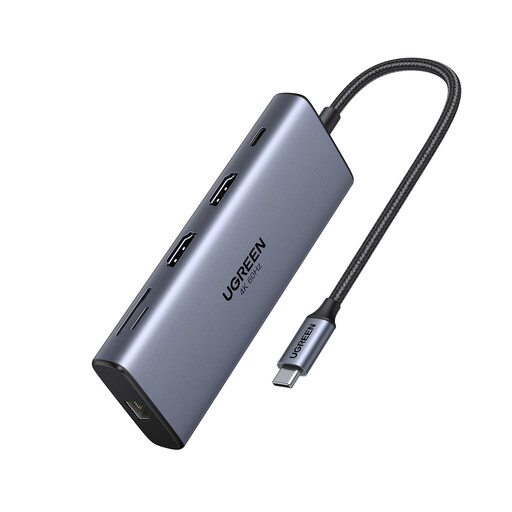
Why it stands out This USB-C docking station is built for performance, with high-speed data ports and support for dual 4K@60Hz displays.
Advantages
Who is it for? For professionals, creatives, and remote workers who want a powerful desk setup with multiple monitors, fast file transfers, and a wired network connection.
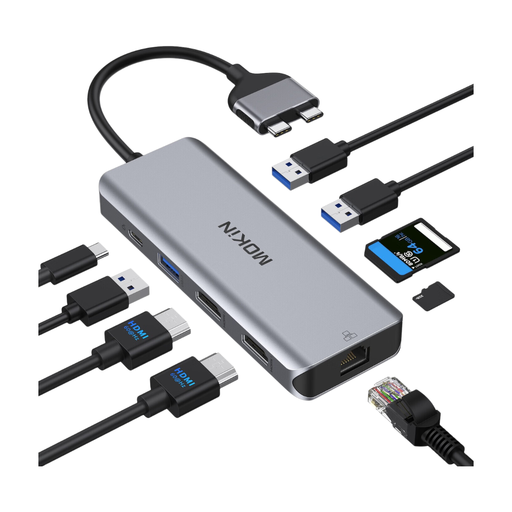
Why it stands out This MacBook Pro dock is specifically designed to plug into the two side-by-side USB-C ports on MacBook Pro and Air models, offering a seamless and stable integration.
Advantages
Who is it for? For owners of compatible MacBook Pro or Air models who want a perfectly integrated docking station for a dual-monitor setup and maximum connectivity.
Does our selection not quite match your needs? If you want to explore a wider range of solutions, many other models are available.
? Discover more options in the Computer HDMI Adapters category
Although the terms are often used interchangeably, a USB-C docking station is generally more comprehensive than a simple hub. It offers more ports, higher performance (like dual 4K@60Hz display support), more powerful charging, and is designed for a stationary desk setup. A hub, on the other hand, is typically more compact, portable, and intended for on-the-go use.
Yes, it's normal for a USB-C hub to get moderately warm during use. Converting video signals, transferring data, and managing power all generate heat. Models with an aluminium casing actually help dissipate this heat. However, if the hub becomes so hot that it's difficult to touch, it's safer to unplug it and check that it isn't defective.
No, and this is a crucial point. To transmit a video signal, your computer's USB-C port must support DisplayPort Alternate Mode (or DP Alt Mode). Most modern laptops (MacBook, Dell XPS, HP Spectre, etc.) include this feature, but it's not always the case on tablets or entry-level PCs. Be sure to check your device's specifications before buying. The good news is that Thunderbolt 3 or 4 ports are always compatible.