
Livraison le jour même ou le lendemain

Qualité garantie

Débloquez vos offres de bienvenue: Livraison GRATUITE | Jusqu'à -80 % | 30 jours d'essai gratuits à JoyPlus
Téléchargez l'application
Modern laptops, from MacBooks to ultrabooks, have never been thinner or lighter. But this minimalism comes at a price?: the gradual disappearance of ports. Plugging in an external monitor, a USB drive, and charging your machine at the same time quickly becomes a headache. The USB-C hub is the ideal solution to regain respectable connectivity from a single port.
With the overwhelming number of models available, it's hard to know where to start. This guide breaks down the essential criteria for you and presents our selection of the best models to help you find the perfect multiport USB-C adapter for your needs in 2026.
Before diving into our selection, let's review the key points to make the right choice.
The first step is simple?: list the peripherals you connect daily.
Be aware that not all USB-C ports are created equal. For video output to work, your computer's USB-C port must support "DisplayPort Alt Mode". Similarly, for charging, it must be compatible with the "Power Delivery" standard. Most recent laptops include both technologies, but a quick check on the manufacturer's website is recommended to avoid any unpleasant surprises.
For professionals who juggle large files, the speed of the USB ports is a decisive factor. USB 3.0 (or 3.2 Gen 1) offers speeds up to 5?Gbps, while USB 3.2 Gen 2 goes up to 10?Gbps.
Your choice will also depend on how you work.
Here are our recommendations, covering different user profiles and budgets.
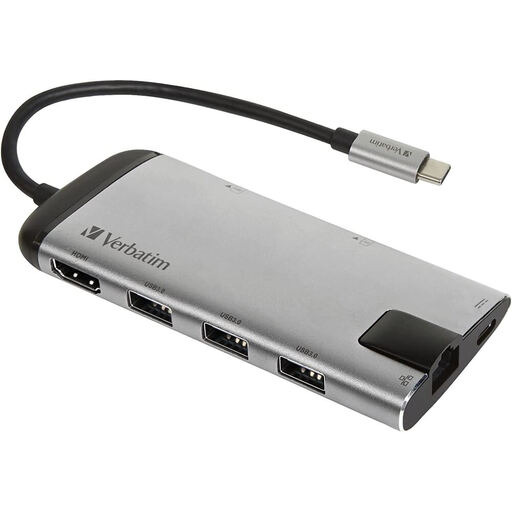
Why it stands out?: This 8-in-1 hub is the ultimate Swiss Army knife. It covers all the essentials in a compact form factor, with a brushed metal finish that perfectly matches the design of modern laptops.
The pros?:
Who is it for? The mobile professional or remote worker looking for a reliable and complete hub for daily use, both in the office and on the go.
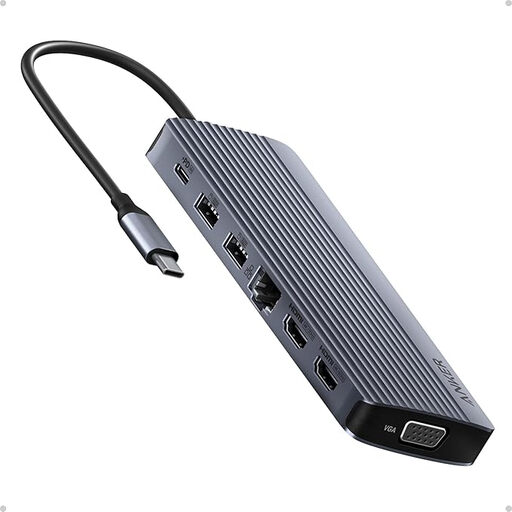
Why it stands out?: With its 14 ports, this Anker model isn't just a hub; it's a true command centre. Its ability to drive up to three displays simultaneously (two in 4K via HDMI, one in 1080p via VGA) makes it ideal for the most complex setups.
The pros?:
Who is it for? The power user (developer, financial analyst, creative professional...) who needs to connect multiple monitors and a myriad of accessories to their workstation.
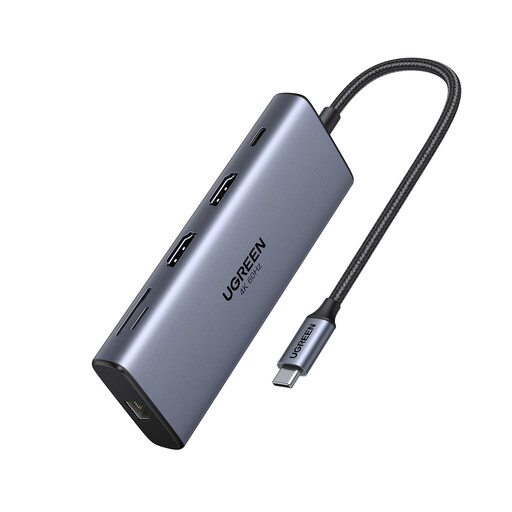
Why it stands out?: This Ugreen dock is all about raw performance, especially for video and data transfer. It distinguishes itself with its dual HDMI 4K at 60?Hz output, 10?Gbps USB-C and USB-A ports, and powerful 100W charging.
The pros?:
Who is it for? The creative professional (photographer, video editor) or tech enthusiast who handles very large files and seeks a perfectly smooth, high-resolution dual-monitor setup. The ideal companion for a MacBook Pro USB-C hub.
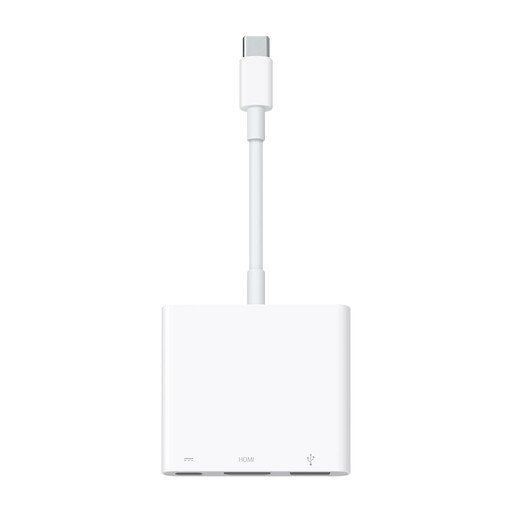
Why it stands out?: This is the official solution from Apple. Its key advantage?: seamless integration and rock-solid reliability within the brand's ecosystem. It gets straight to the point with disarming simplicity.
The pros?:
Who is it for? The dedicated Apple ecosystem user who prioritises simplicity, reliability, and flawless compatibility for their essential connectivity needs (a monitor, a USB accessory, and charging).
Our selection covers the most common use cases, but the world of USB-C hubs is much broader. If you have specific needs (more USB ports, a DisplayPort output, a particular design...), don't hesitate to explore other options.
Explore our complete collection of multiple USB port adapters to find the perfect gem to complete your setup.
A USB-C hub is typically compact, portable, and powered by the computer's port (this is called bus-powered). It's designed for travel or for adding a few extra ports to a desk. A USB-C docking station, on the other hand, is larger, has its own AC power supply, and offers much more extensive connectivity. It's intended to transform a laptop into a stationary workstation.
Yes, it's normal for a hub to get warm, especially when it's simultaneously handling demanding tasks like 4K video and Power Delivery charging. Aluminium casings are actually designed to help dissipate this heat. However, if the device becomes too hot to touch, it's safer to unplug it. Also, make sure it's placed in a well-ventilated area.
In the vast majority of cases, no. Modern USB-C hubs are "plug-and-play,"?meaning they work as soon as you plug them in, without any driver installation on Windows, macOS, or Linux. Only very rare models with advanced features might require a specific driver, which is usually provided by the manufacturer.