
Livraison le jour même ou le lendemain

Qualité garantie

Débloquez vos offres de bienvenue: Livraison GRATUITE | Jusqu'à -80 % | 30 jours d'essai gratuits à JoyPlus
Téléchargez l'application
USB-C has established itself as the universal connector, promising fast charging for all our devices. Yet, when it comes time to check out, the experience often turns into a headache. Between misleading power ratings and unpronounceable technical acronyms, it's easy to end up with a disappointing or, worse, an incompatible charger.
As a product expert at Joybuy, I'm here to separate fact from fiction for you. Let's cut through the marketing jargon and get straight to the point. Here are the pitfalls to avoid and the essential criteria for choosing a USB-C fast charger that will actually deliver on its promises in 2026.
To ensure you make the right choice, focus on these key technical specifications.
Power, measured in watts (W), determines the charging speed. Here are a few benchmarks for your devices?:
Also, check that the charger is compatible with the Power Delivery (PD) protocol, the standard for USB-C fast charging. For the latest devices, support for PPS (Programmable Power Supply) is a real plus: it allows for fine-tuning of voltage and current to optimise charging and preserve your battery's health.
Gallium nitride (GaN) is a semiconductor material that has revolutionised chargers. A GaN charger can handle higher voltages and operate with better energy efficiency than a traditional silicon charger. In practical terms, this translates to?:
For on-the-go use or simply to free up space on your power strip, choosing a GaN model is an excellent move today.
If you own multiple devices, a multi-port USB charger or a charging station is a practical solution. Before choosing, check two crucial points?:
Rather than searching for the "perfect" model that doesn't exist, it's better to find the one that is perfectly suited to your needs.
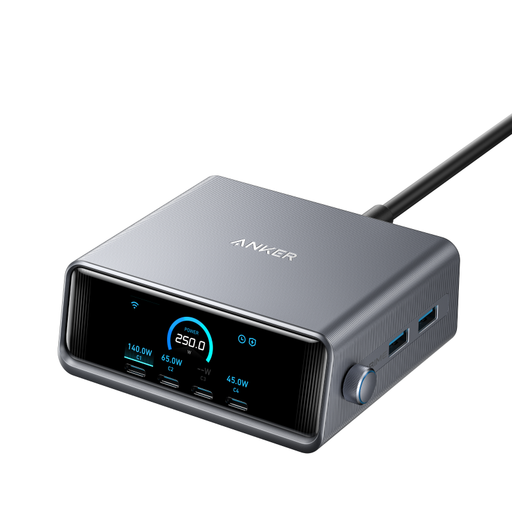
Who is it for? For those who juggle a MacBook Pro, an iPhone 16, a tablet, and a myriad of accessories. This station centralises power for an entire digital ecosystem on a single desk, without compromising on speed.
With its 250 W of total power and smart distribution, it overcomes the shared power pitfall. It can deliver up to 140 W to a single port while continuing to power other devices at full speed.
Charge up to 6 devices simultaneously, including a power-hungry laptop, from a single wall outlet. Its LCD screen displays the power delivered to each port in real time.
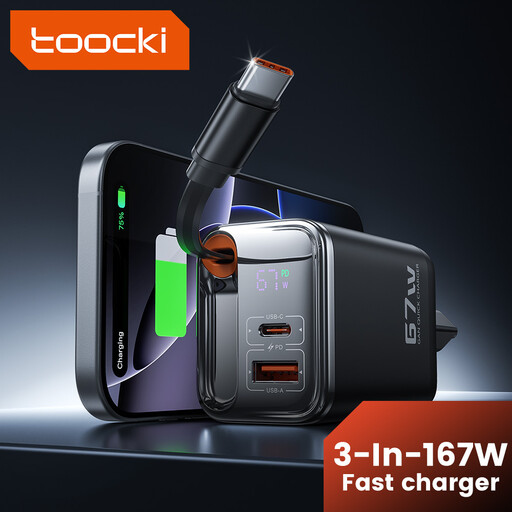
Who is it for? Ideal for those who move between the office, home, and travel. It merges a powerful charger and its cable into a single, ultra-compact unit. No more tangled cables at the bottom of your bag.
It solves the problem of a forgotten or unsuitable cable. The built-in cable is specifically designed to handle the charger's power, ensuring optimal and reliable charging performance every time.
Its all-in-one design with a retractable cable, one USB-C port, and two USB-A ports. Its 67 W is more than enough to fast-charge an ultra-portable laptop and a smartphone at the same time.
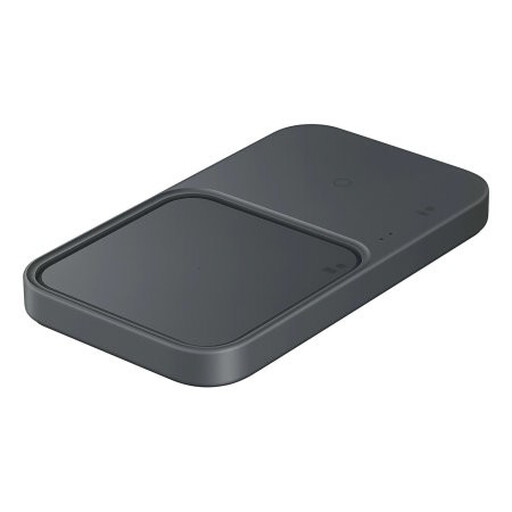
Who is it for? For fans of clean and minimalist workspaces or living areas. This wireless charger powers up a smartphone and a smartwatch (or earbuds) at the same time. Simply set them down to charge.
It puts an end to wear and tear on ports and cables. As an official Samsung product, it ensures perfect compatibility and safety with the brand's devices, avoiding issues with unrecognised protocols.
Simultaneous charging for two Qi-compatible devices. Its built-in active cooling system ensures a fast and stable charge by maintaining an ideal temperature.
We have curated a full range of products that meet our demanding selection criteria and European safety standards.
It all depends on your most power-hungry device. For a smartphone alone, 20-30?W is sufficient. If you plan to charge an ultra-portable laptop like a MacBook Air or a Dell XPS, a 65?W USB-C power adapter is an excellent starting point. For a 16-inch MacBook Pro or another powerful machine, aim for 100?W or more for fast charging, even while in use.
Yes, without a doubt, especially if compactness is a key criterion. For the same power output, a GaN charger is much smaller and lighter than a traditional silicon model. It also generates less heat, which is a mark of longevity and safety.
Absolutely—that's the whole point of the USB-C ecosystem! Opt for a multi-port USB charger with a comfortable total power output (100?W or more) and several USB-C ports. Just remember to check how the power is distributed to ensure your most demanding device always gets enough juice, even when all ports are in use.