
Livraison le jour même ou le lendemain

Qualité garantie

Débloquez vos offres de bienvenue: Livraison GRATUITE | Jusqu'à -80 % | 30 jours d'essai gratuits à JoyPlus
Téléchargez l'application
Our lives are filled with electronic devices, and with them, a jungle of cables and a stack of chargers that are often slow and bulky. Upgrading to a modern USB-C fast charger is the ideal solution, but the market is saturated with often misleading marketing promises. To avoid buyer's remorse, it's crucial to know the most common pitfalls.
As a product expert at Joybuy, I'm here to help you decode spec sheets and make an informed choice. Here are the three most common mistakes to avoid:
To make the right choice, there are three technical criteria to watch closely. These will determine the true performance and versatility of your future charger.
Wattage, measured in watts (W), is the number one criterion. It must be suited to the devices you want to charge. The Power Delivery (PD) protocol is the "language" that allows the charger and your device to negotiate the optimal power output.
Make sure the charger explicitly mentions PD 3.0 compatibility or a more recent version to ensure maximum compatibility.
A GaN charger isn't just a marketing buzzword. Gallium nitride is a semiconductor material that replaces traditional silicon. Its advantages are tangible:
For a fast power adapter that you'll take everywhere, GaN technology is a must-have feature.
A multi-port charger is the key to decluttering your desk or travel bag. Analyse your needs:
A good, versatile USB-C wall charger ideally combines several USB-C ports with at least one USB-A port.
Instead of an exhaustive list, we've selected models that meet specific needs, all evaluated against our performance and safety criteria.
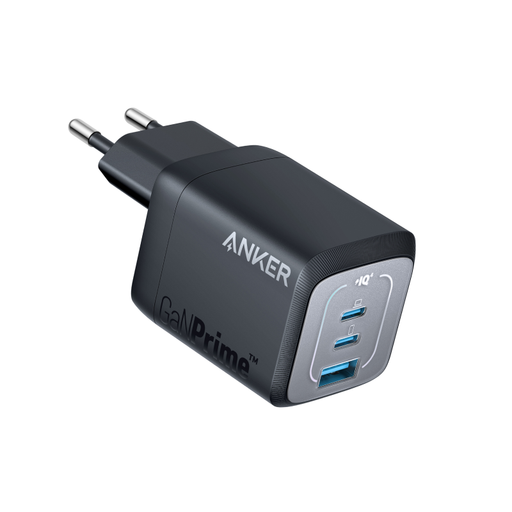
Why it's right for you: Ideal for professionals on the go. Its 67W output is enough for a MacBook Air or Dell XPS, while its three ports let you charge a phone and earbuds simultaneously. Its foldable design and GaN technology make it a discreet and incredibly effective travel companion.
It avoids the bulkiness trap: its GaN technology makes it 51% smaller than an original 67W Apple charger, according to the brand. Its smart power distribution prevents unpleasant surprises.
Fast charging up to 67W on a single port, ultra-compact and foldable design, ActiveShield 2.0 for continuous temperature monitoring.
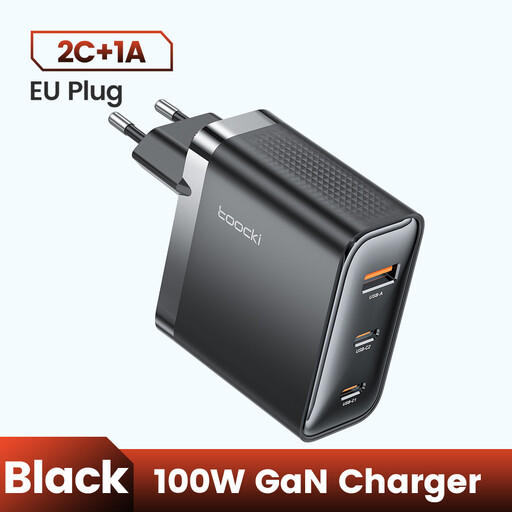
Why it's right for you: Perfect for those who juggle a powerful laptop, a tablet, and a smartphone. With 100W of power, it can charge a MacBook Pro at full speed while powering up other devices. A true all-in-one charging station for the office or home.
It solves the shared power problem. Unlike less ambitious chargers, its 100W ensures that a demanding laptop receives all the power it needs, even when other ports are in use.
High 100W power output, compact form factor thanks to GaN, and wide compatibility with PD 3.0 and QC 3.0 protocols.
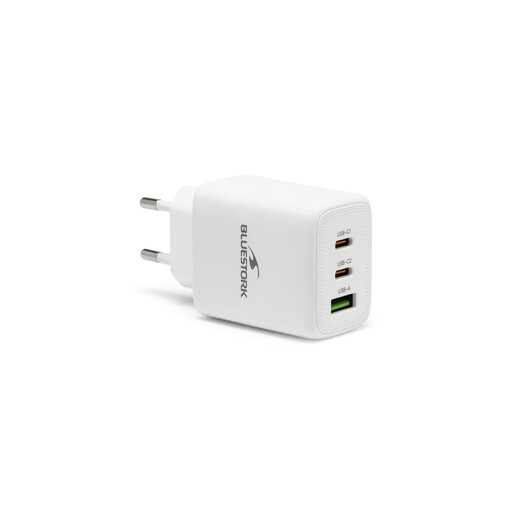
Why it's right for you: An excellent starting point to replace all your old chargers. With 65W, a USB-C PD port, and a USB-A QC 3.0 port, it covers 90% of daily needs, from fast-charging a smartphone to powering an ultrabook. The included cable is a real bonus.
It avoids the incompatibility trap by combining a modern USB-C port and a universal USB-A port. Its 65W power is clearly allocated to the USB-C port, ensuring efficient charging for PD-compatible devices.
Excellent balance of power and versatility, fast-charging cable included, and smart power distribution between the two ports.
Explore our full selection of chargers that meet our quality criteria and comply with European safety standards.
It all depends on your most power-hungry device. For a smartphone alone, 20-30W is sufficient. For an ultrabook, aim for a 65W charger. If you have a powerful laptop (for gaming or creative work) or want to charge multiple devices at once, a 100W model or higher is recommended.
GaN technology doesn't directly impact reliability, but it plays a key role in efficiency. A GaN charger runs cooler and wastes less energy, which can, in the long run, preserve the lifespan of its components. Its main advantage remains its compactness, which is ideal for travel.
Yes, absolutely, and it's completely safe. Thanks to the Power Delivery (PD) protocol, the charger and the iPhone "negotiate" to deliver only the necessary amount of power. A 65W or 100W charger will only supply an iPhone with the maximum power it can accept (around 20-27W, depending on the model), ensuring a charge that is both fast and safe. This principle applies to the vast majority of modern devices.