
Livraison le jour même ou le lendemain

Qualité garantie

Débloquez vos offres de bienvenue: Livraison GRATUITE | Jusqu'à -80 % | 30 jours d'essai gratuits à JoyPlus
Téléchargez l'application
The promise of USB-C was simple: a single charger for all our devices. Yet, daily reality is often filled with disappointing charging times, bulky chargers, and a tangle of cables that, despite looking identical, don't offer the same performance. Choosing the right USB-C charger shouldn't be a headache.
To avoid buyer's remorse, let's review the most common pitfalls.
Fortunately, you only need to understand a few simple technical criteria to make an informed choice and avoid these disappointments.
To find the charger that will truly meet your needs, there are three essential points to check.
Power, expressed in watts (W), is the crucial factor: it determines charging speed. But be careful, raw power isn't everything. The Power Delivery (PD) protocol is a smart charging standard that allows the charger and your device (smartphone, iPhone 16 charger, MacBook charger) to "negotiate" the optimal power to deliver.
A Power Delivery compatible charger is therefore a guarantee of safety and efficiency: it will never send more power than your device can safely accept.
Gallium nitride (GaN) is a semiconductor material that is replacing silicon in modern chargers. A GaN charger offers several decisive advantages:
Opting for a GaN charger means choosing performance and portability.
Ask yourself: how many devices do you need to charge at the same time? A single-port USB-C power adapter may be enough if you only charge one device at a time. But to simultaneously power a computer, a phone, and headphones, a multi-port USB charger with two or three ports (a mix of USB-C and USB-A ports is often useful) will prove much more practical and save you from collecting power bricks.
We have selected a few models that cater to different user profiles, all evaluated according to our criteria for performance, reliability, and safety.
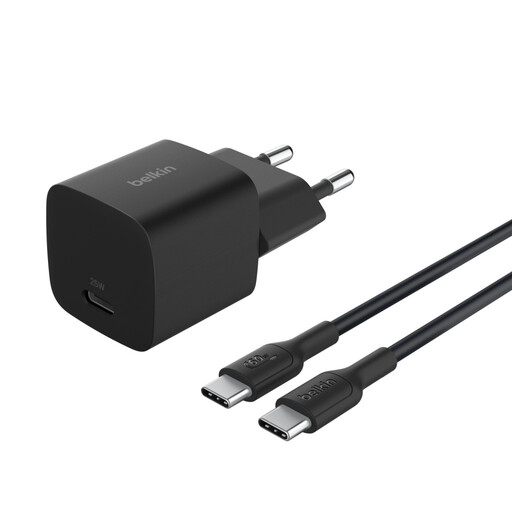
Why we chose it: Perfect for those who travel light. Its ultra-compact size and feather-light weight (58 g) allow it to slip into any bag. Its 45 W output is sufficient to quickly charge a smartphone, a tablet, or even an ultraportable laptop like a MacBook Air.
This charger comes with its own USB-C cable, ensuring optimal compatibility and performance. Its 45 W output is dedicated to its single port, with no unpleasant surprises from shared power.
USB-C PD 3.1 certification for safe and universal charging. A one-metre cable is included, ready to use out of the box.
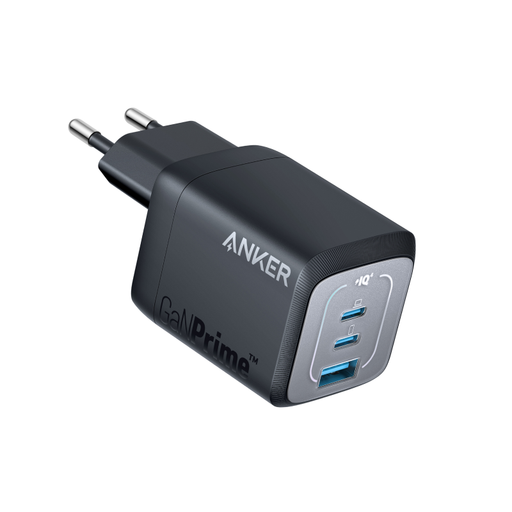
Why we chose it: Essential for those who juggle a laptop, smartphone, and other devices. It replaces three chargers in one, all in a compact block perfect for the office, remote work, or travel.
GaN technology allows it to remain very compact despite its three ports. It intelligently manages power distribution (up to 67 W on a single port), thus preventing performance drops during charging.
3 ports (2 USB-C, 1 USB-A) for maximum versatility. Ultra-compact design, 51% smaller than an original 67 W MacBook charger, according to Anker.
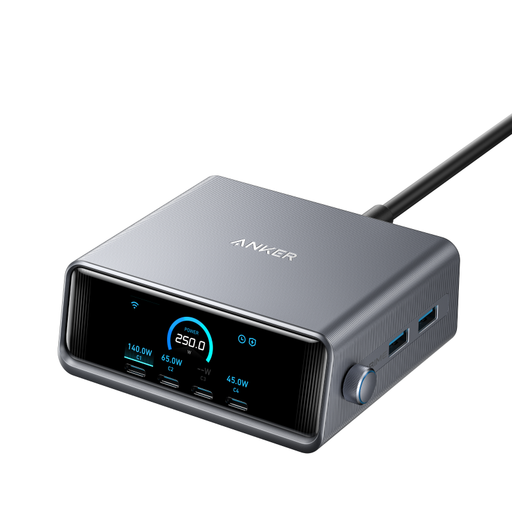
Why we chose it: This is a true desktop charging powerhouse. For those who juggle a complete ecosystem (powerful laptop, tablet, smartphone, watch, headphones…), it's the ultimate solution for charging everything simultaneously and at full speed.
Its built-in LCD screen displays the power delivered to each port in real time. No more guesswork: you know exactly how fast each device is charging and can control the power distribution.
Colossal total power of 250 W. 6 ports (4 USB-C, 2 USB-A) for ultimate connectivity. Control screen for precise charging monitoring.
Explore our complete, updated selection of chargers that meet our strict selection criteria and European safety standards.
No, provided it is a certified charger that complies with the Power Delivery (PD) standard. This smart technology allows the charger to "talk" to your device to supply only the maximum power it can safely accept. Using a 67W MacBook charger to recharge an iPhone is therefore completely safe: the charger will adapt automatically.
Even if they look identical, their internal specifications differ. A USB-C cable designed for fast charging incorporates thicker wires capable of handling a high current (in amps, A). Conversely, a data-focused cable (like a Thunderbolt cable) is optimised for ultra-fast speeds (in Gbit/s) but won't necessarily support the highest charging wattages. For a fast charger, it is therefore crucial to use the supplied cable or a model explicitly certified for the target power (e.g., 100W).
GaN technology generates much less heat than traditional silicon. Heat is public enemy number one for electronic components. Consequently, a GaN charger has a potentially longer lifespan. Under normal usage conditions, a quality model can operate without fail for many years.