
Livraison le jour même ou le lendemain

Qualité garantie

Débloquez vos offres de bienvenue: Livraison GRATUITE | Jusqu'à -80 % | 30 jours d'essai gratuits à JoyPlus
Téléchargez l'application
The promise of USB-C was simple?: one cable and one charger for all our devices. Mission accomplished?? Not quite. The market is now flooded with options, and finding the right fast USB-C charger has become a real headache. Between the marketing jargon and incomprehensible spec sheets, it's easy to make the wrong purchase.
As the head of product selections at Joybuy, my mission is to guide you through this jungle. Let's cut through the marketing speak?: we'll break down the three most common pitfalls so you can choose a charger that truly meets your needs.
To avoid these disappointments, here are the technical specifications that really matter.
The power output, measured in watts (W), determines charging speed. The Power Delivery (PD) protocol allows the charger and your device to "communicate" to safely adjust to the optimal wattage. Here are a few benchmarks?:
Always check the maximum output a single USB-C port can deliver, as this is what matters for your most power-hungry devices.
Ask yourself how many devices you charge simultaneously.
This is where GaN charger technology really shines. If you're looking for an ultra-compact charger for travel, a GaN model will be significantly smaller and lighter than a traditional charger of the same wattage. It's the premier choice for a travel power adapter.
Rather than a long list, we've matched products to user profiles to help you find the one that's truly right for you.
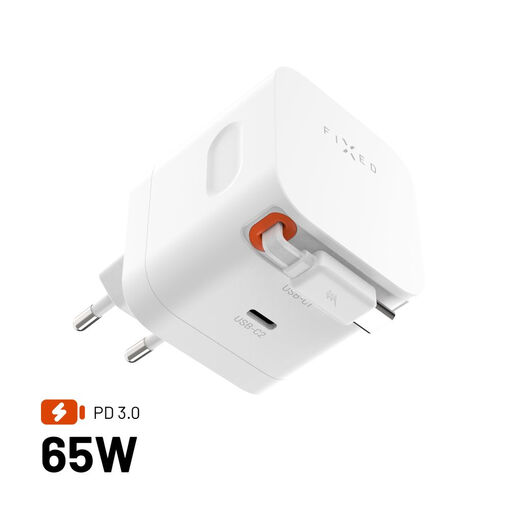
Why we love it : For those who work from anywhere, compactness and practicality are king. This charger combines GaN technology for an ultra-compact size with a built-in retractable USB-C cable, saving you from carrying an extra one.
It leverages the true strength of GaN (compactness) and solves a real problem (cable management) instead of just hyping a technology.
Its 65W output and dual USB-C ports let you charge a laptop and a smartphone simultaneously, all in a pocket-sized form factor.
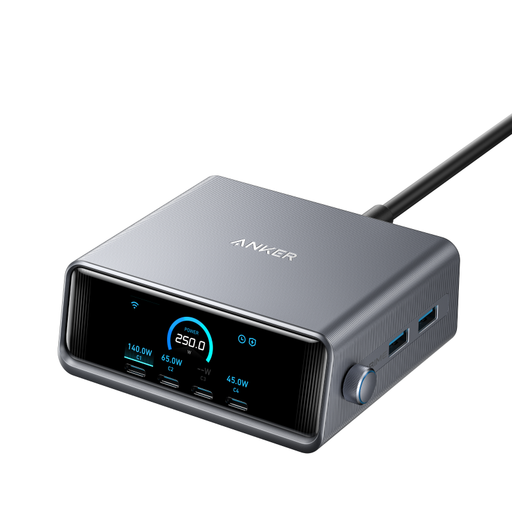
Why we love it : For those who juggle a laptop, tablet, smartphone, watch, and earbuds daily. This station centralises everything with a colossal 250W of power.
It debunks the "total wattage" myth with its LCD screen that displays the real-time power output for each port. Total transparency.
The ability to charge two laptops at full speed simultaneously (up to 140W on a single port), a feat very few chargers can achieve.
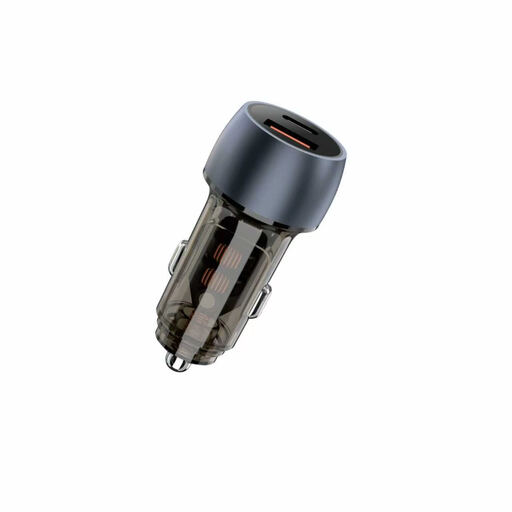
Why we love it : Long trips or days on the road demand a reliable and powerful charging solution. This car charger offers a rare level of power, capable of fully charging a laptop and a smartphone at the same time.
Where classic car chargers struggle to deliver true fast charging, this one makes its capabilities clear : a 100W USB-A port and a 20W USB-C PD port.
The ability to deliver 100W via the USB-A port is exceptional for a car charger, making it capable of powering very demanding devices like pro laptops.
We've compiled a complete, up-to-date selection of chargers that meet our strict selection criteria and safety standards.
It all depends on the most power-hungry device you plan to charge. For a smartphone, 20W is sufficient. For a laptop, check the wattage of its original charger: a replacement should have at least an equivalent output to function correctly, typically between 65W and 100W.
Not necessarily. A GaN charger is an excellent choice if compactness and light weight are your priorities, for example, for travel. However, for stationary use at home or in the office, a good-quality, often more affordable, non-GaN charger will be just as powerful and reliable.
No, and this is a classic pitfall. To charge a MacBook or any other computer via USB-C, the charger must be compatible with the Power Delivery (PD) protocol. Additionally, its maximum output on a single port must be sufficient (typically 65W or more). Trying to use a 20W phone charger won't work or will be excruciatingly slow.