
Livraison le jour même ou le lendemain

Qualité garantie

Débloquez vos offres de bienvenue: Livraison GRATUITE | Jusqu'à -80 % | 30 jours d'essai gratuits à JoyPlus
Téléchargez l'application
USB-C has established itself as THE standard for most of our electronic devices, from smartphones to laptops. However, not all cables are created equal. Between different charging wattages, transfer speeds, and connector types, it's easy to get lost. An unsuitable cable can not only throttle your charging speeds but also give out much sooner than expected.
This guide is here to cut through the confusion and help you find the perfect cable for your needs, whether you're replacing a faulty one, want to enjoy faster charging, or simply need a reliable spare.
Before we dive into our top picks, here are the technical points to consider to make the right choice.
This is arguably the most important criterion. A fast-charging USB-C cable must be able to handle the power delivered by your charger and requested by your device. Modern cables can manage power ranging from 60?W (standard for many smartphones and tablets) up to 240?W for the most power-hungry laptops, like certain MacBooks. Be sure to check the maximum power the cable can handle (indicated in watts, W) to ensure it's compatible with your MacBook charger or any other demanding device.
Even if your device has a USB-C port, the other end of the cable can vary.
A cable's longevity primarily depends on its build quality. A braided USB-C cable offers far better resistance to everyday wear and tear, twists, and bends than a basic plastic model. For reliability, look for cables certified by the USB-IF (USB Implementers Forum), which guarantees compliance with safety and performance standards. Lastly, if you plan to transfer large files regularly, check the data transfer speed (expressed in Mbps or Gbps).
To help you see things more clearly, we've selected three tried-and-tested models, each suited for a specific use case.
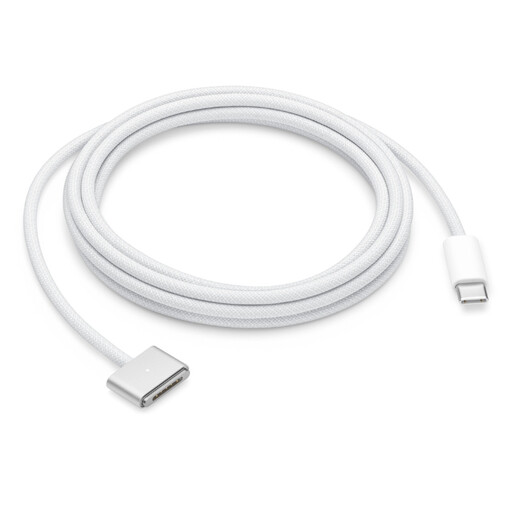
Why It Stands Out
This is THE official Apple cable for owners of recent MacBooks. Its key advantage? The MagSafe 3 magnetic connector, which snaps on almost automatically to the charging port and instantly detaches if someone trips over it, preventing a fatal drop for your machine.
Key Features
Who Is It For? For MacBook Air or MacBook Pro owners with a MagSafe 3 port who are looking to replace their original cable or get a second one that combines safety, convenience, and Apple's signature build quality.
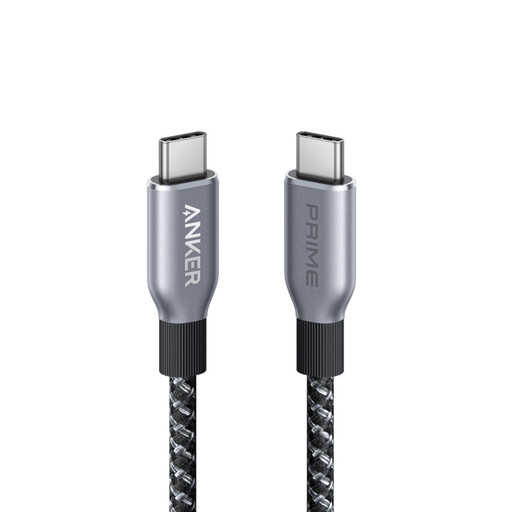
Why It Stands Out
The Anker Prime cable is built for performance and endurance. With its 240?W charging capacity, it's ready for the most demanding devices, both now and in the future. Anker states its braided sheath is made from recycled materials and designed to withstand tens of thousands of bends.
Key Features
Who Is It For? For users of power-hungry devices (laptops, pro tablets) who want a USB-C to USB-C cable that can deliver maximum power without breaking a sweat. It's the sensible choice for anyone prioritizing performance and robustness.
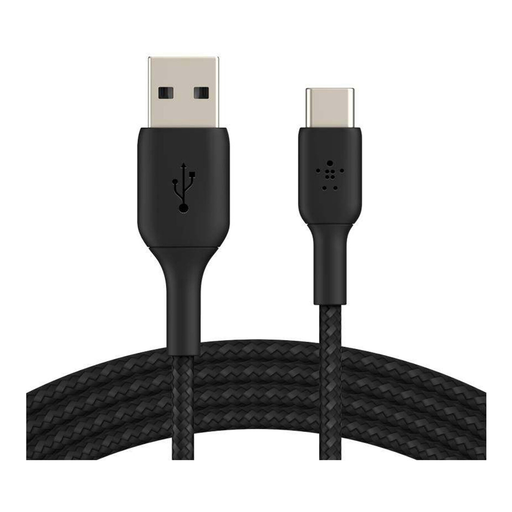
Why It Stands Out
This Belkin cable perfectly bridges the gap between the old and the new. It allows you to connect modern USB-C devices to a host of chargers, computers, and power banks equipped with traditional USB-A ports. Its USB-IF certification is a guarantee of safety and reliability.
Key Features
Who Is It For? For anyone who needs to connect a recent USB-C device to older power sources or computers. It's the ultimate backup cable to always have in your bag, car, or at the office.
If these three models don't check all your boxes (length, color, specs, etc.), don't worry: the selection is vast. To discover a wider range of choices, feel free to browse our dedicated category.
? Explore our full range of Type-C to USB Cables
1. Can a more powerful USB-C cable damage my device? Absolutely not. A cable designed for high power (e.g., 240?W) will never damage a device that requires less (e.g., a 25?W smartphone). The USB Power Delivery (PD) charging protocol is smart: the device only "requests" the power it needs. The charger and cable then adjust to deliver the right amount of current, completely safely.
2. Are all USB-C cables compatible with fast charging? No, and this is a common pitfall. To benefit from fast charging, the trio of device, charger, and cable must all be on the same page. A low-quality or older-generation cable may not support high wattages and will act as a bottleneck, throttling the charging speed even if your charger and phone are compatible.
3. What's the difference between a USB-C cable for charging and one for high-speed data transfer (Thunderbolt/USB4)? All USB-C cables can charge a device and transfer data. However, cables designed for very high-speed data transfer (like Thunderbolt 3/4 or USB4, up to 40 Gbps) integrate more complex electronics and are therefore, logically, more expensive. For everyday use (charging and transferring photos), a standard cable with USB 2.0 (480 Mbps) or USB 3.1 (5-10 Gbps) speeds is more than sufficient.