
Livraison le jour même ou le lendemain

Qualité garantie

Débloquez vos offres de bienvenue: Livraison GRATUITE | Jusqu'à -80 % | 30 jours d'essai gratuits à JoyPlus
Téléchargez l'application
USB-C has established itself as the standard for connecting and charging all our devices, from smartphones to laptops. Yet, buying a new USB-C cable can quickly become a headache. A cable that charges at a snail's pace, another that frays after just a few weeks... These situations are not only frustrating but also end up being costly. The culprit?? Vague marketing promises and often incomprehensible spec sheets. To avoid being misled, here are the pitfalls to watch out for.
To avoid these disappointments, you just need to focus on a few objective technical specifications. These are the true arbiters of a cable's performance and reliability.
Power, measured in watts (W), is the heart of the matter: it determines the charging speed. For the fast-charging magic to happen, the device, charger, and cable trio must all speak the same language. The Power Delivery (PD) protocol is the gold standard for fast charging via USB-C.
Checking for the Power Delivery logo and the maximum wattage is therefore the only way to ensure perfect compatibility with your fast charger.
The type of connector at each end of the cable directly dictates its use.
When it comes to file transfers, don't expect miracles: most standard charging cables are limited to the USB 2.0 standard (480 Mbit/s). If you frequently work with large files, look for cables certified for USB 3.1, 3.2, or even Thunderbolt, which offer stratospheric speeds in comparison.
A longer cable means more convenience, but be careful: its quality must be impeccable to avoid power loss and premature wear. A 2m-long USB-C cable is a real daily convenience, but its construction is crucial.
Rather than an endless list, we've selected products that meet specific needs, based on the performance and reliability criteria we've just outlined.
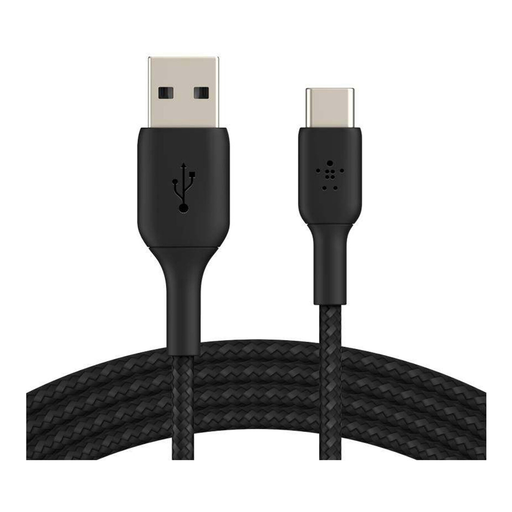
Why we chose it ? Perfect for those who still have an army of chargers and computers with USB-A ports. It lets you charge a modern smartphone (iPhone 15, Samsung Galaxy...) without having to throw out all your old power adapters.
It avoids the fragility trap. Its braided nylon sheath is certified to withstand over 30,000 bends, an endurance far superior to that of basic cables.
The USB-IF certification guarantees compliance with safety and performance standards. It's true peace of mind for your devices.
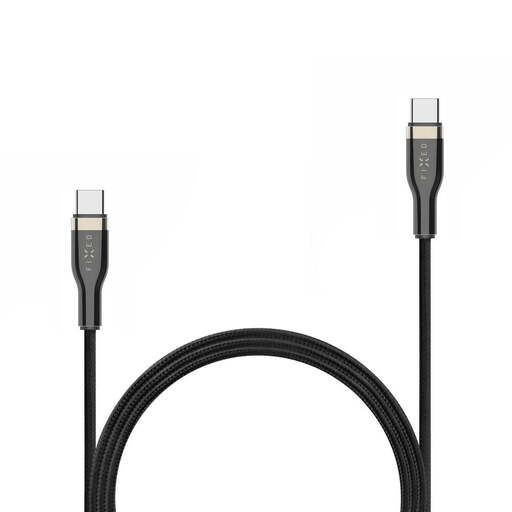
Why we chose it ? Designed for pros and power-users who want to charge their laptop, tablet, and smartphone with a single cable. Its 100W power rating makes it compatible with almost every laptop on the market.
It knocks out the "fake fast charging" trap by clearly displaying its Power Delivery compatibility up to 100W. A performance guarantee for powering the most demanding devices.
The combination of a braided sheath and metal connectors makes this a cable built for life on the go and intensive use.
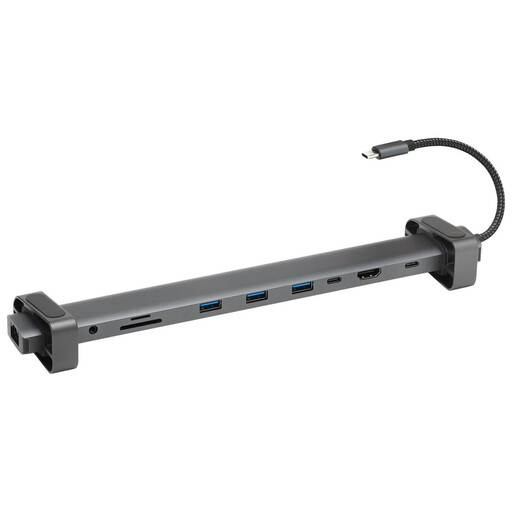
Why we chose it ? More than just a cable, this is the Swiss Army knife for the modern office and remote work. This USB-C hub transforms a single port on your computer into an ultra-complete USB-C docking station with 10 connectors (HDMI, Ethernet, USB-A, etc.).
It avoids the "master of none" trap by offering specialised and comprehensive connectivity. Instead of one cable that does everything poorly, it provides dedicated, high-performance ports for every use: video, networking, data, and charging.
Its 10-in-1 versatility allows you to connect multiple displays, get a stable Ethernet connection, and plug in all your peripherals. All through a single cable.
We have put together a complete selection of products that meet our demanding selection criteria and European safety standards.
No, and that's the whole problem! While the physical connector is indeed universal, the cable's capabilities (the technology it contains) vary enormously. A cable can be optimised for charging (with data transfer speeds worthy of USB 2.0), for ultra-fast data transfer (Thunderbolt), or for video output. It is therefore imperative to read the spec sheet to verify that it matches your primary need.
Yes, a power loss (the infamous "voltage drop") can occur over long distances, especially with low-quality cables. For a 2m-long USB-C cable or longer, opt for a model from a reputable brand with sufficiently thick copper conductors and a solid construction to limit this effect and ensure optimal charging.
The only reliable rule of thumb: check the maximum supported power (in watts, W) on the spec sheet or packaging. Look for the Power Delivery (PD) logo or mention. If this information is missing or vague, be wary! There's a high chance the cable is not designed for fast charging. An original Samsung cable, or a certified cable from a reputable brand, will always clearly state its power rating: 25W, 60W, 100W, etc.